NVP vProxy: A FLR falha na VM do Windows "A sintaxe do nome do arquivo, nome do diretório ou rótulo de volume está incorreta"
Summary: Falha na restauração em nível de arquivo (FLR) do NetWorker VMware Protection (NVP) de uma máquina virtual (VM) do Windows. O erro retornado é "Alguns objetos ou propriedades de segurança não puderam ser recuperados" ...
Symptoms
A restauração em nível de arquivo (FLR) do NetWorker VMware Protection (NVP) vProxy é realizada em uma máquina virtual (VM) Windows.
A operação de FLR apresenta falha, relatando o erro genérico "Some objects or security properties could be rerecover"
O log de recuperação completo detalha o seguinte erro para alguns caminhos de arquivo: "A sintaxe do nome do arquivo, nome do diretório ou rótulo do volume está incorreta."
152791:nsrvproxy_flr_recover: vProxy Log Begins ===============================================
159373:nsrvproxy_flr_recover: vProxy Log: 2020-03-05T21:11:58Z NOTICE: [89] Logging to '/opt/emc/vproxy/runtime/logs/vflrd/recover-xxxxxxxxxxxxxxxxxxxxxxxxx.log' on host xxxx'.
159373:nsrvproxy_flr_recover: vProxy Log: 2020-03-05T21:11:58Z NOTICE: [89] Release: '4.0.0-11_1', Build number: '1', Build date: '2019-09-06T12:54:06Z'
- - - - - - - - - - - - - - -
- - - - - - - - - - - - - - -
159373:nsrvproxy_flr_recover: vProxy Log: 2020-03-05T15:11:59-06:00 ERROR:  [89] Discovery: Cannot get security data for 'C:\Program Files (x86)\EMC\vProxy FLR Agent\flr\mountpoints\FLRXXXXXXXXX\00-E$\SOME_LONG_PATH\FILE_NAME': The filename, directory name, or volume label syntax is incorrect.
159373:nsrvproxy_flr_recover: vProxy Log: 2020-03-05T15:11:59-06:00 WARN:   [89] Discovery: Cannot get attributes for 'C:\Program Files (x86)\EMC\vProxy FLR Agent\flr\mountpoints\FLRXXXXXXXXX\00-E$\SOME_LONG_PATH\FILE_NAME': Cannot get security data for 'C:\Program Files (x86)\EMC\vProxy FLR Agent\flr\mountpoints\FLRXXXXXXXXX\00-E$\SOME_LONG_PATH
159373:nsrvproxy_flr_recover: vProxy Log:  SOME_LONG_PATH\FILE_NAME': The filename, directory name, or volume label syntax is incorrect.
159373:nsrvproxy_flr_recover: vProxy Log: 2020-03-05T15:11:59-06:00 INFO:   [89] Recovery: XXXX - FILE_NAME
159373:nsrvproxy_flr_recover: vProxy Log: 2020-03-05T15:11:59-06:00 ERROR:  [89] Recovery: Cannot create handle for 'C:\Program Files (x86)\EMC\vProxy FLR Agent\flr\mountpoints\FLRXXXXXXXXX\00-E$\SOME_LONG_PATH\FILE_NAME': The system cannot find the path specified.
159373:nsrvproxy_flr_recover: vProxy Log: 2020-03-05T15:11:59-06:00 INFO:   [89] File copying completed.
159373:nsrvproxy_flr_recover: vProxy Log: 2020-03-05T15:11:59-06:00 ERROR:  [89] C:\Program Files (x86)\EMC\vProxy FLR Agent\bin\vflrcopy.exe: Some objects or security properties could not be recovered.
159373:nsrvproxy_flr_recover: vProxy Log: 2020-03-05T15:11:59-06:00 TRACE:  [89] C:\Program Files (x86)\EMC\vProxy FLR Agent\bin\vflrcopy.exe exiting with status code 0
152793:nsrvproxy_flr_recover: vProxy Log Ends =================================================
163541:nsrvproxy_flr_recover: FLR recovery failed: error code: 0, error message: Some objects or security properties could not be recovered.
162216:nsrvproxy_flr_recover: FLR recover job completed with errors.
164970:nsrvproxy_flr_recover: Requested termination of the FLR mount session 3098161.
Os logs de FLR podem ser encontrados nos seguintes locais:
- vProxy: /opt/emc/vproxy/runtime/logs/reciclagem/vflrd/DATE
- VM do Windows: C:\Arquivos de Programas (x86)\EMC\vProxy FLR Agent\logs\vflragentd\vflragentd-agent.log
Cause
As APIs do Windows (especialmente o Win32) limitam os caminhos dos arquivos a 260 caracteres (MAX_PATH). Os caminhos de arquivo que relatam esse erro excedem 260 caracteres. Esse limite inclui letra da unidade, dois pontos, barras invertidas, nomes de pasta, nome do arquivo e extensão de arquivo.
Resolution
A partir do Windows 10 versão 1607, Server 2016 e posteriores, você pode habilitar o suporte a caminhos longos no sistema operacional.
Isso pode ser feito usando uma política de grupo ou alteração de registro na VM do Windows de destino:
Ir para Local Group Policy Editor → Computer Configuration → Administrative Templates → System → Filesystem. Habilite "Enable Win32 long paths".
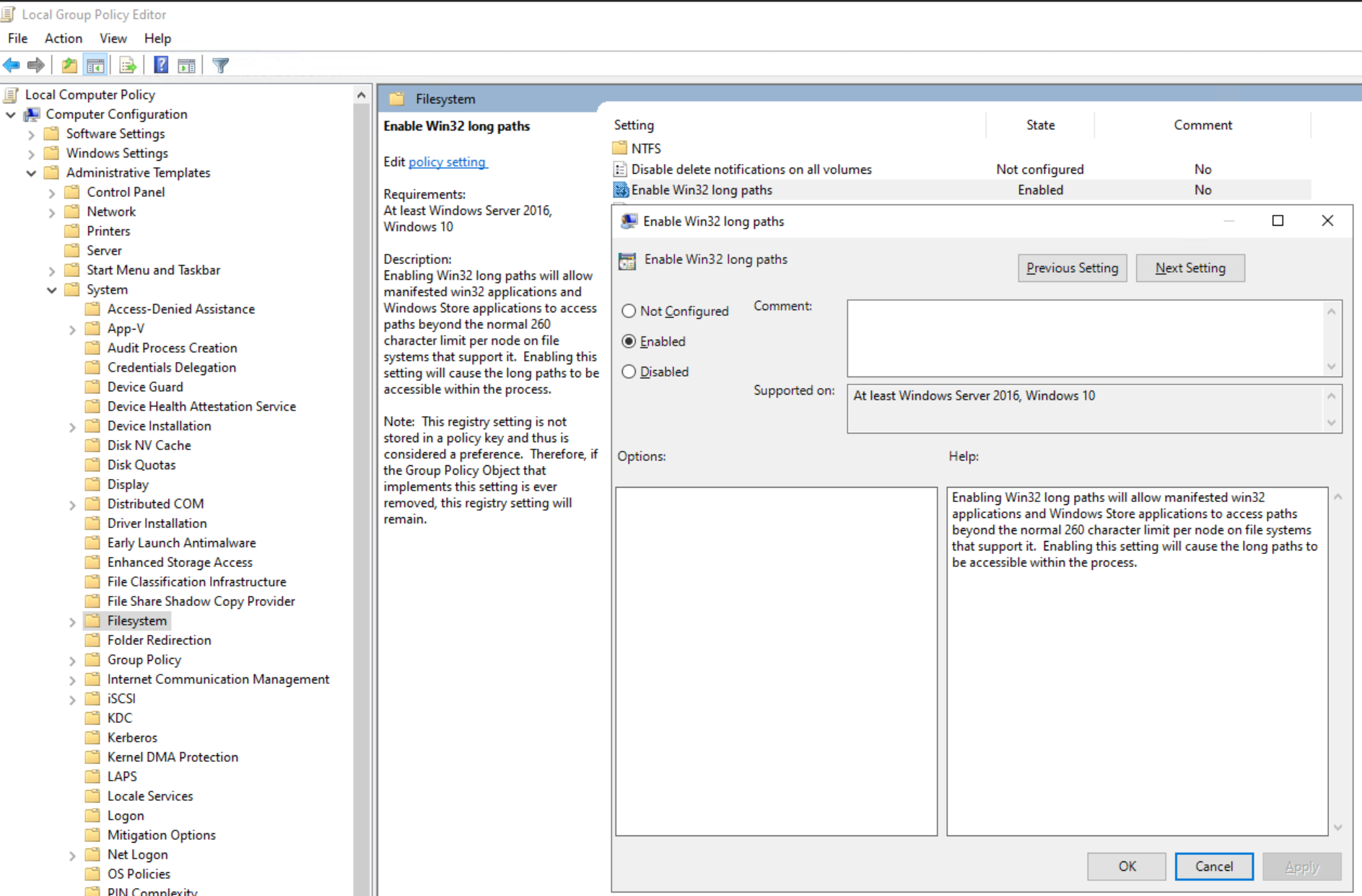
Ou defina a chave de registro:
[HKEY_LOCAL_MACHINE\SYSTEM\CurrentControlSet\Control\FileSystem]
"LongPathsEnabled"=dword:00000001
Additional Information
Erros semelhantes poderão aparecer se o recurso Desduplicação do Windows estiver ativado: NVP vProxy: A recuperação em nível de arquivo da VM do Windows apresenta falha para alguns arquivos com a mensagem "Não foi possível recuperar alguns objetos ou propriedades de segurança".