NVP vProxy:FLR 在 Windows VM 上失敗「檔案名稱、目錄名稱或標籤標籤語法不正確」
Summary: Windows 虛擬機器 (VM) 的 NetWorker VMware Protection (NVP) 檔案層級還原 (FLR) 失敗。返回的錯誤是“無法恢復某些物件或安全屬性”
This article applies to
This article does not apply to
This article is not tied to any specific product.
Not all product versions are identified in this article.
Symptoms
NetWorker VMware Protection (NVP) vProxy 檔案層級還原 (FLR) 是在 Windows 虛擬機器 (VM) 上執行。
FLR 作業失敗,並報告一般錯誤「某些物件或安全性屬性無法復原」,
完整復原記錄會詳細說明某些檔案路徑的下列錯誤:“檔名、目錄名稱或標籤語法不正確。”
152791:nsrvproxy_flr_recover: vProxy Log Begins ===============================================
159373:nsrvproxy_flr_recover: vProxy Log: 2020-03-05T21:11:58Z NOTICE: [89] Logging to '/opt/emc/vproxy/runtime/logs/vflrd/recover-xxxxxxxxxxxxxxxxxxxxxxxxx.log' on host xxxx'.
159373:nsrvproxy_flr_recover: vProxy Log: 2020-03-05T21:11:58Z NOTICE: [89] Release: '4.0.0-11_1', Build number: '1', Build date: '2019-09-06T12:54:06Z'
- - - - - - - - - - - - - - -
- - - - - - - - - - - - - - -
159373:nsrvproxy_flr_recover: vProxy Log: 2020-03-05T15:11:59-06:00 ERROR:  [89] Discovery: Cannot get security data for 'C:\Program Files (x86)\EMC\vProxy FLR Agent\flr\mountpoints\FLRXXXXXXXXX\00-E$\SOME_LONG_PATH\FILE_NAME': The filename, directory name, or volume label syntax is incorrect.
159373:nsrvproxy_flr_recover: vProxy Log: 2020-03-05T15:11:59-06:00 WARN:   [89] Discovery: Cannot get attributes for 'C:\Program Files (x86)\EMC\vProxy FLR Agent\flr\mountpoints\FLRXXXXXXXXX\00-E$\SOME_LONG_PATH\FILE_NAME': Cannot get security data for 'C:\Program Files (x86)\EMC\vProxy FLR Agent\flr\mountpoints\FLRXXXXXXXXX\00-E$\SOME_LONG_PATH
159373:nsrvproxy_flr_recover: vProxy Log:  SOME_LONG_PATH\FILE_NAME': The filename, directory name, or volume label syntax is incorrect.
159373:nsrvproxy_flr_recover: vProxy Log: 2020-03-05T15:11:59-06:00 INFO:   [89] Recovery: XXXX - FILE_NAME
159373:nsrvproxy_flr_recover: vProxy Log: 2020-03-05T15:11:59-06:00 ERROR:  [89] Recovery: Cannot create handle for 'C:\Program Files (x86)\EMC\vProxy FLR Agent\flr\mountpoints\FLRXXXXXXXXX\00-E$\SOME_LONG_PATH\FILE_NAME': The system cannot find the path specified.
159373:nsrvproxy_flr_recover: vProxy Log: 2020-03-05T15:11:59-06:00 INFO:   [89] File copying completed.
159373:nsrvproxy_flr_recover: vProxy Log: 2020-03-05T15:11:59-06:00 ERROR:  [89] C:\Program Files (x86)\EMC\vProxy FLR Agent\bin\vflrcopy.exe: Some objects or security properties could not be recovered.
159373:nsrvproxy_flr_recover: vProxy Log: 2020-03-05T15:11:59-06:00 TRACE:  [89] C:\Program Files (x86)\EMC\vProxy FLR Agent\bin\vflrcopy.exe exiting with status code 0
152793:nsrvproxy_flr_recover: vProxy Log Ends =================================================
163541:nsrvproxy_flr_recover: FLR recovery failed: error code: 0, error message: Some objects or security properties could not be recovered.
162216:nsrvproxy_flr_recover: FLR recover job completed with errors.
164970:nsrvproxy_flr_recover: Requested termination of the FLR mount session 3098161.
FLR 記錄可在下列位置找到:
- vProxy:/opt/emc/vproxy/runtime/logs/recycle/vflrd/DATE
- Windows VM:C:\Program Files (x86)\EMC\vProxy FLR Agent\logs\vflragentd\vflragentd-agent.log
Cause
Windows API (尤其是 Win32) 會將檔案路徑限制為 260 個字元 (MAX_PATH)。報告此錯誤的檔案路徑超過 260 個字元。此限制包括驅動器號、冒號、反斜杠、資料夾名稱、檔名和檔擴展名。
Resolution
從 Windows 10 版本 1607、Server 2016 及更新版本開始,您可以在作業系統上啟用長路徑支援。
您可以使用目標 Windows VM 上的群組原則或登錄檔變更來完成此作業:
前往本機 Group Policy Editor → Computer Configuration → Administrative Templates → System → Filesystem。啟用「啟用 Win32 長路徑」。
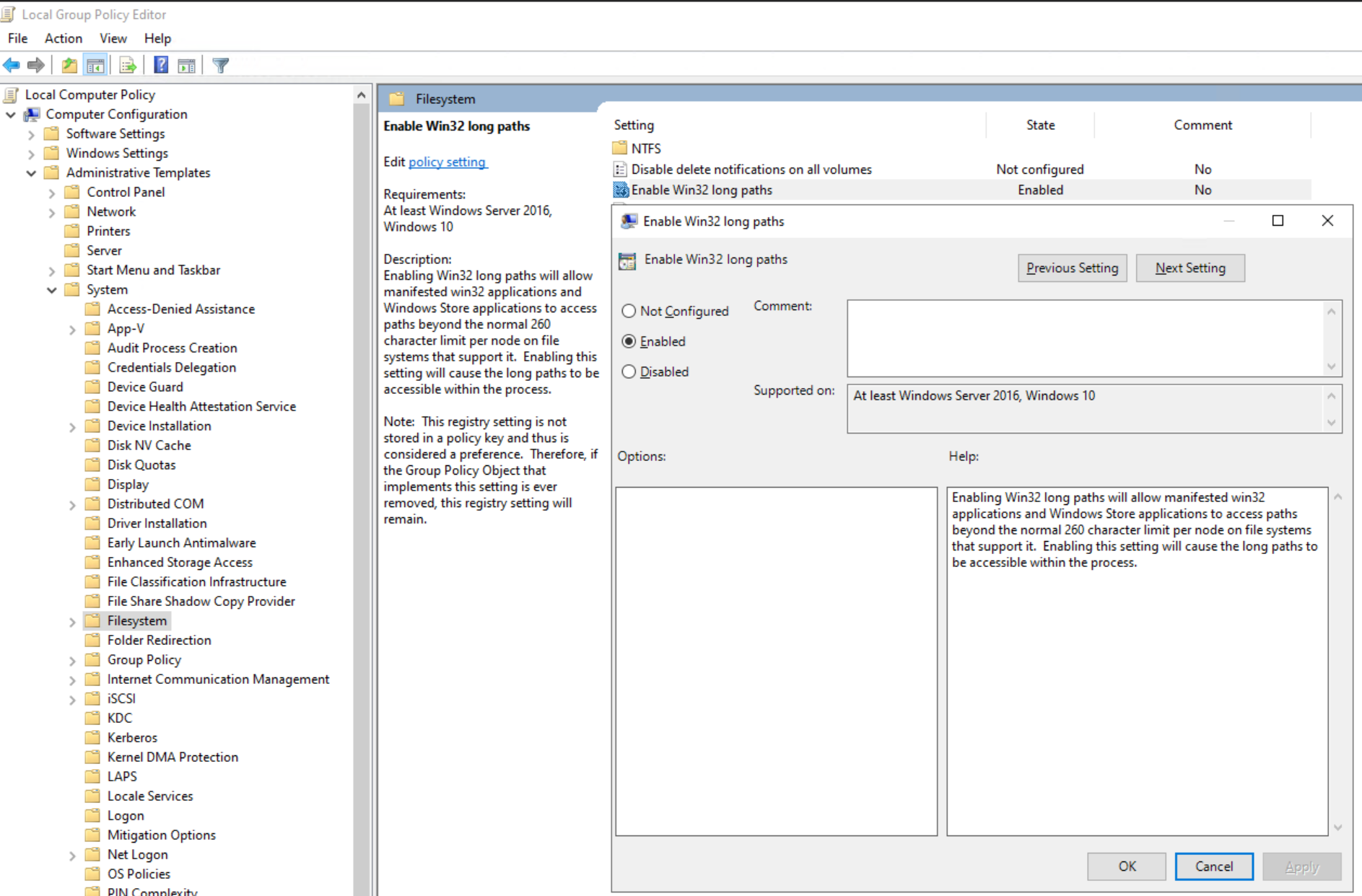
或者設定註冊表項:
[HKEY_LOCAL_MACHINE\SYSTEM\CurrentControlSet\Control\FileSystem]
"LongPathsEnabled"=dword:00000001
注意:請洽詢您的 Windows 系統管理員,以協助在目標虛擬機器上啟用 Win32 長路徑。
Additional Information
如果啟用 Windows 重複資料刪除功能,可能會出現類似的錯誤:NVP vProxy:Windows VM 檔案層級復原在某些檔案失敗,並出現訊息「某些物件或安全性屬性無法復原」。
Affected Products
NetWorkerProducts
NetWorker FamilyArticle Properties
Article Number: 000170302
Article Type: Solution
Last Modified: 21 Aug 2025
Version: 5
Find answers to your questions from other Dell users
Support Services
Check if your device is covered by Support Services.