NVP vProxy:Windows 虚拟机上的 FLR 失败“文件名、目录名称或卷标语法不正确”
Summary: Windows 虚拟机 (VM) 的 NetWorker VMware Protection (NVP) 文件级还原 (FLR) 失败。返回的错误为“无法恢复某些对象或安全属性”
This article applies to
This article does not apply to
This article is not tied to any specific product.
Not all product versions are identified in this article.
Symptoms
NetWorker VMware Protection (NVP) vProxy 文件级还原 (FLR) 在 Windows 虚拟机 (VM) 上执行。
FLR作失败,并报告一般错误 “某些对象或安全属性无法恢复”
完整恢复日志详细说明了某些文件路径的以下错误:“文件名、目录名称或卷标语法不正确。”
152791:nsrvproxy_flr_recover: vProxy Log Begins ===============================================
159373:nsrvproxy_flr_recover: vProxy Log: 2020-03-05T21:11:58Z NOTICE: [89] Logging to '/opt/emc/vproxy/runtime/logs/vflrd/recover-xxxxxxxxxxxxxxxxxxxxxxxxx.log' on host xxxx'.
159373:nsrvproxy_flr_recover: vProxy Log: 2020-03-05T21:11:58Z NOTICE: [89] Release: '4.0.0-11_1', Build number: '1', Build date: '2019-09-06T12:54:06Z'
- - - - - - - - - - - - - - -
- - - - - - - - - - - - - - -
159373:nsrvproxy_flr_recover: vProxy Log: 2020-03-05T15:11:59-06:00 ERROR:  [89] Discovery: Cannot get security data for 'C:\Program Files (x86)\EMC\vProxy FLR Agent\flr\mountpoints\FLRXXXXXXXXX\00-E$\SOME_LONG_PATH\FILE_NAME': The filename, directory name, or volume label syntax is incorrect.
159373:nsrvproxy_flr_recover: vProxy Log: 2020-03-05T15:11:59-06:00 WARN:   [89] Discovery: Cannot get attributes for 'C:\Program Files (x86)\EMC\vProxy FLR Agent\flr\mountpoints\FLRXXXXXXXXX\00-E$\SOME_LONG_PATH\FILE_NAME': Cannot get security data for 'C:\Program Files (x86)\EMC\vProxy FLR Agent\flr\mountpoints\FLRXXXXXXXXX\00-E$\SOME_LONG_PATH
159373:nsrvproxy_flr_recover: vProxy Log:  SOME_LONG_PATH\FILE_NAME': The filename, directory name, or volume label syntax is incorrect.
159373:nsrvproxy_flr_recover: vProxy Log: 2020-03-05T15:11:59-06:00 INFO:   [89] Recovery: XXXX - FILE_NAME
159373:nsrvproxy_flr_recover: vProxy Log: 2020-03-05T15:11:59-06:00 ERROR:  [89] Recovery: Cannot create handle for 'C:\Program Files (x86)\EMC\vProxy FLR Agent\flr\mountpoints\FLRXXXXXXXXX\00-E$\SOME_LONG_PATH\FILE_NAME': The system cannot find the path specified.
159373:nsrvproxy_flr_recover: vProxy Log: 2020-03-05T15:11:59-06:00 INFO:   [89] File copying completed.
159373:nsrvproxy_flr_recover: vProxy Log: 2020-03-05T15:11:59-06:00 ERROR:  [89] C:\Program Files (x86)\EMC\vProxy FLR Agent\bin\vflrcopy.exe: Some objects or security properties could not be recovered.
159373:nsrvproxy_flr_recover: vProxy Log: 2020-03-05T15:11:59-06:00 TRACE:  [89] C:\Program Files (x86)\EMC\vProxy FLR Agent\bin\vflrcopy.exe exiting with status code 0
152793:nsrvproxy_flr_recover: vProxy Log Ends =================================================
163541:nsrvproxy_flr_recover: FLR recovery failed: error code: 0, error message: Some objects or security properties could not be recovered.
162216:nsrvproxy_flr_recover: FLR recover job completed with errors.
164970:nsrvproxy_flr_recover: Requested termination of the FLR mount session 3098161.
FLR 日志可在以下位置找到:
- vProxy:/opt/emc/vproxy/runtime/logs/recycle/vflrd/DATE
- Windows 虚拟机:C:\Program Files (x86)\EMC\vProxy FLR Agent\logs\vflragentd\vflragentd-agent.log
Cause
Windows API(尤其是 Win32)将文件路径限制为 260 个字符 (MAX_PATH)。报告此错误的文件路径超过 260 个字符。此限制包括驱动器号、冒号、反斜杠、文件夹名称、文件名和文件扩展名。
Resolution
从 Windows 10 版本 1607、Server 2016 及更高版本开始,可以在作系统上启用长路径支持。
这可以使用目标 Windows VM 上的组策略或注册表更改来完成:
转到本地 Group Policy Editor → Computer Configuration → Administrative Templates → System → Filesystem。启用“Enable Win32 long paths”。
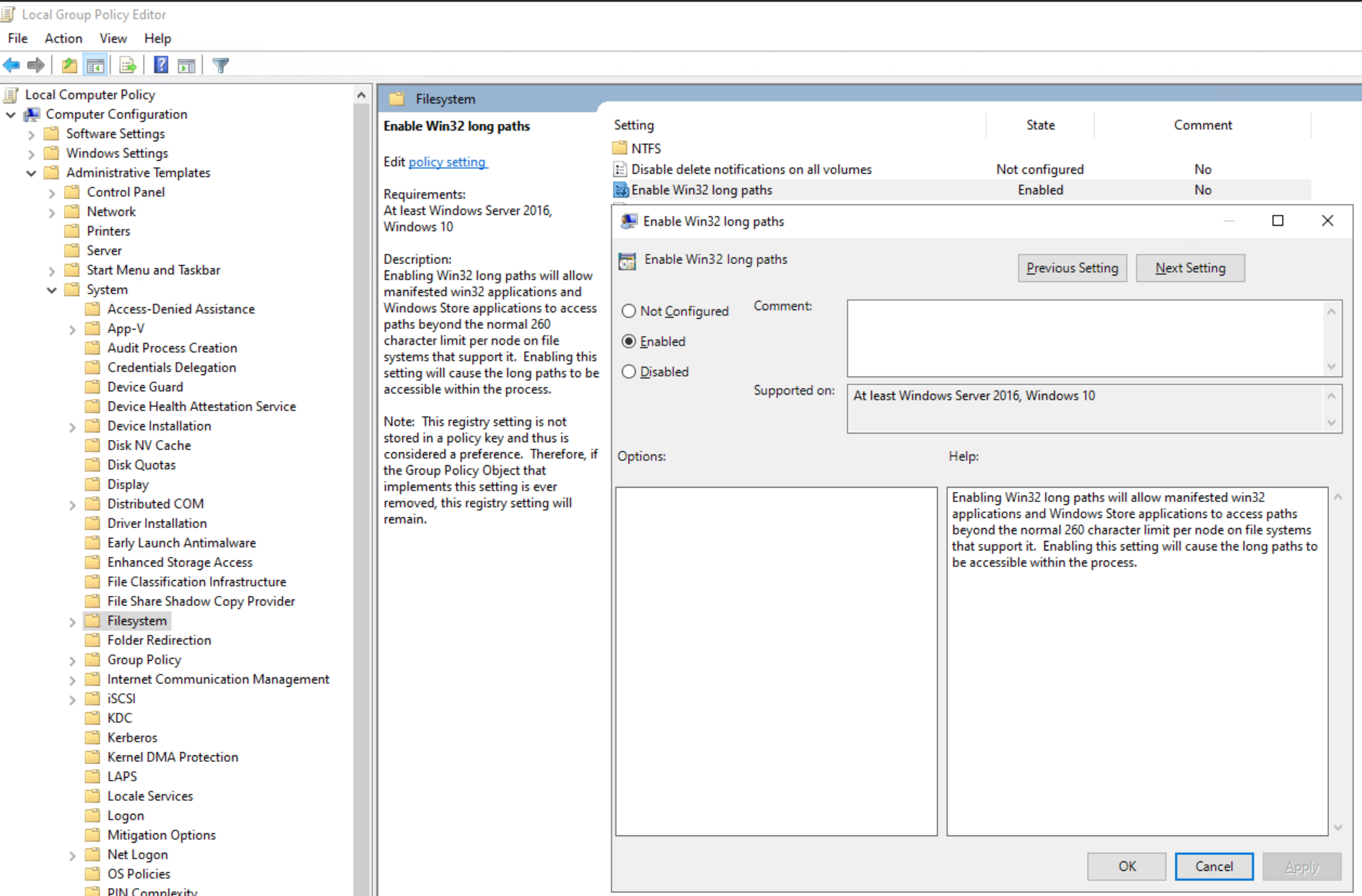
或设置注册表项:
[HKEY_LOCAL_MACHINE\SYSTEM\CurrentControlSet\Control\FileSystem]
"LongPathsEnabled"=dword:00000001
提醒:请咨询 Windows 系统管理员,以获取在目标虚拟机上启用 Win32 长路径的帮助。
Additional Information
如果启用了 Windows 重复数据消除功能,则可能会出现类似的错误:NVP vProxy:对于某些文件,Windows 虚拟机文件级恢复失败,并显示消息“无法恢复某些对象或安全属性”。
Affected Products
NetWorkerProducts
NetWorker FamilyArticle Properties
Article Number: 000170302
Article Type: Solution
Last Modified: 21 Aug 2025
Version: 5
Find answers to your questions from other Dell users
Support Services
Check if your device is covered by Support Services.