CyberSense:在 CyberSense 8.6 中安装许可证会导致出现最终用户许可协议错误消息
Summary: 尝试在 CyberSense 8.6 环境中安装或重新安装许可证会导致上传许可证文件时出现以下错误: “许可证上传失败。错误:licmanage: checking licensing directory:“/opt/ie/var/licenses” 此许可证需要最终用户许可协议。
This article applies to
This article does not apply to
This article is not tied to any specific product.
Not all product versions are identified in this article.
Symptoms
上传新许可证会导致 CyberSense 8.6 UI 中出现以下错误:
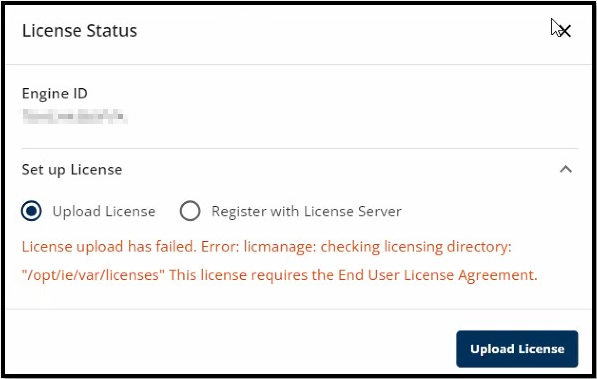
图 1:“许可证上传失败”错误对话框
图 1:“许可证上传失败”错误对话框
Cause
CyberSense 8.6 的发布为 UI 带来了更多特性和功能,可提供更好的用户体验。在 8.6 版本中,在此更新的 UI 中不接受任何最终用户许可协议 (EULA) 设置来应用此许可证。
Resolution
临时解决方法:
1.登录到已弃用的原始 CyberSense UI。
2.导航至AdministrationSystemLicenses>>。
3.选择 EULA 选项:

图 2:选择“Administration > ”下的“EULA”按钮系统 > 许可证。
4.滚动浏览 EULA 并接受它:

图 3:已接受 EULA。
5.重新登录到 CyberSense 8.6 UI 并使用正常过程安装许可证。
分辨率:
此问题已在所有 CyberSense 8.7 及更高版本中得到解决。
1.登录到已弃用的原始 CyberSense UI。
2.导航至AdministrationSystemLicenses>>。
3.选择 EULA 选项:
图 2:选择“Administration > ”下的“EULA”按钮系统 > 许可证。
4.滚动浏览 EULA 并接受它:
图 3:已接受 EULA。
5.重新登录到 CyberSense 8.6 UI 并使用正常过程安装许可证。
分辨率:
此问题已在所有 CyberSense 8.7 及更高版本中得到解决。
Article Properties
Article Number: 000227959
Article Type: Solution
Last Modified: 22 Aug 2024
Version: 1
Find answers to your questions from other Dell users
Support Services
Check if your device is covered by Support Services.