VxRail:指令檔錯誤: 砰:./clean_up_esrs.sh:/bin/bash^M:錯誤的解釋器
Summary: 嘗試從 VxRail Manager 執行指令檔時發生錯誤: 「砰:./clean_up_esrs.sh:/bin/bash^M:錯誤的解釋器:No such file or directory"
This article applies to
This article does not apply to
This article is not tied to any specific product.
Not all product versions are identified in this article.
Symptoms
嘗試在 VxRail Manager CLI 上執行 shell 指令檔時,會發生下列情況:
"bash: ./clean_up_esrs.sh: /bin/bash^M: bad interpreter: No such file or directory"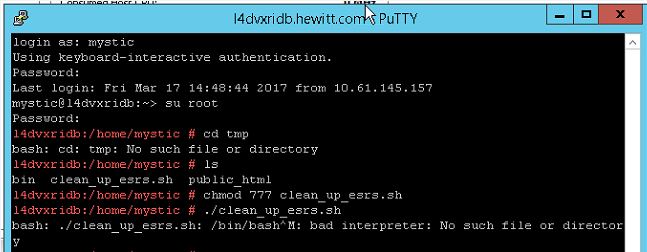
Cause
從 FTP 下載 shell 指令檔時,它是 ASCI 格式。腳本需要轉換為二進位才能與 UNIX 配合使用。
Resolution
- 使用 SSH 與 ROOT 存取權限登入 VxRail Manager。
- 瀏覽至 shell 指令檔的位置,並將 vi 放入其中。
範例:
vi clean_up_esrs.sh
注意:在底部,它應該顯示shell腳本的當前格式。在此特定情況下,它顯示shell腳本在 DOS中。請記住,VxRail Manager 是以 Linux 為基礎,也就是說它必須是 UNIX 格式。
- 變更格式以在二進位中運作。在 vi 工作階段中輸入下列命令,然後按下 Enter 鍵。
:set ff=unix 
- 輸入以下命令以儲存檔案:
:wq!- 使用 vi 返回 shell 指令檔,以確保格式已變更 (底部不應看到 DOS)
- 嘗試再次執行 shell 指令檔,現在應該會成功。

Products
VxRail, VxRail Appliance Series, VxRail SoftwareArticle Properties
Article Number: 000025001
Article Type: Solution
Last Modified: 10 Feb 2025
Version: 4
Find answers to your questions from other Dell users
Support Services
Check if your device is covered by Support Services.