Avamar: Klusterin määritysvirhe SQL AG, Exchange DAG tai Hyper-V
Summary: Tässä artikkelissa on ohjeet Avamar-klusteripalveluiden manuaaliseen poistamiseen Windows-käyttöjärjestelmästä.
Symptoms
Ohjattu Avamar Cluster Configuration Wizard ei onnistu asentamaan ja poistamaan Exchange DAG- tai Hyper-V-klusterin määritystä.
av_cluster_config_wizard WARN<0000>:  Unable to retrieve any cluster group agent information for the plug-in associated with pin file: 'windows.pin'.
av_cluster_config_wizard WARN<0000>:  The cluster agent resource does not exist. This is expected if the cluster has not yet been configured.
av_cluster_config_wizard WARN<0000>:  Unable to get Avamar server settings because no Cluster Group Agents were detected. This is expected if the cluster has not yet been configured.
av_cluster_config_wizard WARN<0000>:  The cluster agent resource does not exist. This is expected if the cluster has not yet been configured.
Ohjattu klusterin määritystoiminto ei asenna ja poista SQL AG:tä, Exchange DAG eli Hyper-V-klusterit.
Cause
Avagent klusterirooli poistettiin manuaalisesti SQL AG-, Exchange DAG- tai Hyper-V-klusterista Failover Cluster Manager -työkalussa:
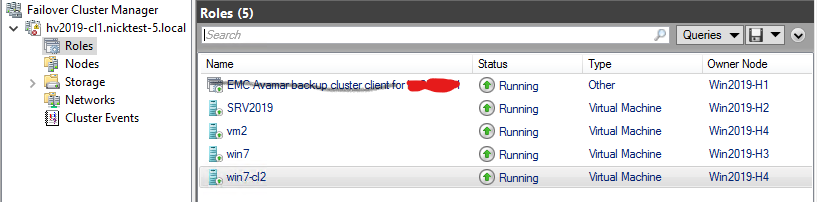
Linuxin Avagent Klusteripalvelu säilyy kohdassa services.msc Konsoli:

Resolution
- SQL AG:n, Exchange DAG:n tai Hyper-V:n tarkistaminen
AvagentCluster Service on edelleen asennettuna, avaaservices.msckonsoli Microsoft Windowsissa. Kopioi arvo Huollon nimi -kentästä ja sulje sittenservices.msckonsoli (*TÄRKEÄÄ! Katso alla). - Avaa Windowsin komentokehote järjestelmänvalvojana asiakaskoneessa tai -palvelimessa.
- Hae palvelun määritystiedot seuraavalla komennolla:
sc [<ServerName>] qc [<ServiceDisplayName>]- Tilastojen saaminen
AvagentKlusteripalvelu paikallisessa tietokoneessa:
sc qc "Avamar Backup Agent for hv2019"- Käytä "
sc delete" Palvelun poistokomento:sc [<ServerName>] delete [<ServiceName>]
sc delete "Avamar Backup Agent for hv2019".Toista toimenpiteet klusterisolmuissa, joissa on sama ongelma.
*TÄRKEÄÄ! Suljetaan services.msc Konsoli nopeuttaa Avagent klusteripalvelut, jotka käyttävät Windowsin komentokehotetta services.msc Konsoli. Muussa tapauksessa ajoita käyttökatko klusterisolmujen käynnistämiseksi uudelleen, jos palvelun poistokomennot onnistuvat, mutta Avagent Klusteripalvelu on edelleen olemassa services.msc Konsoli.