Avamar: Clusterconfiguratiefout SQL AG, Exchange DAG of Hyper-V
Summary: Dit artikel bevat stappen voor het handmatig verwijderen van Avamar clusterservices uit het Windows-besturingssysteem (OS).
Symptoms
De wizard Avamar clusterconfiguratie kan de Exchange DAG- of Hyper-V-clusterconfiguratie niet installeren en verwijderen.
av_cluster_config_wizard WARN<0000>:  Unable to retrieve any cluster group agent information for the plug-in associated with pin file: 'windows.pin'.
av_cluster_config_wizard WARN<0000>:  The cluster agent resource does not exist. This is expected if the cluster has not yet been configured.
av_cluster_config_wizard WARN<0000>:  Unable to get Avamar server settings because no Cluster Group Agents were detected. This is expected if the cluster has not yet been configured.
av_cluster_config_wizard WARN<0000>:  The cluster agent resource does not exist. This is expected if the cluster has not yet been configured.
De clusterconfiguratiewizard kan SQL AG niet installeren en verwijderen, Wissel DAG- of Hyper-V-clusters uit.
Cause
Avagent De clusterrol is handmatig verwijderd voor SQL AG-, Exchange DAG- of Hyper-V-cluster in de Failover Cluster Manager tool:
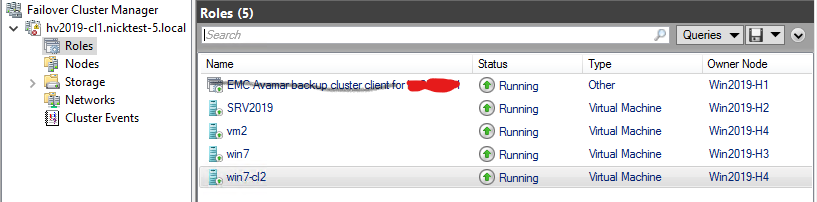
De Avagent Clusterservice blijft in de services.msc Console:

Resolution
- SQL AG, Exchange DAG of Hyper-V controleren
Avagentclusterservice nog steeds is geïnstalleerd, opent u hetservices.mscconsole in Microsoft Windows. Kopieer de waarde uit het veld Servicenaam en sluit vervolgens hetservices.mscconsole (*BELANGRIJK! Zie hieronder). - Open de Windows-opdrachtprompt als administrator op de clientcomputer of server.
- Haal de serviceconfiguratie-informatie op met de volgende opdracht:
sc [<ServerName>] qc [<ServiceDisplayName>]- Om de statistieken te krijgen voor
AvagentClusterservice op de lokale computer:
sc qc "Avamar Backup Agent for hv2019"- Gebruik de knop "
sc delete" opdracht om service te verwijderen:sc [<ServerName>] delete [<ServiceName>]
sc delete "Avamar Backup Agent for hv2019".Herhaal de procedure op de clusterknooppunten met hetzelfde probleem.
*BELANGRIJK! Afsluiten van de services.msc console verhoogt het slagingspercentage voor handmatige verwijdering van de Avagent clusterservices met behulp van de Windows-opdrachtprompt via de services.msc Console. Plan anders downtime om de clusterknooppunten opnieuw op te starten als de opdrachten voor het verwijderen van de service succesvol zijn, maar het Avagent clusterservice bestaat nog steeds in de services.msc Console.