Avamar: Błąd konfiguracji klastra SQL AG, Exchange DAG lub Hyper-V
Summary: Ten artykuł zawiera instrukcje ręcznego usuwania usług klastrowych Avamar z systemu operacyjnego Windows (OS).
Symptoms
Kreator konfiguracji klastra Avamar nie instaluje i odinstalowuje konfiguracji klastra Exchange DAG lub Hyper-V.
av_cluster_config_wizard WARN<0000>:  Unable to retrieve any cluster group agent information for the plug-in associated with pin file: 'windows.pin'.
av_cluster_config_wizard WARN<0000>:  The cluster agent resource does not exist. This is expected if the cluster has not yet been configured.
av_cluster_config_wizard WARN<0000>:  Unable to get Avamar server settings because no Cluster Group Agents were detected. This is expected if the cluster has not yet been configured.
av_cluster_config_wizard WARN<0000>:  The cluster agent resource does not exist. This is expected if the cluster has not yet been configured.
Kreator konfiguracji klastra nie może zainstalować i odinstalować SQL AG. Klastry DAG programu Exchange lub funkcji Hyper-V.
Cause
Avagent rola klastra została ręcznie usunięta dla klastra SQL AG, Exchange DAG lub Hyper-V w narzędziu Menedżer klastra trybu failover:
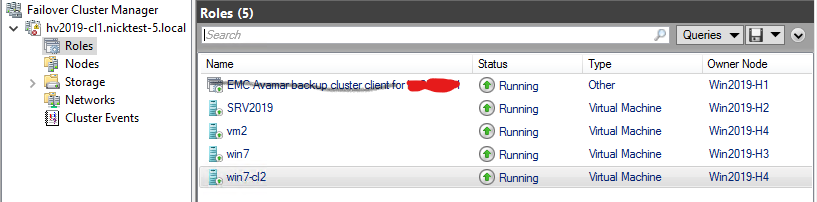
Jednak Avagent Usługa klastrowania pozostaje w services.msc Konsoli:

Resolution
- Weryfikowanie SQL AG, Exchange DAG lub Hyper-V
AvagentUsługa klastrowania jest nadal zainstalowana, otwórz oknoservices.mscw systemie Microsoft Windows. Skopiuj wartość z pola Nazwa usługi, a następnie zamknij oknoservices.msckonsola (*WAŻNE! Patrz poniżej). - Otwórz wiersz poleceń systemu Windows jako administrator komputera klienckiego lub serwera.
- Uzyskaj informacje o konfiguracji usługi przy użyciu następującego polecenia:
sc [<ServerName>] qc [<ServiceDisplayName>]- Aby pobrać statystyki dla
AvagentUsługa klastrowania na komputerze lokalnym:
sc qc "Avamar Backup Agent for hv2019"- Za pomocą przycisku "
sc delete", aby usunąć usługę:sc [<ServerName>] delete [<ServiceName>]
sc delete "Avamar Backup Agent for hv2019".Powtórz procedurę dla węzłów klastra z tym samym problemem.
*WAŻNE! Zamykanie services.msc Console zwiększa wskaźnik powodzenia ręcznego usuwania Avagent usług klastrowania za pomocą wiersza polecenia systemu Windows services.msc Konsoli. W przeciwnym razie zaplanuj przestój w celu ponownego uruchomienia węzłów klastra, jeśli polecenia usunięcia usługi zakończą się pomyślnie, ale Avagent Usługa klastrowania nadal istnieje w services.msc Konsoli.