Avamar:群集配置错误 SQL AG、Exchange DAG 或 Hyper-V
Summary: 本文提供了从 Windows作系统 (OS) 中手动删除 Avamar 群集服务的步骤。
This article applies to
This article does not apply to
This article is not tied to any specific product.
Not all product versions are identified in this article.
Symptoms
Avamar 群集配置向导无法安装和卸载 Exchange DAG 或 Hyper-V 群集配置。
av_cluster_config_wizard WARN<0000>:  Unable to retrieve any cluster group agent information for the plug-in associated with pin file: 'windows.pin'.
av_cluster_config_wizard WARN<0000>:  The cluster agent resource does not exist. This is expected if the cluster has not yet been configured.
av_cluster_config_wizard WARN<0000>:  Unable to get Avamar server settings because no Cluster Group Agents were detected. This is expected if the cluster has not yet been configured.
av_cluster_config_wizard WARN<0000>:  The cluster agent resource does not exist. This is expected if the cluster has not yet been configured.
群集配置向导无法安装和卸载 SQL AG。 Exchange DAG 或 Hyper-V 群集。
Cause
Avagent 已在故障切换群集管理器工具中手动删除了 SQL AG、Exchange DAG 或 Hyper-V 群集的群集角色:
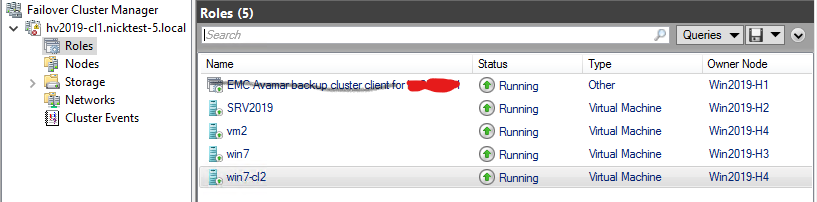
但是, Avagent 群集服务保留在 services.msc 安慰:

Resolution
- 验证 SQL AG、Exchange DAG 或 Hyper-V
Avagent群集服务仍已安装,打开services.mscMicrosoft Windows 中的控制台。复制服务名称字段中的值,然后关闭services.msc控制台(*重要!见下文)。 - 在客户端计算机或服务器上以管理员身份打开 Windows 命令提示符。
- 使用以下命令获取服务配置信息:
sc [<ServerName>] qc [<ServiceDisplayName>]- 获取统计信息
Avagent本地计算机上的群集服务:
sc qc "Avamar Backup Agent for hv2019"- 使用”
sc delete“命令删除服务:sc [<ServerName>] delete [<ServiceName>]
示例:
sc delete "Avamar Backup Agent for hv2019".在具有相同问题的群集节点上重复该过程。
*重要提示!关闭 services.msc 控制台提高了手动删除 Avagent 使用 Windows 命令提示符从 中的群集服务 services.msc 安慰。否则,如果服务删除命令成功,则计划停机时间以重新启动群集节点,但 Avagent 群集服务仍然存在于 services.msc 安慰。
Affected Products
Avamar, Avamar Plug-in for Exchange VSS, Avamar Plug-in for Hyper-V VSS, Avamar Plug-in for SQLArticle Properties
Article Number: 000041427
Article Type: Solution
Last Modified: 17 Dec 2025
Version: 4
Find answers to your questions from other Dell users
Support Services
Check if your device is covered by Support Services.