VNX: Unable to get SAN Copy to verify connection to an IBM XIV GEN3 array. (User Correctable)
Summary: unable to get sancopy to verify connection to IBM XIV GEN3 array
This article applies to
This article does not apply to
This article is not tied to any specific product.
Not all product versions are identified in this article.
Symptoms
The customer is trying to create a SAN Copy pull session from an IBM XIV GEN3 array.
Unable to get the session to create because SAN Copy can't access the source device on the IBM array.
When you try to finish the wizard to create the session it gives the following error:
The create SAN Copy session failed because one or more storage devices were not accessible, go back to the select storage destination for storage sources wizard step and check Verify Connections followed by pressing the next button.
Results from call to create a SAN Copy session named Unknown:50:01:73:80:75:42:01:73:
The source device could not be found. This is probably due to incorrect FC zoning or iSCSI connections set, or the device is not in the correct storage group.
(0x712a801f)[0x712a801f]
Results from call to create a SAN Copy session named Unknown:50:01:73:80:75:42:01:73:
The source device could not be found. This is probably due to incorrect FC zoning or iSCSI connections set, or the device is not in the correct storage group.
(0x712a801f)[0x712a801f]
The customer zoned the VNX to the IBM array.
Both arrays logged into each other.
From the VNX we see the WWN of the FC IBM array initiators logged in.
On the IBM the VNX is logged in.
The port WWNs the customer zoned to on the IBM array were 50:01:73:80:75:42:01:73 and 50:01:73:80:75:42:01:83
We can see these WWNs logged into the VNX under the initiator records and these are the only initiators from the IBM logged into the VNX.
Everything looks good.
On the IBM XIV array the customer created a host for the VNX on the IBM and added its connections. They then provisioned a device to the host(VNX array).
When you use the wizard to create the SANCopy pull session, you need to pick the source device from the IBM using the "Enter WWN..." option as this is a third party array.
NOTE:
All screenshots are from a lab array and not the customer.
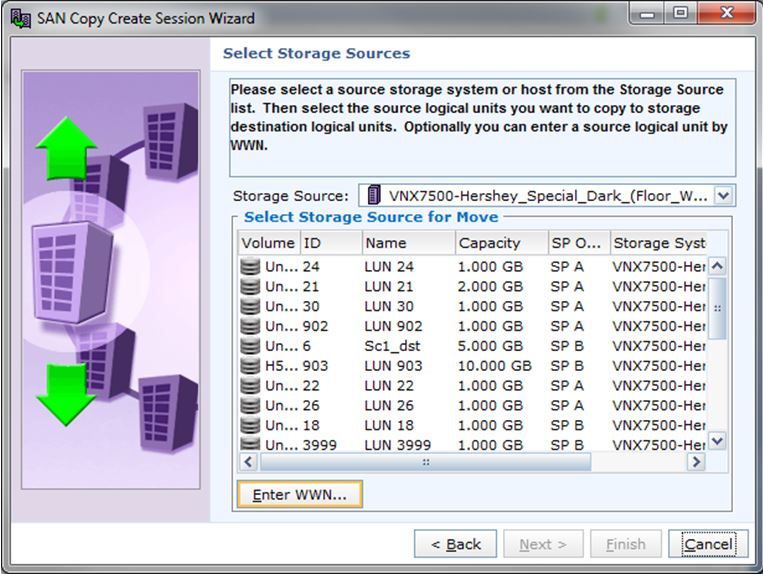
After selection the "Enter WWN..." option the following screen appears:
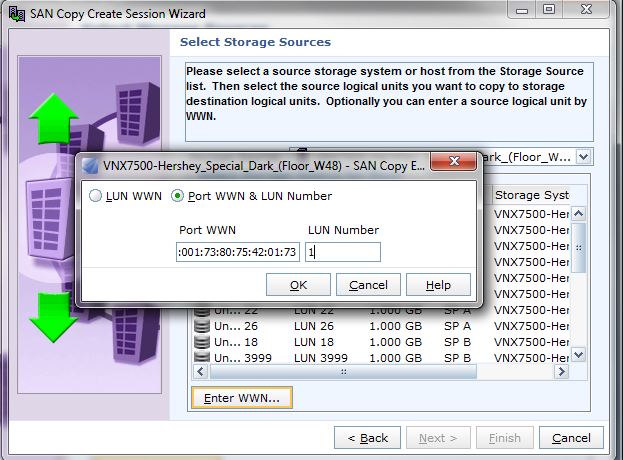
The Port WWN is the port the customer zoned to on the IBM and the port WWNs see on the VNX initiator records. The LUN Number is the HLU presented to the host from the IBM.
After you have completed this setup and the other steps to chose the destination device and click finish it fails with the error mentioned above.
This leads you to believe the issue is in the masking on the IBM.
The customer got IBM on the webex and they confirmed the masking on the IBM for the VNX to access the device is good but we still could't get it to verify.
IBM was going to look into this and get back to the customer.
Cause
The cause of the create session failure is the port WWN used in the command is not the port the source device is masked to on the IBM array.
Resolution
To have SAN Copy search all targets for devices and log the devices it finds in the logs run the following command
Naviseccli -h <SPA IP Address> -user <unisphere username> -password <Unisphere password> -scope 0 sancopy -verify -wwn 10:10:10:10:10:10:10:10:10:10:10:10:10:10:10:10 -log
Naviseccli -h <SPB IP Address> -user <unisphere username> -password <Unisphere password> -scope 0 sancopy -verify -wwn 10:10:10:10:10:10:10:10:10:10:10:10:10:10:10:10 -log
Wait 5 minutes and run spcollects and triage them.
In the SPlogs.txt file search for "Searching target".
You will see all the ports that sancopy can see that are array devices.
example:
B 09/22/16 16:32:05 FEDsk 712b0003 SANCopy Disk Driver: Searching target 5001738075420000:5001738075420180 (log 1 of 2). < -------------- IBM Port
B 09/22/16 16:32:05 FEDsk 712b0003 SANCopy Disk Driver: Searching target 50060160B6E0270B:5006016436E0270B (log 1 of 2). < -------------- VNX Port
B 09/22/16 16:32:05 FEDsk 712b0003 SANCopy Disk Driver: Searching target 50060160B6E0270B:5006016536E0270B (log 1 of 2). < -------------- VNX Port
B 09/22/16 16:32:05 FEDsk 712b0003 SANCopy Disk Driver: Searching target 50060160B6E0270B:5006016C36E0270B (log 1 of 2). < -------------- VNX Port
B 09/22/16 16:32:05 FEDsk 712b0003 SANCopy Disk Driver: Searching target 50012480007AAC20:50012481007AAC20 (log 1 of 2). < -------------- RPA Port
B 09/22/16 16:32:05 FEDsk 712b0003 SANCopy Disk Driver: Searching target 50012480007AAC22:50012481007AAC22 (log 1 of 2). < -------------- RPA Port
B 09/22/16 16:32:05 FEDsk 712b0003 SANCopy Disk Driver: Searching target 50012480007AAD2D:50012481007AAD2D (log 1 of 2). < -------------- RPA Port
B 09/22/16 16:32:05 FEDsk 712b0003 SANCopy Disk Driver: Searching target 50012480007AAD2F:50012481007AAD2F (log 1 of 2). < -------------- RPA Port
B 09/22/16 16:32:05 FEDsk 712b0003 SANCopy Disk Driver: Searching target 5001738075420000:5001738075420170 (log 1 of 2). < -------------- IBM Port
Above you see VNX ports, RPA ports and IBM ports.
The IBM ports that the SAN Copy command found devices, (A LUN is a device) on are not the ports that we see in the VNX initiator records.
50:01:73:80:75:42:01:70 < --- This is the port found by the SAN Copy command that it can see a LUN, which is why it is in the above list.
The port we used in the wizard was 50:01:73:80:75:42:01:73 becuse thhis is the port we see logged in to the VNX in the initiator list.
However, when looking at the customer's switch zones we do see zones to IBM port WWNs:
50:01:73:80:75:42:01:70
50:01:73:80:75:42:01:80
50:01:73:80:75:42:01:73
50:01:73:80:75:42:01:83
When we used WWN 50:01:73:80:75:42:01:70 in the wizard the session created successfully because it is the port that has the LUN masked to it..
We were also able to create a session using 50:01:73:80:75:42:01:80. Both found by the CLI command.
This issue cause has not been fully determined as we are still waiting on the findings from IBM.
Naviseccli -h <SPA IP Address> -user <unisphere username> -password <Unisphere password> -scope 0 sancopy -verify -wwn 10:10:10:10:10:10:10:10:10:10:10:10:10:10:10:10 -log
Naviseccli -h <SPB IP Address> -user <unisphere username> -password <Unisphere password> -scope 0 sancopy -verify -wwn 10:10:10:10:10:10:10:10:10:10:10:10:10:10:10:10 -log
Wait 5 minutes and run spcollects and triage them.
In the SPlogs.txt file search for "Searching target".
You will see all the ports that sancopy can see that are array devices.
example:
B 09/22/16 16:32:05 FEDsk 712b0003 SANCopy Disk Driver: Searching target 5001738075420000:5001738075420180 (log 1 of 2). < -------------- IBM Port
B 09/22/16 16:32:05 FEDsk 712b0003 SANCopy Disk Driver: Searching target 50060160B6E0270B:5006016436E0270B (log 1 of 2). < -------------- VNX Port
B 09/22/16 16:32:05 FEDsk 712b0003 SANCopy Disk Driver: Searching target 50060160B6E0270B:5006016536E0270B (log 1 of 2). < -------------- VNX Port
B 09/22/16 16:32:05 FEDsk 712b0003 SANCopy Disk Driver: Searching target 50060160B6E0270B:5006016C36E0270B (log 1 of 2). < -------------- VNX Port
B 09/22/16 16:32:05 FEDsk 712b0003 SANCopy Disk Driver: Searching target 50012480007AAC20:50012481007AAC20 (log 1 of 2). < -------------- RPA Port
B 09/22/16 16:32:05 FEDsk 712b0003 SANCopy Disk Driver: Searching target 50012480007AAC22:50012481007AAC22 (log 1 of 2). < -------------- RPA Port
B 09/22/16 16:32:05 FEDsk 712b0003 SANCopy Disk Driver: Searching target 50012480007AAD2D:50012481007AAD2D (log 1 of 2). < -------------- RPA Port
B 09/22/16 16:32:05 FEDsk 712b0003 SANCopy Disk Driver: Searching target 50012480007AAD2F:50012481007AAD2F (log 1 of 2). < -------------- RPA Port
B 09/22/16 16:32:05 FEDsk 712b0003 SANCopy Disk Driver: Searching target 5001738075420000:5001738075420170 (log 1 of 2). < -------------- IBM Port
Above you see VNX ports, RPA ports and IBM ports.
The IBM ports that the SAN Copy command found devices, (A LUN is a device) on are not the ports that we see in the VNX initiator records.
50:01:73:80:75:42:01:70 < --- This is the port found by the SAN Copy command that it can see a LUN, which is why it is in the above list.
The port we used in the wizard was 50:01:73:80:75:42:01:73 becuse thhis is the port we see logged in to the VNX in the initiator list.
However, when looking at the customer's switch zones we do see zones to IBM port WWNs:
50:01:73:80:75:42:01:70
50:01:73:80:75:42:01:80
50:01:73:80:75:42:01:73
50:01:73:80:75:42:01:83
When we used WWN 50:01:73:80:75:42:01:70 in the wizard the session created successfully because it is the port that has the LUN masked to it..
We were also able to create a session using 50:01:73:80:75:42:01:80. Both found by the CLI command.
This issue cause has not been fully determined as we are still waiting on the findings from IBM.
Additional Information
I have attached the following document below for reference.
EMC® SAN Copy™ and Open Replicator Migration from IBM XIV to EMC Storage Technical Notes
EMC® SAN Copy™ and Open Replicator Migration from IBM XIV to EMC Storage Technical Notes
Affected Products
VNX1 SeriesProducts
SAN Copy, VNX1 Series, VNX2 SeriesArticle Properties
Article Number: 000056556
Article Type: Solution
Last Modified: 06 Nov 2025
Version: 3
Find answers to your questions from other Dell users
Support Services
Check if your device is covered by Support Services.