마이그레이션 프로세스 중에 Dell Data Protection Virtual Edition 업그레이드가 실패할 수 있음
Summary: 이 문서에서는 다음 Dell Data Protection | Virtual Edition 업그레이드 오류를 해결하는 단계를 제공합니다. "error migrating database and/or configuration."
Symptoms
영향을 받는 제품:
- Dell Data Protection | Virtual Edition
영향을 받는 버전:
- v8.x 및 9.10
Dell Data Protection | Virtual Edition 서버를 최신 버전으로 업그레이드하는 동안 마이그레이션 프로세스에 실패하고 다음 오류가 표시될 수 있습니다.

그림 1: (영어로만 제공) Dell Data Protection | Virtual Edition 오류
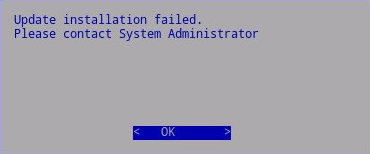
그림 2: (영어로만 제공) 업데이트 설치 실패
Cause
해당 사항 없음
Resolution
이 문제는 v9.10.1에서 해결되었습니다.
Dell Data Protection | Virtual Edition 마이그레이션 프로세스를 시작하기 전에 Dell Data Protection | Virtual Edition 서버 WebUI에 유효한 라이선스가 하나 이상 있는지 확인합니다.
첫 번째 단계로, 관리>라이선스 관리 아래에 하나 이상의 라이선스가 나열되어 있는지 확인해 보겠습니다.
그런 다음 나열된 라이선스 중 하나 이상이 여전히 유효한지 확인해야 합니다.
라이선스가 유효한지 확인하려면 Alert 및 Status 열을 확인해야 합니다. Alert 메시지가 보고되거나 Status에서 라이선스가 만료된 것으로 보고되면 Dell Data Protection | Virtual Edition 서버의 업그레이드 프로세스를 진행하기 전에 WebUI에서 유효한 라이선스를 가져와야 합니다.
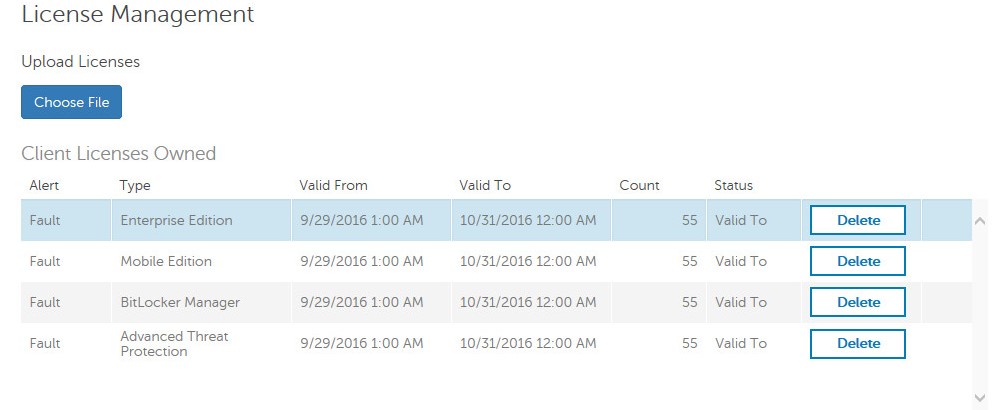
그림 3: (영어로만 제공) Dell Data Protection | Virtual Edition 라이선스 관리
일반적으로 Dell Data Protection | Virtual Edition 마이그레이션 프로세스가 작동하려면 WebUI에서 유효한 라이선스가 하나 이상 있어야 하고 만료되지 않아야 합니다.
지원 부서에 문의하려면 Dell Data Security 국제 지원 전화번호를 참조하십시오.
온라인으로 기술 지원 요청을 생성하려면 TechDirect로 이동하십시오.
추가 정보 및 리소스를 보려면 Dell 보안 커뮤니티 포럼에 참여하십시오.