Avamar: PDM ha esito negativo con "Bad Gateway" e "Java heap space" in AUI
Summary: In questo articolo viene illustrato un errore in Proxy Deployment Manager (PDM) causato da problemi di spazio nell'heap Java quando si utilizza l'interfaccia utente di Avamar (AUI).
This article applies to
This article does not apply to
This article is not tied to any specific product.
Not all product versions are identified in this article.
Symptoms
Durante la raccomandazione PDM, il seguente avviso viene visualizzato in AUI:
Error while submitting recommendations Handler dispatch failed, nested exception is java lang OutOfMemoryError: Java heap space Java heap space Internal exception.
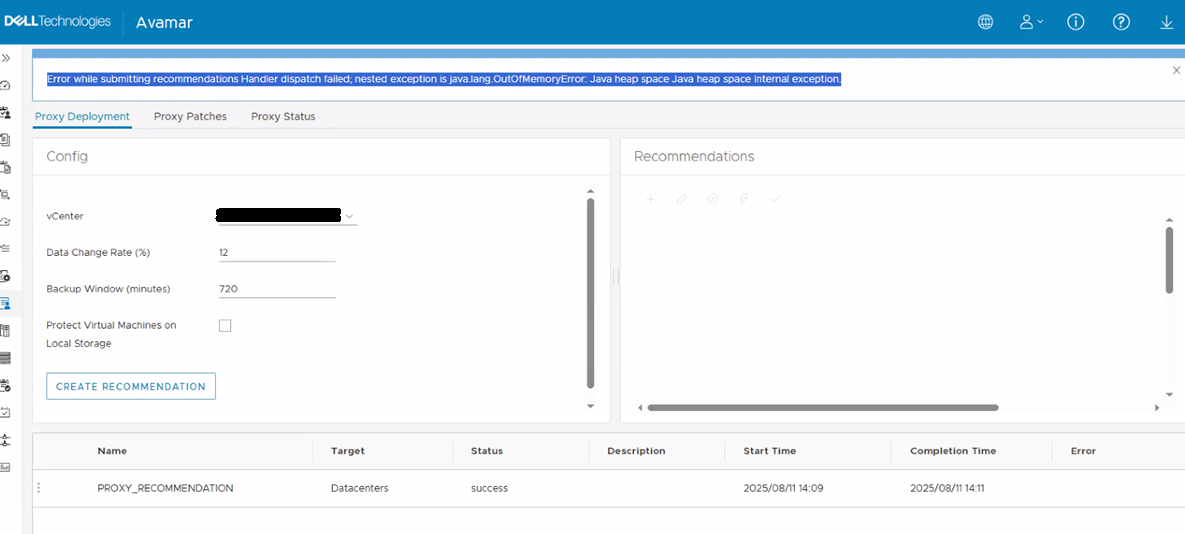
File di log /usr/local/avamar/var/mc/server_log/mc-rest-api.log Mostra:
INFO 24193 --- [http-nio-9000-exec-8] com.avamar.asn.security.LoginPrincipal   : Passed the isLoopbackAddress
WARN 24193 --- [http-nio-9000-exec-8] c.a.m.a.c.e.GlobalExceptionController    : Log exception stack:
org.springframework.web.util.NestedServletException: Handler dispatch failed; nested exception is java.lang.OutOfMemoryError: Java heap space
File di log /usr/local/avamar/var/log/vcs/deploymanager.log Mostra:
TRACE [cTaskExecutor-6][handler.RequestHandler#    handleMessage]: ReplyResponse [success=true, reason=null, statusCode=null]
ERROR [cTaskExecutor-6][SimpleMessageListenerContainer#run]: Consumer thread error, thread abort.
 java.lang.OutOfMemoryError: Java heap space
Cause
I processi Tomcat e API REST sono in esecuzione "OutOfMemoryError: Java heap space"
Resolution
Esiste una soluzione alternativa per aumentare l'heap Java e anche il timeout.
Per implementare la soluzione alternativa, contattare il Supporto Dell Avamar e fare riferimento a questo articolo della Knowledge Base. Il team di supporto illustra i passaggi necessari per applicare la soluzione alternativa.
Per implementare la soluzione alternativa, contattare il Supporto Dell Avamar e fare riferimento a questo articolo della Knowledge Base. Il team di supporto illustra i passaggi necessari per applicare la soluzione alternativa.
AVVERTENZA: Questa procedura richiede l'arresto e l'avvio di Management Console Service (MCS). Assicurarsi che vi sia uno svuotamento MCS valido e un checkpoint recente. L'Avamar Server deve essere inattivo.
Additional Information
Se è necessaria un'ulteriore procedura di risoluzione dei problemi, utilizzare lo script goav. Consultare l'articolo Avamar: Strumento prodotto GoAV per la gestione e la risoluzione dei problemi
./goav vcenter pdm managed
- Gives list of proxies with the PDM managedby extension configured on vCenter

./goav vcenter pdm proxy-add
- Proxy-add will associate manually deployed proxies with Proxy Deployment Manager

./goav vcenter pdm proxy-check
- Checks Proxy Configuration for PDM

./goav vcenter pdm recommendation
- Runnings PDM Proxy Recommendation against vCenter(s)

./goav vcenter pdm remove-pdm-task
- Removes any running/hung PDM recommendation task in vCenter
Affected Products
Avamar, Avamar Client for VMwareArticle Properties
Article Number: 000194353
Article Type: Solution
Last Modified: 02 Sept 2025
Version: 6
Find answers to your questions from other Dell users
Support Services
Check if your device is covered by Support Services.