PowerStore: Cluster Creation Failure Due to Leading Zero in IP Address
Summary: Initial configuration wizard (ICW) cluster creation fails if an IP address contains a leading zero in any octet.
This article applies to
This article does not apply to
This article is not tied to any specific product.
Not all product versions are identified in this article.
Symptoms
Cluster creation fails immediately after create cluster step.
No errors or warnings are displayed during the validation step.
Error message as seen from the PowerStore Initial configuration wizard (ICW):
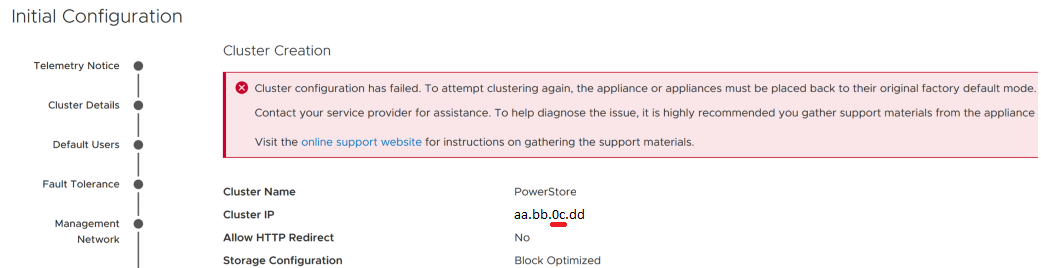
Figure 1: Error Message Received on Cluster Creation Failure
No errors or warnings are displayed during the validation step.
Error message as seen from the PowerStore Initial configuration wizard (ICW):
Figure 1: Error Message Received on Cluster Creation Failure
Cause
Cluster IP address with leading zero is not interpreted properly during cluster creation.
Resolution
See Dell article 180964 to Factory reset the appliance after this failure. Specify IP address without any leading zeros on the new ICW.
Affected Products
PowerStore 1000X, PowerStore 1000T, PowerStore 1200T, PowerStore 3000X, PowerStore 3200T, PowerStore 5000X, PowerStore 5000T, PowerStore 500T, PowerStore 5200T, PowerStore 7000TProducts
PowerStore 7000X, PowerStore 9000X, PowerStore 9000T, PowerStore 9200TArticle Properties
Article Number: 000213168
Article Type: Solution
Last Modified: 25 May 2023
Version: 2
Find answers to your questions from other Dell users
Support Services
Check if your device is covered by Support Services.