Dell Notebook or Desktop Video Shows a Square Artifact
Summary: This article gives you information about fixing your Dell laptop or desktop that shows a square artifact in the middle of your screen.
This article applies to
This article does not apply to
This article is not tied to any specific product.
Not all product versions are identified in this article.
Symptoms
A square artifact appears in the middle of your laptop LCD or monitor.
Cause
The cause of the video artifact has been traced to the presence of the Segurazo anti-virus.
Resolution
Video Has a Square Artifact
Dell laptops and desktops using Windows 10 may show a square artifact in the middle of the screen.
Solution
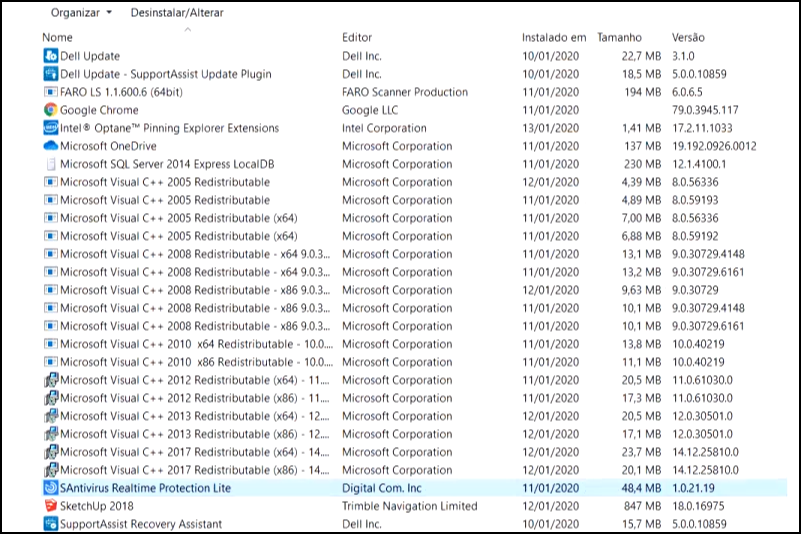
To correct this video issue, uninstall the Segurazo anti-virus app.
Note: Segurazo anti-virus may not be listed in Windows with that name, since it has been changed to S anti-virus. S anti-virus can be uninstalled to resolve this issue.
If your computer does not have Segurazo anti-virus installed, but has video issues. Use the following articles to troubleshoot the issue:
Affected Products
Inspiron, OptiPlex, Vostro, XPS, Inspiron, Latitude, Vostro, XPS, Fixed Workstations, Mobile WorkstationsArticle Properties
Article Number: 000127567
Article Type: Solution
Last Modified: 22 Jul 2025
Version: 7
Find answers to your questions from other Dell users
Support Services
Check if your device is covered by Support Services.