Solução de problemas de envio de fax
Summary: Siga as instruções para obter ajuda na resolução de problemas de envio de fax.
This article applies to
This article does not apply to
This article is not tied to any specific product.
Not all product versions are identified in this article.
Symptoms
Sumário:
Este artigo fornece informações sobre como resolver problemas de fax.
1. Solução de problemas de envio de fax
- Verifique o número do telefone.
- Quando é necessário discar 9 para fazer uma chamada telefônica, pode ser necessário discar 9 também para enviar um fax.
- Tente enviar um fax para outro aparelho de fax.
- Verifique se alguém está enviando um fax para o seu aparelho.
- Certifique-se de que seja um cabo telefônico de 4 linhas, não um cabo de telefone de 2 linhas.
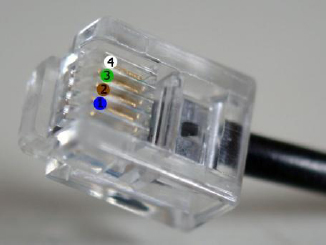
Figura 1: Cabo telefônico de 4 linhas
- Certifique-se de que está a ligar o cabo telefónico directamente da parede à impressora.
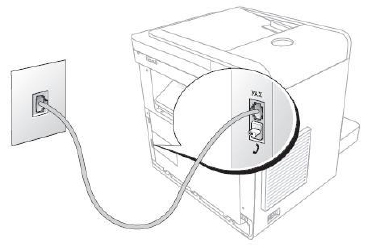
Figura 2: Linha telefônica conectada à parede e fax.
- Remova todas as secretárias eletrônicas, máquinas de cartão de crédito ou vários filtros da linha telefônica e tente enviar fax.
- Verifique o modo e o tipo de linha.
- Modo de fax: Atende a todas as chamadas feitas para esta linha (bom para uma linha dedicada)
- Modo de telefone: Só responde fax se você disser para (você faz isso pegando o aparelho conectado diretamente no aparelho de fax, e certifique-se de que On Hook Dial está ativado ou Yes, e quando você começar a ouvir tons, você pressione o botão Iniciar no Fax)
- Modo de fax/resposta: O aparelho de fax monitora a linha para ver se é um tom de fax, para saber se deve atendê-lo ou não, esse modo não funcionará se uma conexão de telefone serial for usada.
- DRPD (Detecção de Padrão de Anel Distinto): Tem que ser instalado pela empresa de telefonia, basicamente o Fax só vai pegar se receber o toque que está procurando.
2. Download e visualização dos manuais das impressoras
- Para obter mais etapas da solução de problemas, consulte o manual da impressora.
- Para obter informações adicionais sobre como acessar o manual da impressora, consulte a seção Download e exibição de manuais da impressora .
- Navegue até a página Dell Product Selector.
- Em Enter your Sevice Tag (Insira o rótulo de serviço), insira sua etiqueta de serviço da impressora para obter uma lista concisa de drivers e manuais para o seu modelo específico do produto. Clique em Submit para continuar.
Nota: Para obter informações sobre como localizar a etiqueta de serviço da impressora, consulte o artigo Como encontrar a etiqueta de serviço em uma impressora Dell da base de conhecimento Dell.Nota: Se a etiqueta de serviço não estiver disponível:
- Clique em Impressoras.
- Clique em Mono Laser Printers, Color Laser Printers ou All-in-One Inkjet Printers.
- Selecione o modelo da sua impressora (o número do modelo da impressora está localizado na parte frontal da impressora).
- Clique em Manuals.
- Clique no PDF à direita do manual desejado.
Nota:
- Se um ou mais manuais estiverem disponíveis em outros idiomas, será exibida a opção More Languages .
- Um leitor de PDF (Acrobat) está disponível gratuitamente no Adobe.
Cause
N/D
Resolution
N/D
Affected Products
MultiFunction Printers, Dell 5535dn Mono Laser MFP, Dell 810 All In One Inkjet Printer, Dell A920 All In One Personal Printer, Dell 922 All In One Photo Printer, Dell 924 All-in-One Photo Printer, Dell 926 All In One Inkjet Printer
, Dell 928 All In One Inkjet Printer, Dell A940 All In One Personal Printer, Dell 942 All In One Inkjet Printer, Dell 944 All In One Inkjet Printer, Dell 946 All In One Printer, Dell 948 All In One Printer, Dell 948w All In One Photo Printer, Dell A960 All In One Personal Printer, Dell 962 All In One Photo Printer, Dell 964 All In One Photo Printer, Dell 966 All In One Inkjet Printer, Dell 968 All In One Photo Printer, Dell 968w All In One Wireless Photo Printer, Dell B1265dnf Mono Laser Printer MFP, Dell B5465dnf Mono Laser Printer MFP, Dell C1765NF MFP Laser Printer, Dell C1765NFW MFP Laser Printer, Dell C5765DN MFP Color Laser Printer, Dell C7765DN MFP Color Laser Printer, Dell H625cdw Cloud MFP Laser Printer, Dell H815dw Cloud MFP Printer, Dell H825cdw Cloud MFP Laser Printer, Dell 1125 Mono Laser MFP, Dell P513w All In One Photo Printer, Dell P703w All In One Photo Printer, Dell P713w All In One Photo Printer, Dell S2815dn Smart MFP printer, Dell S2825cdn Smart MFP Laser Printer, Dell V105 All In One Inkjet Printer, Dell V305 All In One Inkjet Printer, Dell V305w All In One Wireless Inkjet Printer, Dell V313 All In One Inkjet Printer, Dell V313w All In One Wireless Inkjet Printer, Dell V505 All In One Inkjet Printer, Dell V505w All In One Wireless Inkjet Printer, Dell V515w All In One Wireless Inkjet Printer, Dell V525w All In One Wireless Inkjet Printer, Dell V715w All In One Wireless Inkjet Printer, Dell V725w All In One Wireless Inkjet Printer
...
Article Properties
Article Number: 000136002
Article Type: Solution
Last Modified: 30 Apr 2026
Version: 8
Find answers to your questions from other Dell users
Support Services
Check if your device is covered by Support Services.