解决传真问题
摘要: 按照说明获取解决传真问题的帮助。
本文章適用於
本文章不適用於
本文無關於任何特定產品。
本文未識別所有產品版本。
症狀
目录:
本文提供有关如何解决传真问题的信息。
1.解决传真问题
- 验证电话号码。
- 当需要拨打 9 拨打电话时,可能还需要拨打 9 才能发送传真。
- 尝试传真到另一台传真机。
- 请专人传真您的机器。
- 确保它是 4 线电话线,而不是 2 线电话线。
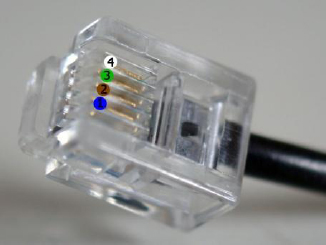
图 1:4 线电话线
- 确保将电话线直接从墙上插入打印机。
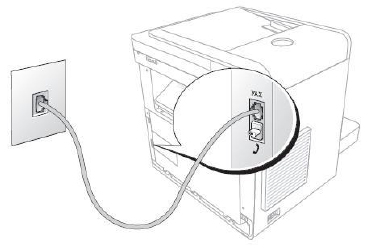
图 2:电话线连接到墙上和传真。
- 从电话线中删除所有应答机、信用卡机或多个过滤器,然后尝试传真。
- 验证线路类型和模式。
- 传真模式:应答此线路的所有呼叫(适用于专用线路)
- 电话模式:仅在您指示时才应答传真(您可以通过拿起直接挂在传真机上的听筒,并确保已启用挂机拨号或是,当您开始听到铃声时按传真上的开始按钮来执行此作)
- 应答/传真模式:传真机监视线路以查看是否为传真铃声,并知道是否应答,如果使用串行电话连接,此模式将不起作用。
- DRPD(区别环形图案检测):必须由电话公司安装,基本上,只有当传真机收到所需的铃声时,传真才会接听。
2.下载并查看打印机手册
- 有关其他故障诊断步骤,请参阅打印机手册。
- 有关访问打印机手册的更多信息,请参阅 下载并查看打印机手册 部分。
- 浏览至戴尔产品选择器页面。
- 在Enter your Service Tag(输入您的服务标签)下,输入打印机的服务标签,以便获得特定产品型号的驱动程序和手册简明列表。单击Submit(提交)以继续。
提醒:有关如何查找打印机服务编号的信息,请参阅戴尔知识库文章 如何在戴尔打印机上查找服务编号(英文版)。提醒:如果服务编号不可用:
- 单击Printers(打印机)。
- 单击单色激光打印机、彩色激光打印机或多功能一体喷墨打印机。
- 选择您的打印机型号(打印机型号位于打印机的前部)。
- 单击Manuals(手册)。
- 单击所需手册右侧的 PDF 。
提醒:
- 如果有一本或多本手册有其它语言版本,则会显示 “更多语言 ”选项。
- PDF阅读器(名为Acrobat)可免费从Adobe获得。
原因
N/A
解析度
N/A
受影響的產品
MultiFunction Printers, Dell 5535dn Mono Laser MFP, Dell 810 All In One Inkjet Printer, Dell A920 All In One Personal Printer, Dell 922 All In One Photo Printer, Dell 924 All-in-One Photo Printer, Dell 926 All In One Inkjet Printer
, Dell 928 All In One Inkjet Printer, Dell A940 All In One Personal Printer, Dell 942 All In One Inkjet Printer, Dell 944 All In One Inkjet Printer, Dell 946 All In One Printer, Dell 948 All In One Printer, Dell 948w All In One Photo Printer, Dell A960 All In One Personal Printer, Dell 962 All In One Photo Printer, Dell 964 All In One Photo Printer, Dell 966 All In One Inkjet Printer, Dell 968 All In One Photo Printer, Dell 968w All In One Wireless Photo Printer, Dell B1265dnf Mono Laser Printer MFP, Dell B5465dnf Mono Laser Printer MFP, Dell C1765NF MFP Laser Printer, Dell C1765NFW MFP Laser Printer, Dell C5765DN MFP Color Laser Printer, Dell C7765DN MFP Color Laser Printer, Dell H625cdw Cloud MFP Laser Printer, Dell H815dw Cloud MFP Printer, Dell H825cdw Cloud MFP Laser Printer, Dell 1125 Mono Laser MFP, Dell P513w All In One Photo Printer, Dell P703w All In One Photo Printer, Dell P713w All In One Photo Printer, Dell S2815dn Smart MFP printer, Dell S2825cdn Smart MFP Laser Printer, Dell V105 All In One Inkjet Printer, Dell V305 All In One Inkjet Printer, Dell V305w All In One Wireless Inkjet Printer, Dell V313 All In One Inkjet Printer, Dell V313w All In One Wireless Inkjet Printer, Dell V505 All In One Inkjet Printer, Dell V505w All In One Wireless Inkjet Printer, Dell V515w All In One Wireless Inkjet Printer, Dell V525w All In One Wireless Inkjet Printer, Dell V715w All In One Wireless Inkjet Printer, Dell V725w All In One Wireless Inkjet Printer
...
文章屬性
文章編號: 000136002
文章類型: Solution
上次修改時間: 30 Apr 2026
版本: 8
向其他 Dell 使用者尋求您問題的答案
支援服務
檢查您的裝置是否在支援服務的涵蓋範圍內。