更換硬碟後無法啟用 BitLocker
Summary: 更換硬碟後,BitLocker 可能無法啟用。
This article applies to
This article does not apply to
This article is not tied to any specific product.
Not all product versions are identified in this article.
Symptoms
如果您在啟用 BitLocker 的磁碟機上遇到硬碟故障,則在更換磁碟機後,您可以在新的作業系統期間啟用 BitLocker,而不會發生問題。
Cause
如果您因任何原因遇到電腦無法與可信賴平台模組 (TPM) 通訊的錯誤,您必須清除 TPM 晶片,然後設定 BitLocker。
Resolution
- 若要清除 TPM,請開機進入 BIOS,並找出使用 TPM 控制項的區域。(位於 TPM 的相同位置,但在 TPM 下可能有多種選項)

- 選擇清除 TPM,然後按一下是以從 TPM 移除所有金鑰。(TPM 必須保持作用中狀態)
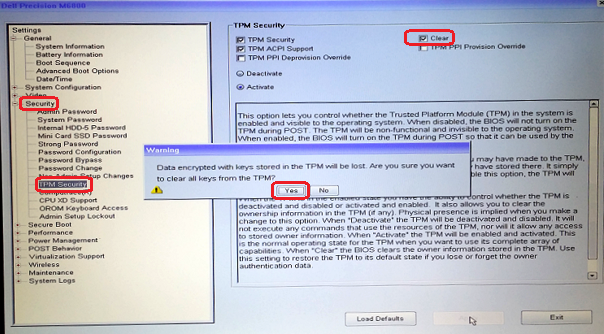
- 然後結束並再次重新開機至 BIOS,並確認 TPM 仍顯示為作用中。
- 結束並重新開機至作業系統,然後使用正常程序設定 BitLocker。
Affected Products
Desktops & All-in-Ones, Alienware, Dell All-in-One, Dell Pro All-in-One, Dell Pro Max Micro, Dell Pro Max Slim, Dell Pro Max Tower, Dell Pro Micro, Dell Pro Slim, Dell Pro Tower, Dell Slim, Dell Tower, Inspiron, Legacy Desktop Models, OptiPlex
, Vostro, XPS, G Series, G Series, Alienware, Dell Plus, Dell Pro, Dell Pro Max, Dell Pro Plus, Dell Pro Premium, Inspiron, Latitude, Dell Pro Rugged, Vostro, XPS, Legacy Laptop Models, Fixed Workstations, Mobile Workstations, Dell Pro Max Micro XE FCM2250, Dell Pro Max Slim XE FCS1250, Dell Pro Max Tower T2 XE FCT2250, Dell Pro Max 16 XE MC16250, Dell Pro Micro Plus XE QBM1250, Dell Pro Slim Plus XE5 QBS1250, Dell Pro Tower Plus XE5 QBT1250
...
Article Properties
Article Number: 000137422
Article Type: Solution
Last Modified: 13 May 2025
Version: 5
Find answers to your questions from other Dell users
Support Services
Check if your device is covered by Support Services.