Come ricevere l'audio dai monitor Dell Gaming e Alienware
Summary: Scopri perché l'audio non viene riprodotto da un monitor Dell Gaming o Alienware. Scopri come ricevere audio dai monitor Dell Gaming e Alienware.
This article applies to
This article does not apply to
This article is not tied to any specific product.
Not all product versions are identified in this article.
Symptoms
Cause
I monitor Dell Gaming e Alienware (ad eccezione del monitor Alienware 55 OLED AW5520QF) NON dispongono di altoparlanti integrati.
Resolution
Assenza di audio dai monitor Dell Gaming e Alienware
Per ricevere l'audio dai monitor Dell Gaming e Alienware (ad eccezione del monitor Alienware 55 OLED AW5520QF, sono necessarie cuffie o altoparlanti esterni).
- Collegare il computer al monitor tramite HDMI, DisplayPort (DP), USB Type-C e così via (qualsiasi porta disponibile).
Nota: se si clicca sull'icona dell'altoparlante nella barra delle applicazioni, viene visualizzato il monitor come dispositivo di riproduzione. Anche se il monitor appare come dispositivo di riproduzione, non viene emesso alcun suono dal monitor poiché NON dispone di altoparlanti.
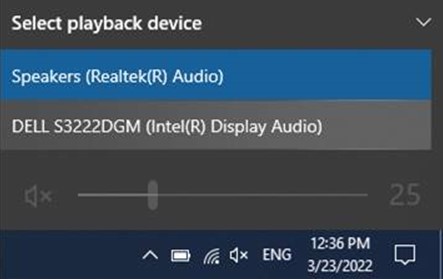
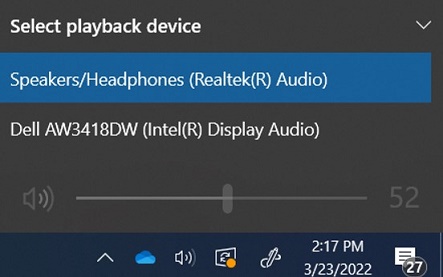
- Collegare le cuffia o un altoparlante esterno alla porta delle cuffie sul retro del monitor. Per ulteriori informazioni sulle porte, consultare la guida utente del monitor in uso.
Nota:
- alcuni monitor dispongono di porte separate per cuffie e altoparlanti. Consultare la guida utente del monitor in uso per identificare la porta corretta da utilizzare.
- Le barre audio Dell NON sono compatibili con i monitor Dell Gaming. Per ulteriori informazioni, consultare l'articolo: Le barre audio Dell non possono essere installate sui supporti per monitor Dell Gaming.
Per ulteriori informazioni sulla risoluzione dei problemi audio in Windows, consultare Risolvere i problemi audio in Windows 10
Per un elenco dei monitor Dell Gaming, consultare Domande frequenti sui monitor Dell Gaming e Alienware.
Affected Products
Alienware 25 Gaming Monitor AW2518H, Alienware 25 Gaming Monitor AW2518Hf, Alienware 34 Monitor AW3418DW, Alienware 34 Monitor AW3418HW, Alienware 34 Curved OLED Monitor AW3423DW, Alienware 25 Gaming Monitor AW2521H
, Alienware 25 Gaming Monitor AW2521HF, Alienware 25 Gaming Monitor AW2521HFA, Alienware 25 Gaming Monitor AW2521HFL, Alienware 25 Gaming Monitor AW2521HFLA, Alienware 27 Gaming Monitor AW2720HF, Alienware 27 Gaming Monitor AW2720HFA, Alienware 27 Gaming Monitor AW2721D, Alienware AW3420DW, Alienware 38 Curved Gaming Monitor AW3821DW, Alienware 55 OLED Monitor AW5520QF, Dell S2417DG, Dell S2419HGF, Dell Gaming S2421HGF, Dell 24 Curved Gaming Monitor S2422HG, Dell 25 Gaming Monitor S2522HG, Dell S2716DG, Dell S2719DGF, Dell 27 Gaming Monitor S2721DGF, Dell S2721DGFA, Dell Gaming S2721HGF, Dell 27 Curved Gaming Monitor S2722DGM, Dell S3220DGF, Dell 32 Curved Gaming Monitor S3222DGM, Dell 32 Curved Gaming Monitor S3222HG, Dell 34 Curved Gaming Monitor S3422DWG, Dell 24 Gaming Monitor G2422HS, Dell 27 Gaming Monitor G2722HS, Dell 27 Gaming Monitor G2723HN, Dell 32 Gaming Monitor G3223D, Dell 32 4K UHD Gaming Monitor G3223Q
...
Products
Alienware 34 Monitor AW3418DW, Alienware 34 Monitor AW3418HW, Alienware 34 Curved OLED Monitor AW3423DW, Alienware AW3420DW, Alienware 38 Curved Gaming Monitor AW3821DW, Alienware 55 OLED Monitor AW5520QF, Dell S2417DG, Dell S2419HGF
, Dell Gaming S2421HGF, Dell 24 Curved Gaming Monitor S2422HG, Dell 25 Gaming Monitor S2522HG, Dell S2716DG, Dell S2719DGF, Dell 27 Gaming Monitor S2721DGF, Dell S2721DGFA, Dell Gaming S2721HGF, Dell 27 Curved Gaming Monitor S2722DGM, Dell S3220DGF, Dell 32 Curved Gaming Monitor S3222DGM, Dell 32 Curved Gaming Monitor S3222HG, Dell 34 Curved Gaming Monitor S3422DWG, Dell 24 Gaming Monitor G2422HS, Dell 27 Gaming Monitor G2722HS, Dell 27 Gaming Monitor G2723HN, Dell 32 Gaming Monitor G3223D, Dell 32 4K UHD Gaming Monitor G3223Q
...
Article Properties
Article Number: 000197984
Article Type: Solution
Last Modified: 17 Oct 2025
Version: 9
Find answers to your questions from other Dell users
Support Services
Check if your device is covered by Support Services.