Windows Update KB5025885 Prevents Reinstallation of Microsoft Windows
摘要: Learn about the impact of KB5025885 on Windows Updates after May 09, 2023 that may prevent the booting of Microsoft Windows. Potential workarounds are also provided.
本文章適用於
本文章不適用於
本文無關於任何特定產品。
本文未識別所有產品版本。
症狀
Applies to: Windows client and server media
Beginning May 09, 2023, Microsoft began pushing monthly updates (Latest Cumulative Updates - LCUs) containing changes in accordance with KB5025885 to all impacted devices in the Initial Deployment Phase of this fix. These updates are critical or automatic, and Windows automatically consumes and installs the updates. The features that could cause breakage are deployed as disabled at this time.
There is no impact until Microsoft enters the Enforcement Phase or until the user enables the feature following all the mitigations in KB5025885. Only after the applying the third mitigation, all Operating System Reinstall (OSRI) media that have been created prior to the policy update becomes unbootable including:
- Recovery media and ISOs (including Dell SupportAssist OSRI, SupportAssist USB media, SupportAssist OS streaming through BIOSConnect)
- Windows backups created before the update were installed
- Windows Recovery
- Windows PE
- Push-Button Reset
- Windows Deployment Service (WDS)
- Microsoft Deployment Toolkit (MDT)
- HTTPS Boot
- Official Windows media from Microsoft
- Media Creation Tool
- Volume Licensing or Visual Studio subscription downloads
- USB Media
Dell is following the guidance of KB5025885 and is in the Evaluation and Deployment phases around the tools it owns in preparation for the Enforcement phase.
原因
For full mitigation, see Microsoft article: Microsoft Security Advisor KB5025885: How to manage the Windows Boot Manager revocations for Secure Boot changes associated with CVE-2023-24932

解析度
What happens when I do not update the policy?
Existing OSRI media and Windows Backups continue to work.
When are Dell and Microsoft providing updated OSRI images or media?
Dell is working on updating OSRI media. We update this article as we progress, and updated images become available.
Can I revert the policy update in order to use OSRI media and Windows Backups?
No.
Can I disable Secure Boot to use OSRI media?
Dell does not recommend reducing the security posture of a device. However, you could see the Recovery procedure in KB5025885 to enable booting external media.
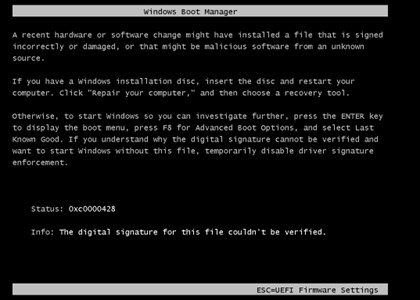
What error message do I see when the OSRI media fails to boot?
Windows Boot Manager may stop the boot process with error 0xC0000428: Windows cannot verify the digital signature when OSRI was performed from media.
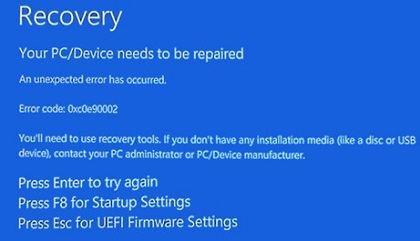
Windows may stop with error 0xC0e90002 when Windows Recovery (WinRE) is invoked.
How can I verify that the revocation was activated?
- Open Event Viewer.
- Windows versions with the Start menu:
- Choose Start Menu > Control Panel > Administrative Tools > Event Viewer.
- Windows versions with the Start screen:
- Open Search and type eventvwr to find the Event Viewer.
- Windows versions with the Start menu:
- Click Windows Logs.
- Click System.
- Click the Find button on the right side of the screen. A window opens.
- Type either Secure boot or dbx.
- If renovation is installed, it shows "Secure Boot Dbx update applied successfully." If not, then it is safe to do OSRI using your preferred method.
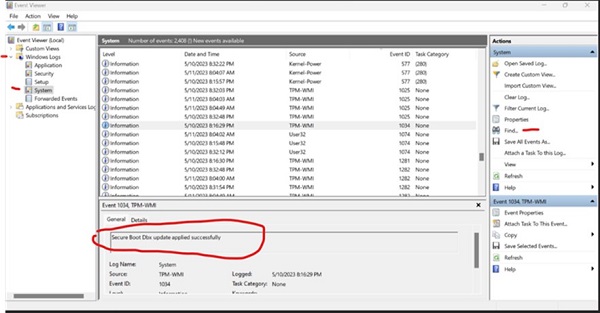
If the revocation is installed, operating system reinstall media may not work.
受影響的產品
Chromebox, Alienware, Dell Pro All-in-One, Dell Pro Max Micro, Dell Pro Max Slim, Dell Pro Max Tower, Dell Pro Micro, Dell Pro Slim, Dell Pro Tower, Dell Slim, Dell Tower, Inspiron, OptiPlex, Vostro, XPS, G Series, Chromebook, G Series, Alienware
, Dell Plus, Dell Pro, Dell Pro Max, Dell Pro Plus, Dell Pro Premium, Inspiron, Latitude, Dell Pro Rugged, Vostro, XPS, Fixed Workstations, Mobile Workstations
...
文章屬性
文章編號: 000213253
文章類型: Solution
上次修改時間: 31 Jul 2025
版本: 16
向其他 Dell 使用者尋求您問題的答案
支援服務
檢查您的裝置是否在支援服務的涵蓋範圍內。