无法完成戴尔计算机上预装的 Office 2021、2024 或 365 的初始激活
Summary: 了解如何成功完成 Office 2021、2024 或 365 的初始激活。
This article applies to
This article does not apply to
This article is not tied to any specific product.
Not all product versions are identified in this article.
Symptoms
Office 用户可能会报告他们无法完成初始激活。系统可能会提示他们输入产品密钥,但如果购买的 Office 是数字许可版本,戴尔不提供任何产品密钥。在初始激活期间,Office 软件的数字许可版本不需要任何产品密钥。
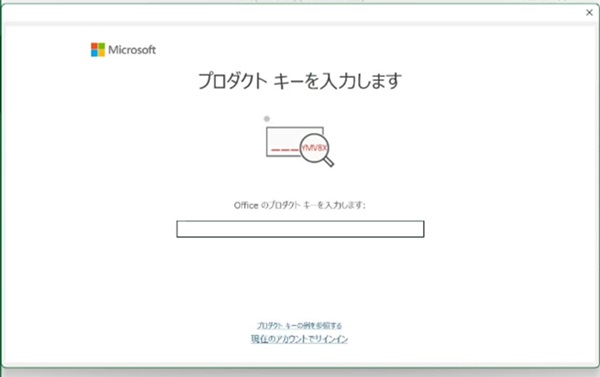
受影响的软件:
- Office 2021
- Office 2024
- Office 365
Cause
由于 Office 安装程序不会检测到与计算机关联的许可证,因此可能会因密钥而升级它们。
Resolution
解决方法 1:使用 Microsoft 修复它。
- 下载 Microsoft FixIt 工具 。
- 解压下载的 cssemerg97275.zip 文件。
- 双击 cssemerg97275.diagcab。
- 当您看到“进行故障处理并帮助预防计算机问题”时,请单击 “下一步 ”。
- 当您看到“查找新问题 97275 的修复或解决方法”时,单击 下一步 。
- 系统会自动检测并修复该问题。
- 看到结果时 ,单击关闭疑难解答 。如果问题仍然存在,请转到下一个解决方法。
解决方法 2:卸载并重新安装 Microsoft Office,然后完成 Office 激活。
- 按照以下步骤卸载 Office:
- 按照以下步骤重新安装 Office:
- 对于 Inspiron、XPS、Alienware 用户:在 PC 或 Mac 上下载并安装或重新安装 Microsoft 365 或 Office 2021
- 对于 Vostro 成就、Latitude、OptiPlex 和 Precision 用户:从 Microsoft Store 应用程序重新安装 Office
- 对于 Inspiron、XPS、Alienware 用户:在 PC 或 Mac 上下载并安装或重新安装 Microsoft 365 或 Office 2021
- 按照以下步骤激活 Office:

Affected Products
Alienware, Inspiron, OptiPlex, Vostro, XPS, G Series, G Series, Alienware, Inspiron, Latitude, Vostro, XPS, Fixed Workstations, Mobile WorkstationsArticle Properties
Article Number: 000224996
Article Type: Solution
Last Modified: 10 Sept 2025
Version: 12
Find answers to your questions from other Dell users
Support Services
Check if your device is covered by Support Services.