Dell APEX Cloud Platform for Microsoft Azure: How to manually patch iSM security hotfix after LCM to 01.03.x.x release
Summary: There's a security issue with iSM software version 5.3.1.0. A hotfix is provided to patch this issue. Users will need to manually apply the hotfix to mitigate this issue. A patch package is provided to install iSM hotfix on all cluster nodes. ...
This article applies to
This article does not apply to
This article is not tied to any specific product.
Not all product versions are identified in this article.
Instructions
Note: The following steps can be done on one of the cluster nodes after LCM to 01.03.x.x release.
Step 1. Download the patch in this KB and upload to one of the cluster's nodes:
- Download patch zip file <attached to this KB>
- The patch can be uploaded to any location on the cluster node, eg. C:\Dell\Payload\Software
Step 2. Extract the zip package:
- Login to the node and navigate to the directory that the patch file was copied to:
#Expand-Archive kb_000228884_prm.zip -DestinationPath C:\Dell\Payload\Software
Step 3. Execute the script
- Move to the destination path from last step:
#cd C:\Dell\Payload\Software
- Execute script
#./kb_000228884.ps1
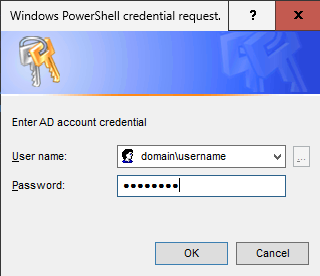
After running,the user will be prompted with the AD credential for cluster node, please enter the correct AD credential for script execution.
Step 4. Troubleshooting
If the script execution is successful, user would get output like the following:
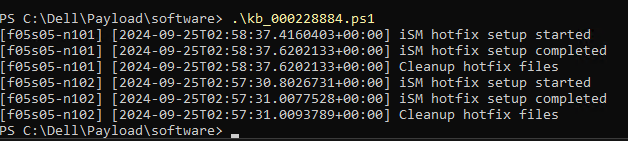
Note: If you find the following error messages, it means the patch is not successfully applied.

For the error below, please make sure the correct AD account was used to log in.

Should you encounter any issues while running this script, please engage Dell Support team for additional analysis.
The script logging file can be found under path: C:\Dell\Payload\Log\ism-hotfix.log, please collect log bundle as well.
Affected Products
APEX Cloud Platform for Microsoft AzureArticle Properties
Article Number: 000228884
Article Type: How To
Last Modified: 05 Mar 2026
Version: 2
Find answers to your questions from other Dell users
Support Services
Check if your device is covered by Support Services.