OptiPlex 5070: Visuele handleiding voor uw computers
Summary: Dit artikel is een visuele handleiding voor de externe poorten en functies op de verschillende vormfactoren van de Dell OptiPlex 5070 desktopserie.
This article applies to
This article does not apply to
This article is not tied to any specific product.
Not all product versions are identified in this article.
Symptoms
Het volgende artikel biedt een visuele handleiding voor uw OptiPlex 5070 computer en een overzicht van de externe poorten en functies van uw pc.
 Opmerking: Een meer gedetailleerde beschrijving van elke locatie kunt u vinden in de systeemhandleidingen op www.dell.com/support
Inhoudsopgave:
- Vooraanzicht minitower (MT)
- Achteraanzicht minitower (MT)
- Vooraanzicht Small Form Factor (SFF)
- Achteraanzicht Small Form Factor (SFF)
- Vooraanzicht Micro Form Factor (MFF)
- Achteraanzicht Micro Form Factor (MFF)
- Aanvullende info:
Vooraanzicht minitower (MT)
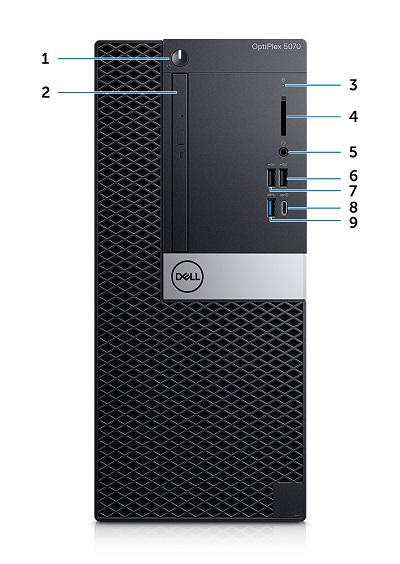
(Afb.1 Vooraanzicht MT)
| 1 | Aan/uit-knop en voedings-LED | 2 | Optisch station (optioneel) |
| 3 | Activiteitslampje van harde schijf | 4 | Geheugenkaartlezer (optioneel) |
| 5 | Headset / universele audio-connector | 6 | USB 2.0-connector met PowerShare |
| 7 | USB 2.0-connector | 8 | USB 3.1 Gen2 Type-C aansluiting met PowerShare |
| 9 | USB 3.1 Gen1 Type-A-connector |
Achteraanzicht minitower (MT)
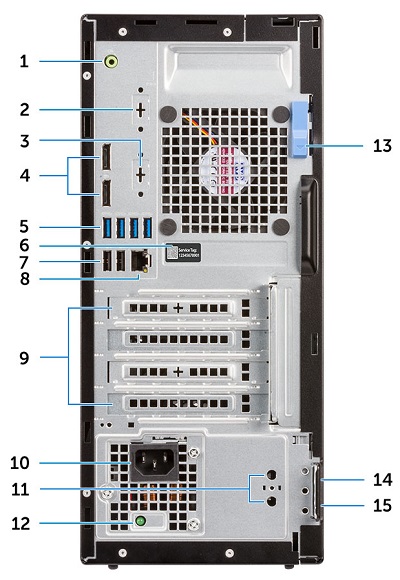
(Afb. 2 Achteraanzicht MT)
| 1 | Lijnuitgang-audioconnector | 2 | Seriële connector (optioneel) |
| 3 | DisplayPort/HDMI 2.0b/VGA/USB Type-C Alt-Mode (optioneel) | 4 | DisplayPort-connector x 2 |
| 5 | USB 3.1 Gen1 Type-A-connector x 4 | 6 | Servicetag |
| 7 | USB 2.0 Type-A-connector x 2 (ondersteunt SmartPower On) | 8 | NIC Ethernet-connector |
| 9 | Slots voor uitbreidingskaarten x 4 | 10 | Voedingsconnector |
| 11 | Externe SMA-antenneconnectoren (optioneel) | 12 | Diagnostisch lampje voor de voeding |
| 13 | Ontgrendeling | 14 | Slot voor Kensington-beveiligingskabel |
| 15 | Hangslotbeugel |
Vooraanzicht Small Form Factor (SFF)
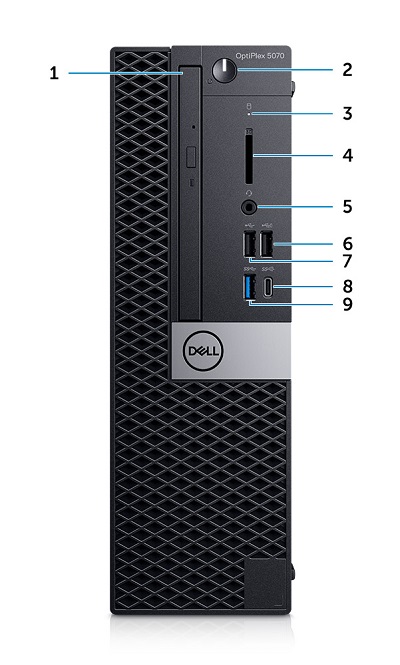
(Afb. 3 Vooraanzicht van SFF)
| 1 | Optisch station (optioneel) | 2 | Aan/uit-knop en voedings-LED |
| 3 | Activiteitslampje van harde schijf | 4 | Geheugenkaartlezer (optioneel) |
| 5 | Headset / universele audio-connector | 6 | USB 2.0-connector met PowerShare |
| 7 | USB 2.0-connector | 8 | USB 3.1 Gen2 Type-C aansluiting met PowerShare |
| 9 | USB 3.1 Gen1 Type-A-connector |
Achteraanzicht Small Form Factor (SFF)
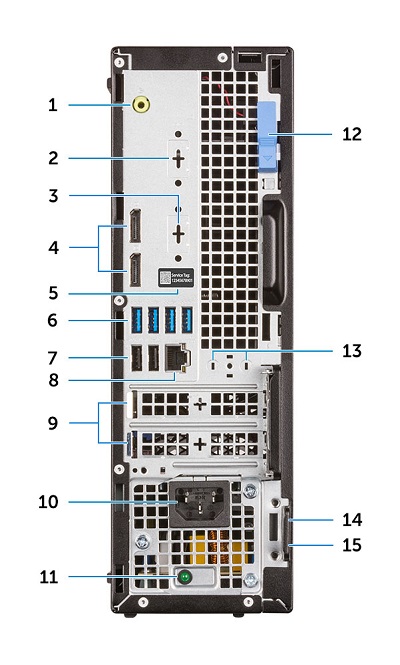
(Afb. 4 Achteraanzicht SFF)
| 1 | Lijnuitgang-audioconnector | 2 | Seriële connector (optioneel) |
| 3 | DisplayPort/HDMI 2.0b/VGA/USB Type-C Alt-Mode (optioneel) | 4 | DisplayPort-connector x 2 |
| 5 | Servicetag | 6 | USB 3.1 Gen1 Type-A-connector x 4 |
| 7 | USB 2.0-connector x 2 (ondersteunt SmartPower On) | 8 | NIC Ethernet-connector |
| 9 | Slots voor uitbreidingskaarten x 2 | 10 | Voedingsconnector |
| 11 | Diagnostisch lampje voor de voeding | 12 | Ontgrendeling |
| 13 | Externe SMA-antenneconnectoren (optioneel) | 14 | Slot voor Kensington-beveiligingskabel |
| 15 | Hangslotbeugel |
Vooraanzicht Micro Form Factor (MFF)
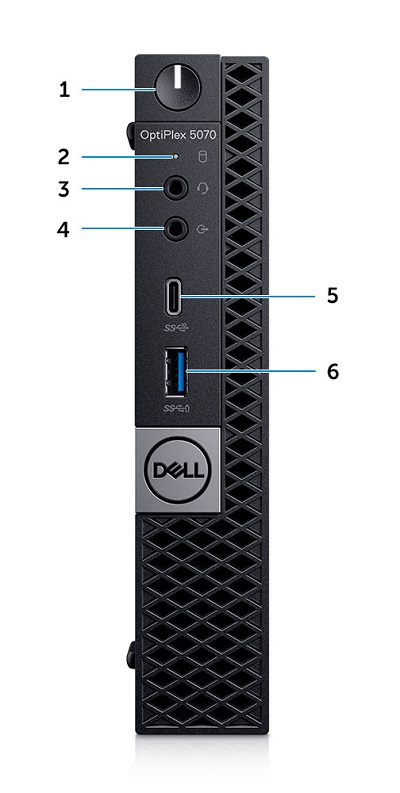
(Fig. 5 Vooraanzicht MFF)
| 1 | Aan/uit-knop en voedings-LED | 2 | Activiteitslampje van harde schijf |
| 3 | Headset / universele audio-connector | 4 | Lijnuitgang-aansluiting |
| 5 | USB 3.1 Gen2 Type-C aansluiting met PowerShare | 6 | USB 3.1 Gen1 Type-A-connector met PowerShare |
Achteraanzicht Micro Form Factor (MFF)
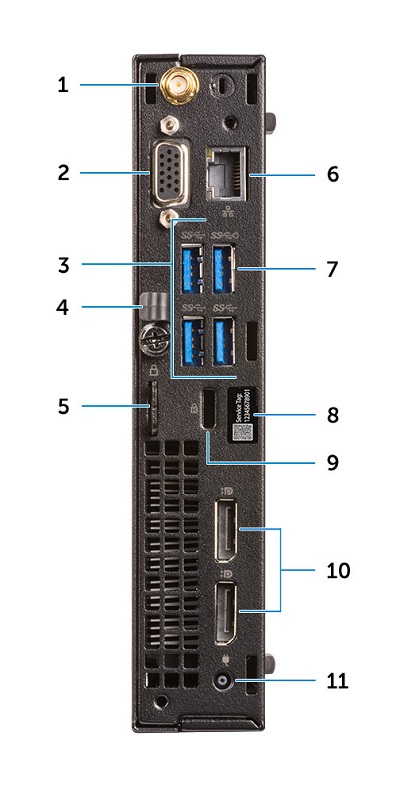
(Fig. 6 Achteraanzicht MFF)
| 1 | Externe SMA-antenneconnectoren (optioneel) | 2 | DisplayPort/HDMI 2.0b/VGA/USB Type-C Alt-Mode (optioneel) |
| 3 | USB 3.1 Gen1 Type-A-connector x 3 | 4 | Kabelhouder |
| 5 | Hangslotbeugel | 6 | NIC Ethernet-connector |
| 7 | USB 3.1 Gen1 Type-A-connector met SmartPower On | 8 | Servicetag |
| 9 | Slot voor Kensington-beveiligingskabel | 10 | DisplayPort-connector x 2 |
| 11 | Connector van de voedingsadapter |
Aanvullende info:
- OptiPlex 5070 Mini Tower (MT) handleiding
- OptiPlex 5070 kleine vormfactor (SFF) handleiding
- OptiPlex 5070 Micro Form Factor (MFF) handleiding
- OptiPlex 5070 demontage-index van door de klant zelf te vervangen onderdelen
Cause
N.v.t.
Resolution
N.v.t.
Affected Products
OptiPlex 5070 Tower, OptiPlex 5070 Micro, OptiPlex 5070 Small Form FactorArticle Properties
Article Number: 000123887
Article Type: Solution
Last Modified: 12 Jun 2025
Version: 7
Find answers to your questions from other Dell users
Support Services
Check if your device is covered by Support Services.