Dell U4924DW Monitor has No Video when Connected Using a USB Type-C Cable
Summary: If a customer has their computer connected to the Dell U4924DW monitor using a USB Type-C cable, they may experience a no video issue.
This article applies to
This article does not apply to
This article is not tied to any specific product.
Not all product versions are identified in this article.
Symptoms
Affected Products:
- Dell U4924DW Monitor
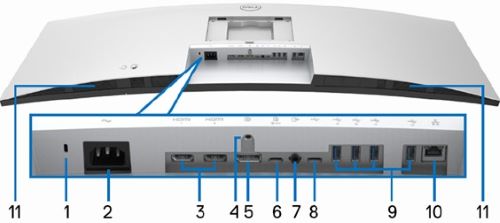
A user may experience a no video issue when they connect the USB Type-C cable to the Type-C upstream port (data only).
Cause
The cause of this may be that the monitor is connected to wrong port.
Resolution
Ask the user to insert the USB Type-C cable into port 6 the upstream port (video and data). Port 8 is data only and port 2 is a downstream port.
Affected Products
Dell U4924DWArticle Properties
Article Number: 000217459
Article Type: Solution
Last Modified: 22 Apr 2025
Version: 5
Find answers to your questions from other Dell users
Support Services
Check if your device is covered by Support Services.