AppSync: Explanation of Recipient email address specified in the AppSync Server Settings page.
This article applies to
This article does not apply to
This article is not tied to any specific product.
Not all product versions are identified in this article.
Instructions
With respect to the Send Mail section of the AppSync Server Settings as seen here:
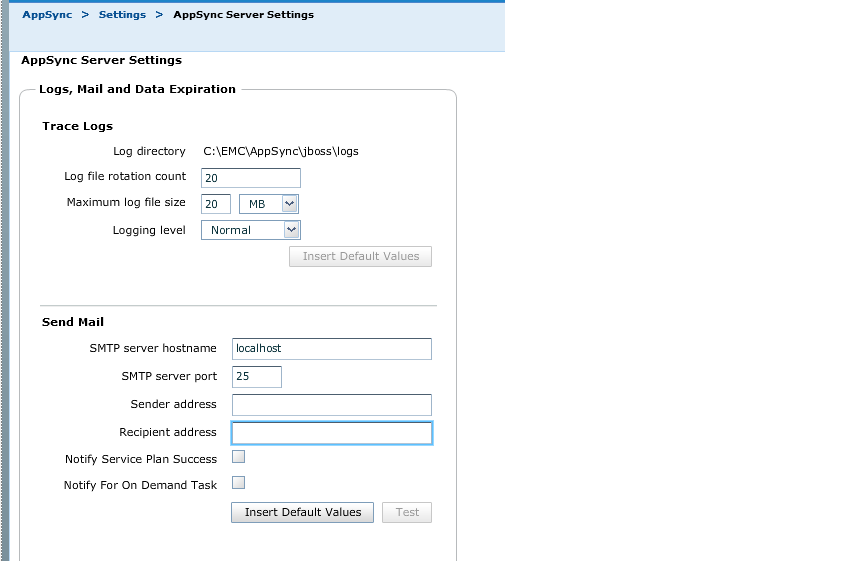
The Recipient address is the email address that ONLY license alerts will be sent to, as noted on page 277 of the AppSync Users Guide.
Successful or failed protection related alerts will NOT be sent to the email address specified in the Recipient address in the send mail section of the AppSync Server Settings page.
Successful or failed protection related alerts can be sent to recipients specified in the Copy Management section for the Source entity of the AppSync console.
These emails are sent at a database or entity level as specified in the Copy Management section of the AppSync console for the Source host.
By default, the entity level emails are sent for failed scheduled protection events only. Enabling the checkbox "Notify Service Plan Success" and "Notify for On Demand Tasks" need to be checked for the email recipient specified in the Copy Management section of the AppSync Console to receive emails for Successful and On Demand related protection events. These emails will be sent at the entity level as seen in Copy Management section for the source entity of the AppSync GUI.
For example: if 5 source databases are subscribed to a service plan, an email will be sent for each of the 5 databases as specified in the Copy Management section for the source databases of the AppSync GUI.
The Recipient address is the email address that ONLY license alerts will be sent to, as noted on page 277 of the AppSync Users Guide.
Successful or failed protection related alerts will NOT be sent to the email address specified in the Recipient address in the send mail section of the AppSync Server Settings page.
Successful or failed protection related alerts can be sent to recipients specified in the Copy Management section for the Source entity of the AppSync console.
These emails are sent at a database or entity level as specified in the Copy Management section of the AppSync console for the Source host.
By default, the entity level emails are sent for failed scheduled protection events only. Enabling the checkbox "Notify Service Plan Success" and "Notify for On Demand Tasks" need to be checked for the email recipient specified in the Copy Management section of the AppSync Console to receive emails for Successful and On Demand related protection events. These emails will be sent at the entity level as seen in Copy Management section for the source entity of the AppSync GUI.
For example: if 5 source databases are subscribed to a service plan, an email will be sent for each of the 5 databases as specified in the Copy Management section for the source databases of the AppSync GUI.
Affected Products
AppSyncArticle Properties
Article Number: 000019729
Article Type: How To
Last Modified: 18 Sept 2025
Version: 3
Find answers to your questions from other Dell users
Support Services
Check if your device is covered by Support Services.