Avamar Exchange 失敗並顯示錯誤:avexvss:物件參考未設定為物件的實體
Summary: Avamar Exchange 備份失敗並顯示錯誤:avexvss 錯誤 <0000>:物件引用未設置為對象的實例。
This article applies to
This article does not apply to
This article is not tied to any specific product.
Not all product versions are identified in this article.
Symptoms
Avamar Exchange DAG 備份失敗會列出下列錯誤:
avexvss Error <0000>: Object reference not set to an instance of an object.
avexvss Error <0000>:    at ps_calls.is_db_mounted_by_guid(String msg_parms)
avexvss Error <13247>: Failed to execute PowerShell command: Get-MailboxDatabase XXXXXXX-XXXXXXX-XXXXXXXXX-XXXXXXX
Cause
自 Avamar 版本 7 起,系統已導入新的驗證,可在備份/還原開始前,檢查 Exchange “AvamarBackupUser” 帳戶群組中是否加入 Active Directory。
此備份失敗似乎是因為特定環境中的驗證檢查發生問題所造成 (可能是緩慢的 AD)。
數據集中的憑據不正確。
Resolution
應移除登入資料集選項中的登入資料。當服務帳戶以「AvamarBackupUser」服務帳戶或客戶服務帳戶執行,而非以「本機系統」帳戶執行時,應執行此操作。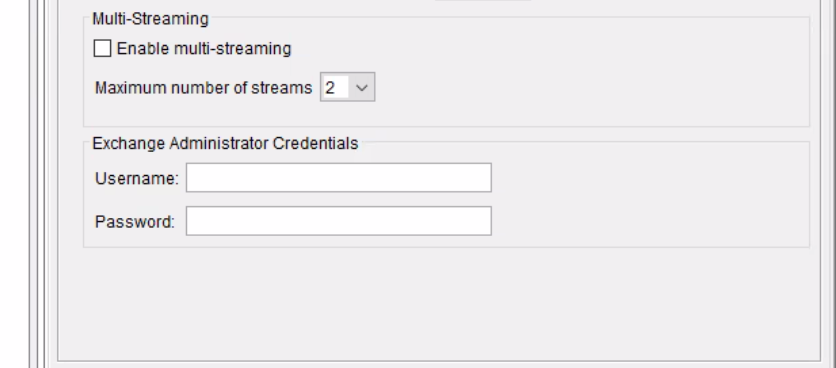
如果以「Local System」帳戶執行請仔細檢查資料集中定義的帳戶和密碼
可以將驗證檢查略過,avexvss.cmd標誌“disable-member-check”設置為“true”。
如果已使用「Avamar Exchange 備份使用者組態工具」正確設定備份帳戶,則備份或還原應不會發生其他問題。
若要應用標誌,請按照以下過程操作:
- 瀏覽至「Avamar DAG」共用 var 資料夾
- 使用記事本編輯檔案avexvss.cmd。
- 添加以下標誌。
--disable-membership-check=true
- 儲存並關閉檔案。
- 流覽到每個 Exchange 節點上的本地 var 資料夾,如果檔案尚不存在,請創建檔avexvss.cmd,並添加相同的標誌。
- 再次執行備份。
如果問題仍然存在,請向支援部門開立服務要求,並引述此 KB 號碼:528519
Affected Products
Avamar, Avamar Plug-in for Exchange VSSProducts
Avamar, Avamar Plug-in for Exchange VSS, Avamar ServerArticle Properties
Article Number: 000064724
Article Type: Solution
Last Modified: 23 Sept 2024
Version: 4
Find answers to your questions from other Dell users
Support Services
Check if your device is covered by Support Services.