DPA: 오류 메시지 '오류 401: UI에 Unauthorized Action'이 표시됨
Summary: 사용자가 몇 시간 동안 로그인 상태를 유지한 후 DPA(Data Protection Advisor) UI에 401 권한 없는 작업 오류가 나타납니다. 비활성 상태로 인해 세션이 자동으로 닫히기 때문에 발생합니다.
This article applies to
This article does not apply to
This article is not tied to any specific product.
Not all product versions are identified in this article.
Symptoms
DPA UI에 오류 메시지가 표시되면 다시 로그인해야 합니다.
Error 401: Unauthorized Action Cause
이 오류는 사용자가 한 번에 몇 시간 동안 DPA UI에 로그인되어 있고 비활성 또는 다른 환경 요인으로 인해 열려 있는 세션이 닫히는 경우에 발생합니다.
Resolution
이 오류는 DPA 기능에 영향을 주지 않으므로 무시해도 됩니다.
사용자는 DPA에 다시 로그인하여 정상적으로 계속할 수 있습니다.
특정 기간 후에 완전히 로그오프하도록 UI에서 다음 설정을 구성할 수 있습니다.
AdministrationUser > & SecuritySecurity > Settings
세션 만료 매개변수는 6시간 동안 예시로 설정할 수 있습니다(기본값은 off).
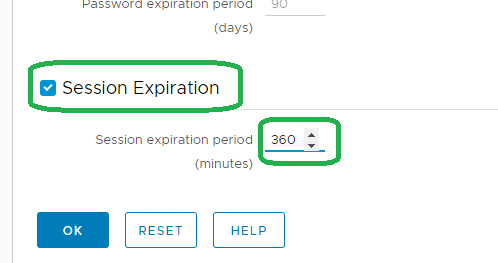
참고: 위의 기능은 18.2에서 도입되었습니다.
자세한 내용은 지원 부서에 문의하십시오.
자세한 내용은 지원 부서에 문의하십시오.
Affected Products
Data Protection AdvisorProducts
Data Protection AdvisorArticle Properties
Article Number: 000173588
Article Type: Solution
Last Modified: 10 Jun 2026
Version: 5
Find answers to your questions from other Dell users
Support Services
Check if your device is covered by Support Services.