PowerFlex Management Platform - Journal Capacity modify 버튼이 회색으로 표시됨
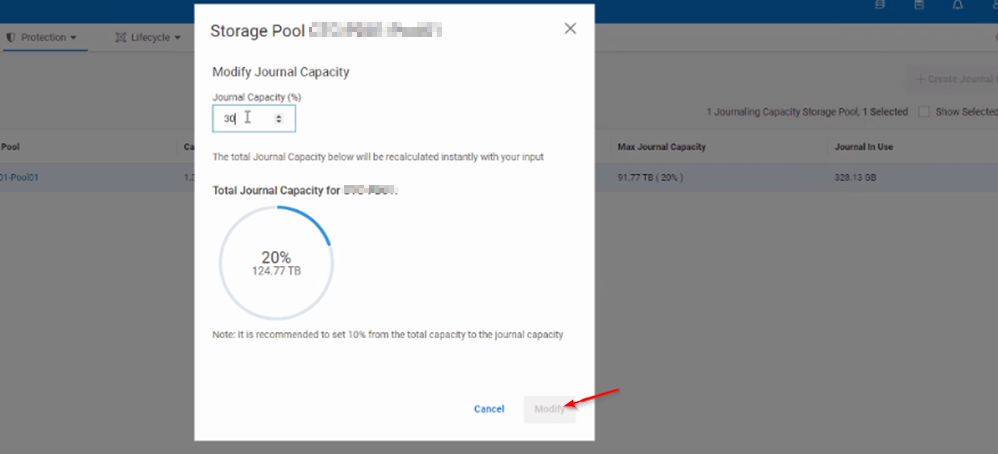
Summary: SP(Storage Pool) 저널 용량을 변경하려고 하면 버튼이 회색으로 표시되고 클릭할 수 없습니다.
This article applies to
This article does not apply to
This article is not tied to any specific product.
Not all product versions are identified in this article.
Symptoms
SP의 저널 용량을 늘리거나 줄이려고 할 때 버튼은 클릭할 수 없고 회색으로 표시됩니다.
Cause
UI 문제.
복제 트래픽이 실행되고 스토리지 풀 세부 정보가 새로 고쳐지면 버튼을 클릭할 수 있게 됩니다.
Resolution
이 문제를 해결하기 위해 사용자는 백그라운드에서 복제 트래픽을 실행하고 Journal Capacity에 필요한 사항을 변경한 다음 Modify를 클릭하면 됩니다.
또는 운영 MDM에서 SCLI 명령을 실행하여 저널 용량을 수동으로 변경할 수 있습니다.
scli --set_replication_journal_capacity --protection_domain_name <PD> --storage_pool_name <POOL> --replication_journal_capacity_max_ratio <value>
Affected Products
PowerFlex rack RCM SoftwareArticle Properties
Article Number: 000264751
Article Type: Solution
Last Modified: 15 May 2026
Version: 4
Find answers to your questions from other Dell users
Support Services
Check if your device is covered by Support Services.