PowerFlex 管理平台 - 日誌容量修改按鈕會呈現灰色
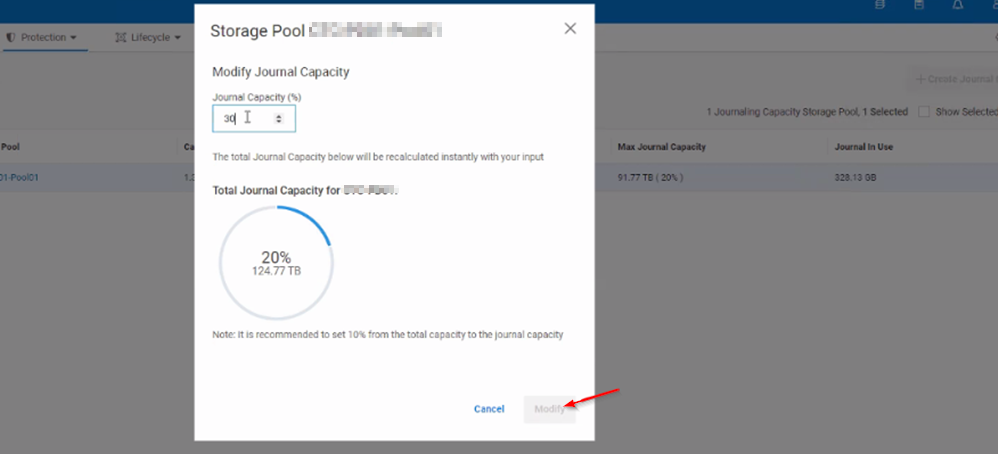
Summary: 嘗試變更儲存集區 (SP) 日誌容量時,該按鈕會呈現灰色,無法按取。
This article applies to
This article does not apply to
This article is not tied to any specific product.
Not all product versions are identified in this article.
Symptoms
嘗試增加或減少 SP 的日誌容量時,該按鈕仍會保持無法按取且顯示為灰色。
Cause
UI 問題。
當複製流量運行且存儲池詳細資訊刷新時,該按鈕變為可按兩下。
Resolution
若要解決此問題,使用者可以在背景執行複寫流量、對日誌容量進行所需的變更,然後按一下修改。
或者,可在主要 MDM 上執行 SCLI 命令,手動變更日誌容量:
scli --set_replication_journal_capacity --protection_domain_name <PD> --storage_pool_name <POOL> --replication_journal_capacity_max_ratio <value>
Affected Products
PowerFlex rack RCM SoftwareArticle Properties
Article Number: 000264751
Article Type: Solution
Last Modified: 15 May 2026
Version: 4
Find answers to your questions from other Dell users
Support Services
Check if your device is covered by Support Services.