PowerFlex 管理平台 — 日志容量修改按钮灰显
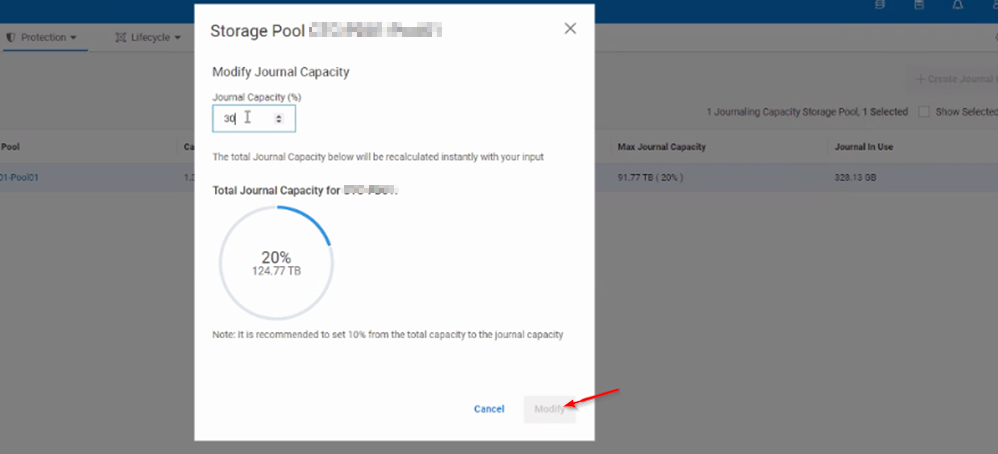
Summary: 尝试更改存储池 (SP) 日志容量时,该按钮呈灰色显示且无法单击。
This article applies to
This article does not apply to
This article is not tied to any specific product.
Not all product versions are identified in this article.
Symptoms
尝试增加或减少 SP 的日志容量时,该按钮仍不可单击且呈灰显。
Cause
UI 问题。
当复制流量运行且存储池详细信息刷新时,该按钮将变为可单击状态。
Resolution
要解决此问题,用户可以在后台运行复制流量,对日志容量进行必要的更改,然后单击“Modify”。
或者,可以通过在主 MDM 上运行 SCLI 命令来手动更改日志容量:
scli --set_replication_journal_capacity --protection_domain_name <PD> --storage_pool_name <POOL> --replication_journal_capacity_max_ratio <value>
Affected Products
PowerFlex rack RCM SoftwareArticle Properties
Article Number: 000264751
Article Type: Solution
Last Modified: 15 May 2026
Version: 4
Find answers to your questions from other Dell users
Support Services
Check if your device is covered by Support Services.