NVP vProxy: VM restores successfully but is missing disks
Summary: A NetWorker VMware Protection (NVP) restore is performed. The recovery completes successfully; however, the recovered Virtual Machine (VM) is missing disks.
Symptoms
The VM restore session completes successfully without any warnings.
The recovered VM is missing disks resulting in missing data or failure to power on.
The original VM contains "Independent" disks.
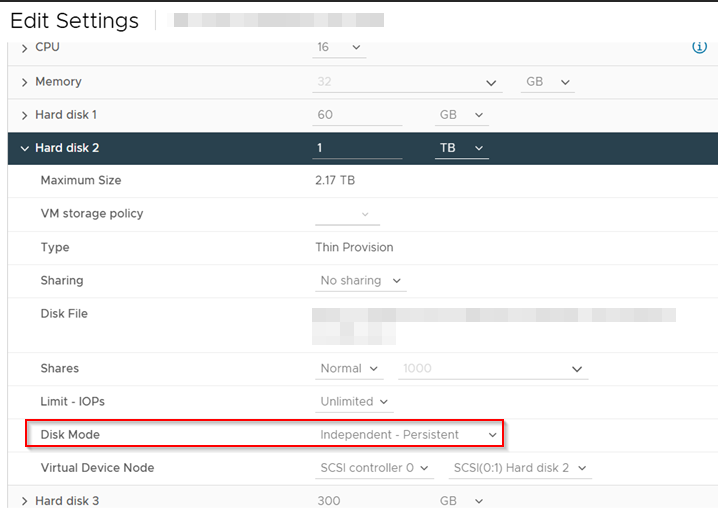
During the backups of the original VM, the Independent disk is ignored.
YYYY-MM-DDTHH:mm:SS INFO:   [177]     "VmSpec": {
YYYY-MM-DDTHH:mm:SS INFO:   [177]       "Name": "MY_VM",
YYYY-MM-DDTHH:mm:SS INFO:   [177]       "VmMoref": "vm-491157",
YYYY-MM-DDTHH:mm:SS INFO:   [177]       "VirtualDisks": [
YYYY-MM-DDTHH:mm:SS INFO:   [177]         {
YYYY-MM-DDTHH:mm:SS INFO:   [177]           "Label": "Hard disk 1",
YYYY-MM-DDTHH:mm:SS INFO:   [177]           "Key": 2000
YYYY-MM-DDTHH:mm:SS INFO:   [177]         },
YYYY-MM-DDTHH:mm:SS INFO:   [177]         {
YYYY-MM-DDTHH:mm:SS INFO:   [177]           "Label": "Hard disk 3",
YYYY-MM-DDTHH:mm:SS INFO:   [177]           "Key": 2002
YYYY-MM-DDTHH:mm:SS INFO:   [177]         }
YYYY-MM-DDTHH:mm:SS INFO:   [177]       ],
YYYY-MM-DDTHH:mm:SS INFO:   [177]       "IndependentDisks": [
YYYY-MM-DDTHH:mm:SS INFO:   [177]         {
YYYY-MM-DDTHH:mm:SS INFO:   [177]           "Label": "Hard disk 2",
YYYY-MM-DDTHH:mm:SS INFO:   [177]           "Key": 2001
YYYY-MM-DDTHH:mm:SS INFO:   [177]         }
YYYY-MM-DDTHH:mm:SS INFO:   [177]       ],
...
YYYY-MM-DDTHH:mm:SS INFO:   [177] DiskStats: Disk Label    |  Mode  | Bytes Moved |  Read Rate   |  Write Rate  |     Overhead  |   VDDK Wait   |   Total Time  | VM MORef  | VM Name
YYYY-MM-DDTHH:mm:SS INFO:   [177] DiskStats: ------------- | ------ | ----------- | ------------ | ------------ | ------------- | ------------- | ------------- | --------- | ------------------------------
YYYY-MM-DDTHH:mm:SS INFO:   [177] DiskStats: Hard disk 3   | hotadd |     300 GiB |      2 GiB/s |    497 MiB/s |       0:00:18 |        1.5 us |       0:10:51 | vm-491157 | MY_VM
YYYY-MM-DDTHH:mm:SS INFO:   [177] DiskStats: Hard disk 1   | hotadd |      60 GiB |    102 MiB/s |    342 MiB/s |       0:00:19 |        1.5 us |       0:11:14 | vm-491157 | MY_VM
YYYY-MM-DDTHH:mm:SS INFO:   [177] DiskStats: Total         |        |     360 GiB |    467 MiB/s |    462 MiB/s |       0:00:38 |        3.1 us |       0:22:05 | vm-491157 | MY_VM
Cause
This is expected behavior. The VM disk cannot be recovered because it was never backed up. The VM workflow does not warn when a VM is configured with Independent disks: NVP vProxy: VM Backup Is Not Warning When VM Contains Independent Disk
Independent Persistent disks are excluded from snapshot operations. When you take a snapshot of a virtual machine, VMware only includes dependent disks in the snapshot. Any disk set to Independent Persistent mode is ignored during the snapshot process; thus, is not backed up during NVP backups.
VMware Documentation: General Backup and Restore
This is also noted in the NetWorker VMware Integration Guide under vProxy limitations and unsupported features.

https://www.dell.com/support/product-details/product/networker/docs"When using independent disks, you cannot perform VMware snapshot for backup."
Resolution
To avoid this on future restores, perform one of the following options:
- Consult with the VMware Administrator and see if the VM disk can be changed from "Independent" to "Dependent."
- If the disk must remain "Independent," install the NetWorker client software on the VM and perform a client-based file system backup of the data.
Additional Information
If the VM has no Independent disks but was recovered without a disk, check if the vProxy VM was vMotioned during recovery.