Connectrix: Web Tools, Element Manager, portin kuntoa ei näytetä koontinäytössä 9.x:n jälkeisissä FOS-versioissa
Summary: Ongelma ilmenee Web Toolsissa, joka on 9.x-version jälkeisten laiteohjelmistojen kytkinten Element Manager, jossa portin kuntotietoja ei näytetä, vaikka portit ovat online-tilassa.
This article applies to
This article does not apply to
This article is not tied to any specific product.
Not all product versions are identified in this article.
Symptoms
Sataman kunto, jossa ei tietoja: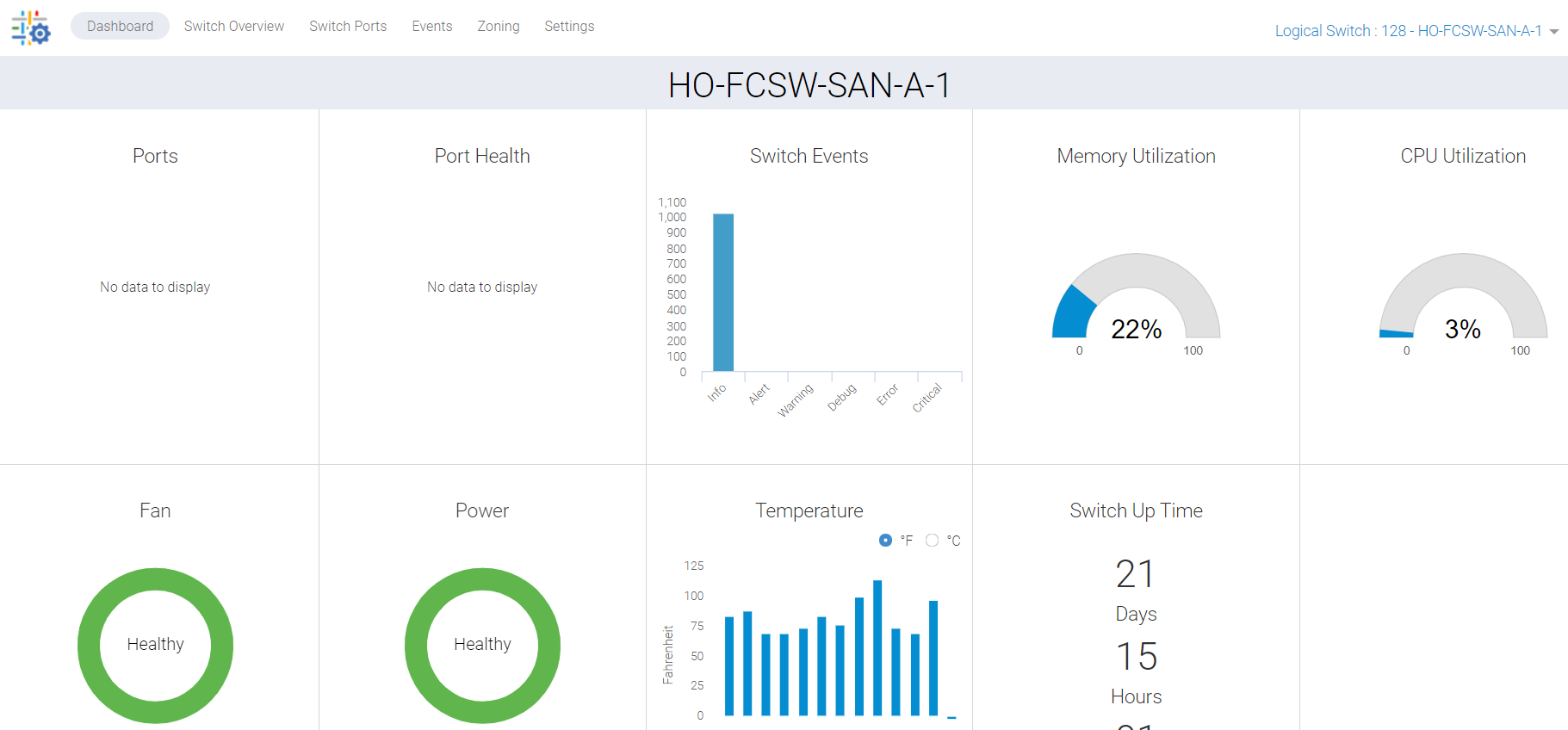
Kuva 1: Näyttökuva Port Healthista, jossa ei näy tietoja
Cause
Tämä ongelma johtuu seuraavista syistä:
- Portit eivät näy vihreinä kytkimen Yleiskatsaus-välilehdessä, joten portin kunto ei näy koontinäytössä
- Synkronoinnin puuttuminen taustan juuttumisen vuoksi
Resolution
Meidän on päivitettävä nämä tiedot, ja toimintasuunnitelmia on kaksi:
SUUNNITELMA 1:
Tämä toiminto kytkimessä edellyttää pääkäyttäjän oikeuksia. Käynnistä verkkotyökalujen HTTP-palvelut uudelleen.
SAN-SWITCH1:root> /fabos/libexec/webdconfigure
http attributes (yes, y, no, n): [no] y

HTTP Restart (yes, y, no, n): [no] y
HTTP enabled (yes, y, no, n): [yes] y
ErrorLog Enabled (yes, y, no, n): [no]
AccessLog Enabled (yes, y, no, n): [no]
SSLLog Enabled (yes, y, no, n): [no]
HTTP Port: (1..60000) [80]
Secure HTTP Port: (1..60000) [443]
HTTP IsAlive Check Enabled (yes, y, no, n): [yes]
HTTP Max HeapSize: (256..1024) [512]

webtools attributes (yes, y, no, n): [no]
cal attributes (yes, y, no, n): [no]
Tai
SUUNNITELMA 2:
Suorita seuraava komento:
Departmental model: #hareboot

Director class model: #hafailover
Affected Products
Connectrix B-Series Fabric OS 9.X, Connectrix B-Series SoftwareArticle Properties
Article Number: 000201036
Article Type: Solution
Last Modified: 17 Dec 2024
Version: 5
Find answers to your questions from other Dell users
Support Services
Check if your device is covered by Support Services.