Connectrix:Webツール, Element Manager, FOSバージョン9.x以降で、ダッシュボードの下にポートの正常性ステータスが表示されない
Summary: この問題は、Webツールの9.x以降のファームウェアを搭載したスイッチのエレメント マネージャーで、ポートがオンラインであるにもかかわらずポートの正常性データが表示されない場合に発生します。
This article applies to
This article does not apply to
This article is not tied to any specific product.
Not all product versions are identified in this article.
Symptoms
ポートの正常性にデータが表示されない: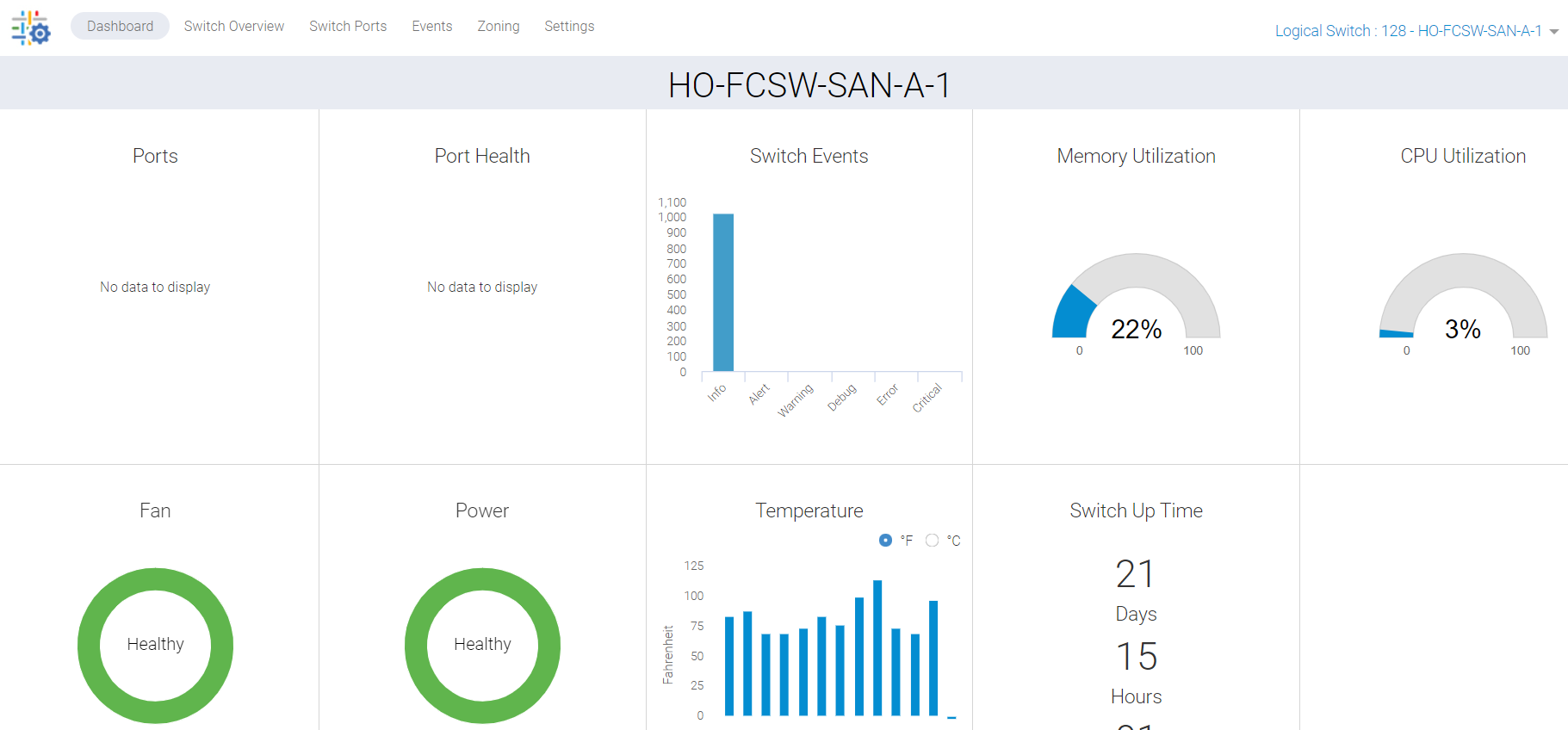
図1: データがないことを示すポートの正常性のスクリーンショット
Cause
この問題は、次の理由により発生します。
- スイッチの[Overview]タブでポートが緑色で表示されないため、ダッシュボードにポートの正常性ステータスが表示されない
- バックグラウンド スタック プロセスによる同期ミス
Resolution
このデータを更新する必要があります。また、次の2つのアクション プランがあります。
プラン1:
スイッチでこのアクティビティーを実行するには、rootアクセスが必要です。Web ツールの HTTP サービスを再起動します。
SAN-SWITCH1:root> /fabos/libexec/webdconfigure
http attributes (yes, y, no, n): [no] y

HTTP Restart (yes, y, no, n): [no] y
HTTP enabled (yes, y, no, n): [yes] y
ErrorLog Enabled (yes, y, no, n): [no]
AccessLog Enabled (yes, y, no, n): [no]
SSLLog Enabled (yes, y, no, n): [no]
HTTP Port: (1..60000) [80]
Secure HTTP Port: (1..60000) [443]
HTTP IsAlive Check Enabled (yes, y, no, n): [yes]
HTTP Max HeapSize: (256..1024) [512]

webtools attributes (yes, y, no, n): [no]
cal attributes (yes, y, no, n): [no]
または
プラン2:
次のコマンドを実行します。
Departmental model: #hareboot

Director class model: #hafailover
Affected Products
Connectrix B-Series Fabric OS 9.X, Connectrix B-Series SoftwareArticle Properties
Article Number: 000201036
Article Type: Solution
Last Modified: 17 Dec 2024
Version: 5
Find answers to your questions from other Dell users
Support Services
Check if your device is covered by Support Services.