NVP-vProxy: Log Collection Processes for VMware Protection Issues
Summary: This article outlines how to collect vProxy support bundles, NetWorker logs for VMware Protection, and logs needed when a vProxy system crash occurs.
Instructions
vProxy bundles contain vProxy engine state, previous backup sessions, and engine log files. The bundles also provide command outputs for common troubleshooting commands.
The NetWorker Management Console (NMC) can be used to generate a bundle and download it to your system. The tar command can also be used to manually create a tarball; however, the NMC-generated log bundle is preferred.
General vProxy Log Collection:
Collecting a vProxy log bundle can be used to review issues observed during vProxy backup or restore operations. Specific log files are detailed in: NVP-vProxy Triage Guide: NetWorker VMware Protection vProxy Triage and Log Collection Guide
There are three methods that can be followed:
- (recommended)
vproxy_log_collectortool. This is an interactive executable that you download from the NetWorker Support Tools site. It is run from any Windows host with network (SSH) access to the vProxies. It remotely connects to one or more vProxies specified and creates a full support bundle that is then downloaded to the Windows system the executable was run from. - NMC log bundle collector. Legacy approach provided in the NetWorker Management Console (NMC).
- Linux
tarcommand. You connect to the vProxy via SSH and run the Linux tar command to create a log bundle containing logs.
Expand each of the below sections for instructions on each log collection process.
Option 1: vproxy_log_collector tool:
vproxy_log_collector tool:The vproxy_log_collector tool can be downloaded from Solutions (You must sign-in with your Dell support account).
vproxy_log_collector is a Windows-based diagnostic utility for collecting logs and configuration data from vProxy appliances and (optionally) the associated VMware vCenter environment. Designed for use with Dell NetWorker support cases.
Requirements:
- Windows system with network access to:
- The target vProxy appliance(s) (SSH/SFTP, port 22)
- The vCenter Server (if inventory collection is enabled)
- Valid credentials for:
- The vProxy `admin` account (and `root`, if sudo elevation fails)
- The vCenter service account used by NetWorker
- Check the vCenter properties from NMC "VMware View".
What Gets Collected:
vCenter Collection (Optional): When enabled, using the vCenter hostname/IP and the same credentials used to add vCenter to NetWorker, the tool collects:
-
- vCenter Server Summary (Version, Build)
- VMware Inventory and overview
- Datastore overview (Name, Type, Capacity)
- ESXi host overview (Name, Version, Status)
- ESXi host and datastore connectivity mapping
vProxy Collection For each specified vProxy appliance, the tool collects:
-
- OS system command outputs (CPU, memory, disk, network, services, etc.)
- Package and version details (vProxy, VDDK, VMware Tools, agents)
- OS-level logs (`
/var/log/warn`, `/var/log/messages`, `audit.log`) - vProxy engine service and configuration state files
- vProxy protection engine and session logs
- DD Boost precert logging (if enabled):
-
-
- Collects `
ddboost_precert.log` - Generates a read/write I/O performance report.
- See articles:
- This is skipped automatically if precert logging is not enabled.
- Collects `
ProxyHChealth check (if available):
-
-
-
- Runs `
ProxyHC vCenter all` - Collects `
/tmp/proxy-hc.log` - See article: NVP-vProxy: How to use health check tool ProxyHC on vProxy appliance
- Skipped automatically if
ProxyHCis not installed.
- Runs `
-
Getting Started:
- Download and Place the Executable and Place `
vproxy_log_collector.exe` in a folder of your choosing. - Windows Defender Notice: Some systems may flag the `
.exe` as a threat. This is expected — the executable is **unsigned** because it was built in-house by NetWorker Support. It is safe to use if downloaded directly from the https://central.dell.com/solutions/Networker-Tools site or provided directly from Dell support.
If needed, add an exclusion:
- Open Windows Security.
- Go to Virus & threat protection.
- Under Virus & threat protection settings, click Manage settings.
- Scroll to Exclusions → Add or remove exclusions.
- Add a File or Folder exclusion for the executable.
- Run `
vproxy_log_collector.exe` and follow the interactive prompts:
- Enter vProxy hostname(s)/IP(s) — one per line. Press **Enter** on a blank line when done.
- (Optional) Specify local output directory — press Enter to use the current directory, or provide a full path in quotes.
- Confirm vCenter inventory collection** (recommended: yes).
- Enter vCenter hostname/IP
- Enter the vCenter username (The same vCenter credentials you use for NetWorker VMware Protection operations)
- Enter the vCenter password
- The tool processes each vProxy **sequentially**:
- Prompts for the vProxy `admin` password (falls back to `root` if sudo elevation fails)
- Collects OS data, logs, configuration, and version info
- Checks for DD Boost precert logging and ProxyHC — collects if available
- Downloads the resulting bundle locally (up to 3 retry attempts) and cleans up remote temp files
- Once all vProxies are processed, the vCenter inventory report is generated (if enabled).
- All collected files are packaged into the final `
-complete.zip` in the same directory the .exe was run from, unless another target location was specified while running the tool. - Upload the `
-complete.zip` to a Dell support service request or Dell provided MFT.
Example Run:
┌────────────────────────────────────────────────────────────────────────┐
│  vproxy_collector v1.7.0   │  NVP Diagnostic Log Collector             │
│  Sept 2026  --  @ https://central.dell.com/solutions/Networker-Tools   │
│  Contact Dell NetWorker Support for any assistance / enhancements      │
│  Tool Runtime: 2026-09-23 16:37:09                                     │
└────────────────────────────────────────────────────────────────────────┘

Log file: C:\Users\Administrator\Downloads\vproxy_collector_20260923_163709.log

Enter vProxy hostname(s)/IP(s), one per line.
Press ENTER on a blank line when finished.

vProxy hostname / IP  : nsr-vproxy01.amer.lan
vProxy hostname / IP  : nsr-vproxy02.amer.lan
vProxy hostname / IP  :
Local output dir [.]  :

Also collect vCenter inventory report (recommended)? [y/N]: y
vCenter hostname / IP : vcsa.amer.lan
vCenter username      : networker_user@vsphere.local
vCenter password      :

============================================================
2 vProxy host(s) queued for collection:
	• nsr-vproxy01.amer.lan
	• nsr-vproxy02.amer.lan
vCenter inventory will also be collected from: vcsa.amer.lan
============================================================


############################################################
[1/2] Starting collection: nsr-vproxy01.amer.lan
############################################################

Enter vProxy admin password   :
NOTE: if sudo elevation fails, you will be prompted for the vProxy root password.

============================================================
Connecting to nsr-vproxy01.amer.lan:22 as 'admin'
============================================================
[+] SSH connection established.
[*] Validating sudo credentials …
[+] Sudo credentials verified (elevation via sudo).

[+] Hostname: nsr-vproxy01

[*] Checking available disk space (minimum 10 GB) …
	/tmp         → 36.0 GB free
	✓ Using /tmp for bundle staging.

[+] Remote work directory: /tmp/vproxy_diag_20260923_163747

[*] Running diagnostic commands …
	cat /proc/cpuinfo         → cpuinfo.txt            [OK]
	date                      → date.txt               [OK]
	df -T -B1                 → df_T_B1.txt            [OK]
	env                       → env.txt                [OK]
	fdisk -l                  → fdisk.txt              [OK]
	hostnamectl               → hostname.txt           [OK]
	cat /etc/hosts            → hosts.txt              [OK]
	ip a                      → ip_a.txt               [OK]
	lsmod                     → lsmod.txt              [OK]
	lsof                      → lsof.txt               [OK]
	cat /proc/meminfo         → meminfo.txt            [OK]
	mount                     → mount.txt              [OK]
	ps aux                    → ps_aux.txt             [OK]
	cat /etc/resolv.conf      → resolv.txt             [OK]
	rpm -qa --last            → rpm_qa_last.txt        [OK]
	ip route show             → route.txt              [OK]
	ss -a                     → ss_a.txt               [OK]
	cat /etc/ssh/sshd_config  → sshd_config.txt        [OK]
	sysctl -p                 → sysctl_p.txt           [OK]
	systemctl                 → systemctl.txt          [OK]
	timedatectl               → timedatectl.txt        [OK]
	uptime                    → uptime.txt             [OK]
	ulimit -a                 → ulimit.txt             [OK]
	vmstat                    → vmstat.txt             [OK]

[*] Collecting vProxy build and version info …
	cat /etc/os-release                                → osrelease.txt                       [OK]
	uname -a                                           → uname.txt                           [OK]
	grep /opt/emc/vproxy/runtime/logs/recycle/vback…   → ddboost.txt                         [OK]
	grep /opt/emc/vproxy/runtime/logs/recycle/vback…   → ddos.txt                            [OK]
	cat /opt/emc/vproxy/runtime/logs/vbackupd/vback…   → vddk-version.txt                    [OK]
	rpm -qa | grep vmtools                             → vmware-tools-version.txt            [OK]
	rpm -qa | grep -i vProxy                           → vProxy-version.txt                  [OK]
	ls -l /opt/emc/sw-repo/msvmappagent/windows/ 2>…   → msvmappagent-version.txt            [OK]
	ls -l /opt/emc/sw-repo/vflragent/linux/ 2>/dev/…   → linux-flr-agent-version.txt         [OK]
	ls -l /opt/emc/sw-repo/vflragent/windows/ 2>/de…   → windows-flr-agent-version.txt       [OK]
	ls -l /opt/emc/sw-repo/emcmsappagent/windows/ 2…   → emcmsappagent-version.txt           [OK]

[*] Collecting system logs …
	/var/log/warn                  → copied
	/var/log/messages              → copied
	/var/log/audit/audit.log       → copied

[*] Collecting vProxy configuration directories …
	/opt/emc/vproxy/conf                          → copied (1 files)
	/opt/emc/vproxy/unit                          → copied (8 files)

[*] Checking for /ddboost_precert.ini …
	/ddboost_precert.ini found and copied to bundle.
	── contents of /ddboost_precert.ini ──
	│ precert_enabled=true
	│ num_log_files=4
	│ log_file_size=512
	│ log_file_name=ddboost_precert.log
	│ log_file_dir=/DDLog
	│ ddcl_logs_include=true
	│ ddcl_logs_sev=3
	── end ──
	log_file_dir = /DDLog
	Found 1 file(s) in /DDLog:
	• /DDLog/ddboost_precert.log
	Archived ddboost logs (13M).

[*] Generating ddboost precert I/O performance report
	This may take several minutes, depending on ddboost_precert.log size …
	Log file: /DDLog/ddboost_precert.log (169.4 MB)
	Extracting write I/O entries (ddp_write Params/Exit) …
		→ 605268 ddp_write lines found.
		Reading results via SFTP …
		→ 605268 lines loaded for analysis.

	Completed assessment, saving to /ddboost folder:

	Write CSV: nsr-vproxy01-precert-io-write-20260923.csv
	Read CSV : nsr-vproxy01-precert-io-read-20260923.csv
	Summary  : nsr-vproxy01-precert-io-summary-20260923.txt

[*] Searching for ProxyHC utility …
	Found: /home/admin/ProxyHC
	Do you want to run ProxyHC?
	WARNING: This should only be done if the vProxy is not currently performing backup or restore operations (Check from NMC/NWUI or jobkill command)?

	Proceed with ProxyHC? [y/N]: y

	Executing ProxyHC with vCenter credentials (non-interactive)
	vCenter: vcsa.amer.lan
	User: networker_user@vsphere.local
	─── automated execution ───


Info: Checking OS account status -------> Passed
Info: Checking configuration files
		Info: Proxy is registered to: nsr.amer.lan
		Info: Proxy version is: 4.4.0-16
Info: Checking OS
		Info: Checking attached disks -------> Passed
		Info: Checking disk usage -------> Passed
		Info: Checking memory usage -------> Passed
Info: Checking connectivity
		Info: Checking primary NIC ------->  192.168.9.151
		Info: Testing ping to gateway 192.168.9.100 -------> Passed
		Info: Testing ping to DNS 192.168.9.100 -------> Passed
		Info: Checking DNS response
		Info: Testing name lookup for nsr.amer.lan -------> Passed
		Info: Testing name lookup for vcsa.amer.lan -------> Passed
Info: Checking package details
		Info: Checking vProxy package version -------> Found version 4.4.0
		Info: Verifying vProxy package -------> Passed
Info: Checking service state
		Info: Checking status for vbackupd -------> Passed
		Info: Checking status for vflragentd -------> Passed
		Info: Checking status for vflrd -------> Passed
		Info: Checking status for vkpod -------> Passed
		Info: Checking status for vrapid -------> Passed
		Info: Checking status for vrecoverd -------> Passed
		Info: Checking status for vsessionsd -------> Passed
Info: Checking engine logs
		Info: Checking vsessionsd engine log -------> Passed
		Info: Checking vrapid engine log -------> Passed
		Info: Checking vrecoverd engine log -------> Passed
		Info: Checking vbackupd engine log -------> Found 28 failed sessions
		Info: Checking vkpod engine log -------> Passed
		Info: Checking vflragentd engine log -------> Passed
		Info: Checking vflrd engine log -------> Passed
Info: Initializing vCenter acccess
		Info: Validating vCenter server connectivity -------> Passed
Info: Calling all vCenter tools
Info: Testing port connectivity         Info: Looking for vProxy VM -------> Passed
		Info: Testing connectivity to ESXi esx03.amer.lan
				port 443 -------> Passed
				port 902 -------> Passed
		Info: Testing connectivity to ESXi esx01.amer.lan
				port 443 -------> Passed
				port 902 -------> Passed
		Info: Testing connectivity to ESXi esx02.amer.lan
				port 443 -------> Passed
				port 902 -------> Passed
		Info: Testing connectivity to data domain "ddve01.amer.lan"
				port 22 -------> Passed
				port 111 -------> Passed
				port 161 -------> Passed
				port 2049 -------> Passed
				port 2052 -------> Passed
				port 3009 -------> Passed
Info: Checking vCenter access permissions
		Info: Looking for user permissions to root object -------> Passed
		Info: Looking for privileges for role -------> Passed
Info: Removing left over artifacts
Info: Attempting to find/release extra disks    Info: Looking for vProxy VM -------> Passed
				Info: No extra disk(s) to remove
		Results: Check completed successfully.
Info: Looking for stale backup locks(annotations) in vCenter
		Please specify NW AuthC(NMC) USER name[administrator]:
		Please provide NW server user password:
		Please specify Remote NW AuthC(NMC) server, if any[]:
		Info: Validating NW server connectivity -------> Passed
		Info: NW server shows backup session count: 0 for this vCenter
				-------> Passed
Info: Checking vCenter for stale migration locks -------> Passed

	─── end of ProxyHC session ───

	SFTP write failed: [Errno 13] Permission denied, trying alternative method...
	Copied /tmp/proxy-hc.log into bundle.

[*] Archiving /data01/runtime …
	Archived successfully (8.9M).

[*] Creating bundle: nsr-vproxy01_20260923_163747_diag.tgz
	Staging location: /tmp
	Remote bundle size: 21M (21,969,196 bytes)

[*] Download attempt 1 of 3 → nsr-vproxy01_20260923_163747_diag.tgz
	SFTP download: |████████████████████████████████████████| 100.0% (21.0/21.0 MB) completed in 0.4s
[+] Saved: nsr-vproxy01_20260923_163747_diag.tgz  (21,969,196 bytes)

[*] Cleaning up remote temp files …
[+] Cleanup complete.

[+] Disconnected from vProxy.

############################################################
[2/2] Starting collection: nsr-vproxy02.amer.lan
############################################################

Enter vProxy admin password   :
NOTE: if sudo elevation fails, you will be prompted for the vProxy root password.

============================================================
Connecting to nsr-vproxy02.amer.lan:22 as 'admin'
============================================================
[+] SSH connection established.
[*] Validating sudo credentials …
[+] Sudo credentials verified (elevation via sudo).

[+] Hostname: nsr-vproxy02.amer.lan

[*] Checking available disk space (minimum 10 GB) …
	/tmp         → 36.0 GB free
	✓ Using /tmp for bundle staging.

[+] Remote work directory: /tmp/vproxy_diag_20260923_163952

[*] Running diagnostic commands …
	cat /proc/cpuinfo         → cpuinfo.txt            [OK]
	date                      → date.txt               [OK]
	df -T -B1                 → df_T_B1.txt            [OK]
	env                       → env.txt                [OK]
	fdisk -l                  → fdisk.txt              [OK]
	hostnamectl               → hostname.txt           [OK]
	cat /etc/hosts            → hosts.txt              [OK]
	ip a                      → ip_a.txt               [OK]
	lsmod                     → lsmod.txt              [OK]
	lsof                      → lsof.txt               [OK]
	cat /proc/meminfo         → meminfo.txt            [OK]
	mount                     → mount.txt              [OK]
	ps aux                    → ps_aux.txt             [OK]
	cat /etc/resolv.conf      → resolv.txt             [OK]
	rpm -qa --last            → rpm_qa_last.txt        [OK]
	ip route show             → route.txt              [OK]
	ss -a                     → ss_a.txt               [OK]
	cat /etc/ssh/sshd_config  → sshd_config.txt        [OK]
	sysctl -p                 → sysctl_p.txt           [OK]
	systemctl                 → systemctl.txt          [OK]
	timedatectl               → timedatectl.txt        [OK]
	uptime                    → uptime.txt             [OK]
	ulimit -a                 → ulimit.txt             [OK]
	vmstat                    → vmstat.txt             [OK]

[*] Collecting vProxy build and version info …
	cat /etc/os-release                                → osrelease.txt                       [OK]
	uname -a                                           → uname.txt                           [OK]
	grep /opt/emc/vproxy/runtime/logs/recycle/vback…   → ddboost.txt                         [OK]
	grep /opt/emc/vproxy/runtime/logs/recycle/vback…   → ddos.txt                            [OK]
	cat /opt/emc/vproxy/runtime/logs/vbackupd/vback…   → vddk-version.txt                    [OK]
	rpm -qa | grep vmtools                             → vmware-tools-version.txt            [OK]
	rpm -qa | grep -i vProxy                           → vProxy-version.txt                  [OK]
	ls -l /opt/emc/sw-repo/msvmappagent/windows/ 2>…   → msvmappagent-version.txt            [OK]
	ls -l /opt/emc/sw-repo/vflragent/linux/ 2>/dev/…   → linux-flr-agent-version.txt         [OK]
	ls -l /opt/emc/sw-repo/vflragent/windows/ 2>/de…   → windows-flr-agent-version.txt       [OK]
	ls -l /opt/emc/sw-repo/emcmsappagent/windows/ 2…   → emcmsappagent-version.txt           [OK]

[*] Collecting system logs …
	/var/log/warn                  → copied
	/var/log/messages              → copied
	/var/log/audit/audit.log       → copied

[*] Collecting vProxy configuration directories …
	/opt/emc/vproxy/conf                          → copied (1 files)
	/opt/emc/vproxy/unit                          → copied (8 files)

[*] Checking for /ddboost_precert.ini …
	/ddboost_precert.ini not found — skipping.

[*] Searching for ProxyHC utility …
	ProxyHC NOT found — skipping.

[*] Archiving /data01/runtime …
	Archived successfully (84K).

[*] Creating bundle: nsr-vproxy02.amer.lan_20260923_163952_diag.tgz
	Staging location: /tmp
	Remote bundle size: 360K (366,379 bytes)

[*] Download attempt 1 of 3 → nsr-vproxy02.amer.lan_20260923_163952_diag.tgz
	SFTP download: |████████████████████████████████████████| 100.0% (0.3/0.3 MB) completed in 0.0s
[+] Saved: nsr-vproxy02.amer.lan_20260923_163952_diag.tgz  (366,379 bytes)

[*] Cleaning up remote temp files …
[+] Cleanup complete.

[+] Disconnected from vProxy.

============================================================
Connecting to vCenter: vcsa.amer.lan
============================================================
[+] Connected: VMware vCenter Server 8.0.3 build-24853646 (build 24853646)
[*] Collecting vCenter summary …
	Saved: VMware Environment/vcsa-vcenter-summary-20260923.csv
[*] Collecting ESXi host inventory …
	Found 3 ESXi host(s).
	Saved: VMware Environment/vcsa-esxi-hosts-20260923.csv
[*] Collecting datastore inventory …
	Found 1 datastore(s).
	Saved: VMware Environment/vcsa-datastores-20260923.csv
[*] Mapping host-to-datastore access …
	Found 3 host-datastore mapping(s).
	Saved: VMware Environment/vcsa-host-datastore-map-20260923.csv

[*] Collecting detailed VM inventory …
	Found 24 VM(s), 87 disk row(s).
	Saved: VMware Environment/vcsa-vm-inventory-20260923.csv

[+] Disconnected from vCenter.

[*] Packaging final combined zip: vproxy_collector_20260923_164015-complete.zip
	Added: nsr-vproxy01_20260923_163747_diag.tgz
	Added: nsr-vproxy02.amer.lan_20260923_163952_diag.tgz
	Added: VMware Environment/vcsa-vcenter-summary-20260923.csv
	Added: VMware Environment/vcsa-esxi-hosts-20260923.csv
	Added: VMware Environment/vcsa-datastores-20260923.csv
	Added: VMware Environment/vcsa-host-datastore-map-20260923.csv
	Added: VMware Environment/vcsa-vm-inventory-20260923.csv
[+] Final combined zip created: vproxy_collector_20260923_164015-complete.zip (22,242,906 bytes)


============================================================
Collection Summary
============================================================
	nsr-vproxy01.amer.lan          → SUCCESS
	nsr-vproxy02.amer.lan          → SUCCESS
	vCenter (vcsa.amer.lan)        → SUCCESS
Log saved to: C:\Users\Administrator\Downloads\vproxy_collector_20260923_163709.log
============================================================


Press ENTER to close …
Option 2: Collect the bundle using the NMC:
Option 2: Collect the bundle using the NMC:
- Log in to NMC and select Devices tab
- Select VMware proxies
- Right-click your proxy and select Log Bundle

- Click Yes to collect the vProxy's recycled logs. Virtual Machine (VM) session logs are sent here upon completion.
- Open an SSH session to the vProxy and log in as admin
- Switch to root:
sudo su - - Check the /opt/emc/vproxy/runtime/state/logbundle/ to see if a bundle exists with the timestamp from when the bundle was generated in the NMC:
nsr-vproxy01:~ # ls -lh /opt/emc/vproxy/runtime/state/logbundle/
total 616K
-rw-r----- 1 root root 616K Jul 10 09:03 logbundle-5679cd0c-0262-46e9-b99a-97ae336f8ff2.tar.gz
- If the bundle exists, perform the following steps to copy it off with a Secure Copy Protocol (SCP) agent; otherwise, see option 2.
- Move the bundle to the admin user's home directory (Example):
nsr-vproxy01:~ # mv /opt/emc/vproxy/runtime/state/logbundle/logbundle-5679cd0c-0262-46e9-b99a-97ae336f8ff2.tar.gz /home/admin
- Change the permissions on the bundle so that the admin user can copy the file off the vProxy (Example):
nsr-vproxy01:~ # chmod 777 /home/admin/logbundle-5679cd0c-0262-46e9-b99a-97ae336f8ff2.tar.gz
- Use an SCP agent (WinSCP, and so forth) to copy the bundle from the user's home directory to your system. Required settings in SCP agent:
Protocol: SCP
User: Admin
Optionally, it may be possible to SCP the bundle from your Windows workstation using command-line:
scp admin@vProxyAddress:/path/to/logbundle .
See: NetWorker (Linux): How to copy files to or from a Linux NetWorker server.
Option 3: Use tar on the vProxy:
Option 3: Use tar on the vProxy:
- Connect to the vProxy using SSH and log in as admin.
- Switch to root:
sudo su - - Run:
tar cvzfP /home/admin/$(hostname)_$(date -I).tgz /opt/emc/vproxy/runtime /var/log/messages* /etc/hosts ; chmod 755 /home/admin/$(hostname)_$(date -I).tgz
nsr-vproxy01:~ # tar cvzfP /home/admin/$(hostname)_$(date -I).tgz /opt/emc/vproxy/runtime /var/log/messages* /etc/hosts ; chmod 755 /home/admin/$(hostname)_$(date -I).tgz
/opt/emc/vproxy/runtime
/var/log/messages
/etc/hosts
nsr-vproxy01:~ #

nsr-vproxy01:~ # ls -lh /home/admin/ | grep tgz
-rwxr-xr-x 1 root  root  107K Sep  1 13:36 nsr-vproxy01_2026-09-01.tgz
- Use an SCP agent (WinSCP, and so forth) to copy the bundle from the user's home directory to your system. Required settings in SCP agent:
Protocol: SCP
User: Admin
Optionally, it may be possible to SCP the bundle from your Windows workstation using command-line:
scp admin@vProxyAddress:/home/admin/BUNDLE_NAME.tgz .
Example:
PS C:\Users\Administrator\Downloads> scp admin@nsr-vproxy01:/home/admin/nsr-vproxy01_2026-09-01.tgz .
The authenticity of host 'nsr-vproxy01 (192.168.X.X)' can't be established.
ED25519 key fingerprint is SHA256:ZsV1JnrdzQ2DdcY1gH9bOrCFnEgBsABruninvAGaPEg.
This key is not known by any other names.
Are you sure you want to continue connecting (yes/no/[fingerprint])?
Warning: Permanently added 'nsr-vproxy01' (ED25519) to the list of known hosts.
admin@nsr-vproxy01's password: HIDDEN PASSWORD
nsr-vproxy01_2026-09-01.tgz                                                           100%  106KB   9.4MB/s   00:00
PS C:\Users\Administrator\Downloads>
vProxy Log Bundle Analyzer
The vproxy_bundle_analyzer is a NetWorker Tool that can be downloaded from: Solutions (you must sign-in with your Dell support account).
The bundle contains both a .exe and .py formats of the tool.
- Some system's Windows Defender may report the
.exeas a threat. This is because it is an unsigned executable that was created by NetWorker support. It is safe to add an exclusion for the tool, the same script that was used to generate the.exeis provided and can be reviewed. The.exeis available in the event you do not have python installed on your system.- Open Windows Security.
- Go to Virus & threat protection.
- Under Virus & threat protection settings, click Manage settings.
- Scroll to Exclusions.
- Click Add or remove exclusions.
- Add a File or Folder exclusion for your executable.
- The raw python script can be executed if you have python installed on your system. If python is not part of the user/system PATH, then you must cd to the python.exe directory. Example execution would be:
python vproxy_bundle_analyzer.py
The tool is run from any system where you have downloaded and extracted a vProxy log bundle. It then creates a new directory called reports in the bundles \opt\emc\vproxy\runtime\logs path.
Run the .exe and specify the full path to the downloaded and extracted vProxy log bundle:
 ┌────────────────────────────────────────────────────────────────────────┐
 │  vproxy_bundle_analyzer v1.0.0   |  NVP Bundle Diagnostic Reports      │
 │  Sept 2026  --  @ https://central.dell.com/solutions/Networker-Tools   │
 │  Contact Dell NetWorker Support for any assistance / enhancements      │
 │  Tool Runtime: 2026-09-23 13:12:28                                     │
 └────────────────────────────────────────────────────────────────────────┘


  Full path to extracted vProxy runtime\logs folder: "C:\Users\Administrator\Documents\nsr-vproxy01_Bundle\logbundle-vProxyNode\opt\emc\vproxy\runtime\logs"

[*] Generating backup performance report ...
    vbackupd -> no DiskStats entries found.
    recycle/vbackupd -> 165 DiskStats entries found.

    Report: C:\Users\Administrator\Documents\nsr-vproxy01_Bundle\logbundle-vProxyNode\opt\emc\vproxy\runtime\logs\reports\backup-performance_20260923.csv
    Total entries      : 165
    Per-disk entries   : 122
    Total/summary      : 43

[*] Generating backup failure report ...
    recycle/vbackupd -> 108 failure entries found.

    Report: C:\Users\Administrator\Documents\nsr-vproxy01_Bundle\logbundle-vProxyNode\opt\emc\vproxy\runtime\logs\reports\backup-failures_20260923.csv
    Total failure entries: 108

[*] Generating VDDK failure report ...
    vbackupd -> 5 VDDK failure entries found.
    recycle/vbackupd -> no VDDK failure entries found.

    Report: C:\Users\Administrator\Documents\nsr-vproxy01_Bundle\logbundle-vProxyNode\opt\emc\vproxy\runtime\logs\reports\vddk-failures_20260923.csv
    Total VDDK failures: 5
       - VDDK Warning/Error (unclassified): 5

[*] Generating vbackupd boost failure report ...
    vbackupd/vbackupd-boost.log -> scanned.
    1 log file(s) scanned, 26 failure entries found.

    Report: C:\Users\Administrator\Documents\nsr-vproxy01_Bundle\logbundle-vProxyNode\opt\emc\vproxy\runtime\logs\reports\vbackupd-boost-failures_20260923.csv
    Total failure entries: 26

[*] Generating vbackupd engine failure report ...
    vbackupd/vbackupd-engine.log -> scanned.
    1 log file(s) scanned, 138 failure entries found.

    Report: C:\Users\Administrator\Documents\nsr-vproxy01_Bundle\logbundle-vProxyNode\opt\emc\vproxy\runtime\logs\reports\vbackupd-engine-failures_20260923.csv
    Total failure entries: 138

[*] Generating recover performance report ...
    vrecoverd -> 27 performance entries found.
    recycle/vrecoverd -> 1374 performance entries found.

    Report: C:\Users\Administrator\Documents\nsr-vproxy01_Bundle\logbundle-vProxyNode\opt\emc\vproxy\runtime\logs\reports\recover-performance_20260923.csv
    Total entries: 4

[*] Generating recover failure report ...
    recycle/vrecoverd -> 7 failure indicator(s) found.

    Report: C:\Users\Administrator\Documents\nsr-vproxy01_Bundle\logbundle-vProxyNode\opt\emc\vproxy\runtime\logs\reports\recover-failures_20260923.csv
    Genuine failures: 3

[*] Generating vrecoverd boost failure report ...
    vrecoverd/vrecoverd-boost.log -> scanned.
    1 log file(s) scanned, 2 failure entries found.

    Report: C:\Users\Administrator\Documents\nsr-vproxy01_Bundle\logbundle-vProxyNode\opt\emc\vproxy\runtime\logs\reports\vrecoverd-boost-failures_20260923.csv
    Total failure entries: 2

[*] Generating vrecoverd engine failure report ...
    vrecoverd/vrecoverd-engine.log -> scanned.
    1 log file(s) scanned, 13 failure entries found.

    Report: C:\Users\Administrator\Documents\nsr-vproxy01_Bundle\logbundle-vProxyNode\opt\emc\vproxy\runtime\logs\reports\vrecoverd-engine-failures_20260923.csv
    Total failure entries: 13

[*] Generating FLR failure report ...
    recycle/vflrd -> 9 failure indicator(s) found.

    Report: C:\Users\Administrator\Documents\nsr-vproxy01_Bundle\logbundle-vProxyNode\opt\emc\vproxy\runtime\logs\reports\flr-failures_20260923.csv
    Genuine failures: 5

[*] Generating vflrd engine failure report ...
    vflrd/vflrd-engine.log -> scanned.
    1 log file(s) scanned, 38 failure entries found.

    Report: C:\Users\Administrator\Documents\nsr-vproxy01_Bundle\logbundle-vProxyNode\opt\emc\vproxy\runtime\logs\reports\vflrd-engine-failures_20260923.csv
    Total failure entries: 38

[*] Generating vrapid engine failure report ...
    vrapid/vrapid-engine.log -> scanned.
    1 log file(s) scanned, 1 failure entries found.

    Report: C:\Users\Administrator\Documents\nsr-vproxy01_Bundle\logbundle-vProxyNode\opt\emc\vproxy\runtime\logs\reports\vrapid-engine-failures_20260923.csv
    Total failure entries: 1
       - Connection Refused: 1

============================================================
 All reports complete.
 Output folder: C:\Users\Administrator\Documents\nsr-vproxy01_Bundle\logbundle-vProxyNode\opt\emc\vproxy\runtime\logs\reports
============================================================

Press Enter to close...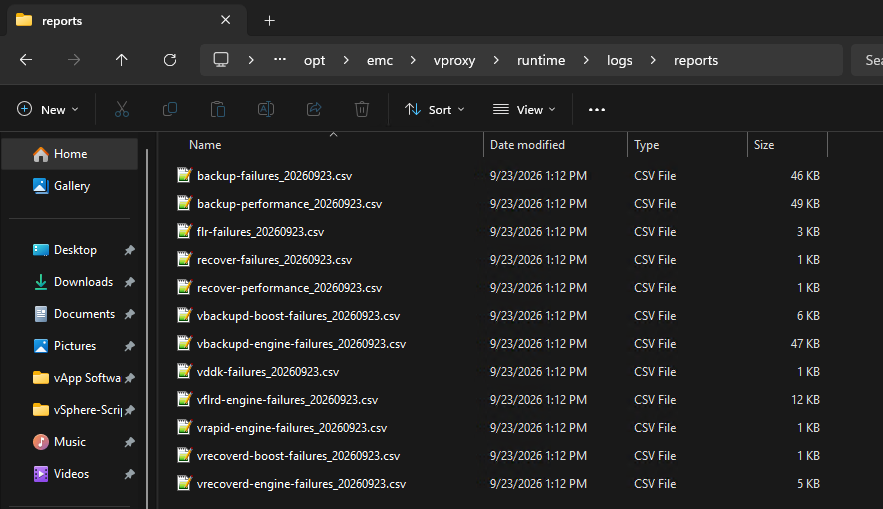
The reports can be reviewed and filtered in a CVS reader (such as Microsoft Excel). For example the
backup-performance report:

VM Logs (FLR and MSVMAPPAGENT):
The Virtual Machine (VM) contains logs specific to File Level Restore (FLR) and SQL-Consistent (MSVMAPPAGENT) Protection.
| FLR Engine Logs: |
|
File Level Restore (FLR) logs. |
| Microsoft SQL Agent (MSVMAPPAGENT) |
SQL Virtual Machine (VM):
|
SQL VM app-consistent protection operations. |
NetWorker Server-Side Logs:
NetWorker Server-Side Logs:
NetWorker server-side logs can be reviewed for the following types of issues:
- vProxy reports as unavailable in NetWorker daemon logs or NMC
- vProxy upgrade performed using
nsrvproxy_mgmtcommand has failed - VMware inventory issues/errors
- VMware backup errors observed during a VMware protection policy failure
- Performing VM File Level Restore (FLR) or SQL-consistent (MSVMAPPAGENT) restores from the Data Protection Restore Client web interface:
https://networker-server-address:9090/flr
General Server Logs:
| Log Name | Location | Purpose |
daemon.raw |
|
General NetWorker server daemon messages - This contains logging about vProxy availability or unavailability and registration status messages: |
<job-uuid>.log |
|
vProxy management job log file is created during the redeployment of the associated vProxy. |
vproxy_upgrade_session__< jobuuid> |
|
Associated nsrvisd log file is created during redeployment of the vProxy. |
nsrvisd-daemon.log |
|
Associated nsrvisd detailed log file is created. |
ProxySessions- .log |
|
Associated ProxySessions log file is created during redeployment of the vProxy. |
nsrvisd logs |
|
Associated inventory sessions log file is created. |
| VM backup logs |
|
The VM backup session logs are retained as per the jobsdb retention window (default 72 hours). The session logs are the same logs found on the vProxy under /opt/emc/vproxy/runtime/logs/recycle. The logs from the vProxy are not removed by the NetWorker jobsdb log rotation. |
| Data Protection Restore Client Log |
|
These logs are associated with the Data Protection Restore Client web interface used to perform FLR or SQL-consistent (MSVMAPPAGENT) restores. |
vCenter Inventory:
On the NetWorker server, run the following command from a root prompt (Linux) or Administrator Command-Prompt (Windows):
nsrvim -d --names vCenter_Name
Where vCenter_Name matches how the vCenter/Hypervisor was added to NetWorker. This command generates .xml files in the following directories:
Linux: /nsr/cores/nsrvim
Windows: Files are generated in the same directory that the nsrvim command was run.
[root@nsr ~]# ls -l /nsr/cores/nsrvim
total 48
-rw-r--r--. 1 root root    47 Jul 10 10:30 vcsa.amer.lan-cat_tags.xml
-rw-r--r--. 1 root root  4175 Jul 10 10:30 vcsa.amer.lan-mapping.xml
-rw-r--r--. 1 root root 32913 Jul 10 10:30 vcsa.amer.lan.xml
See: NetWorker (Linux): How to copy files to or from a Linux NetWorker server.
vProxy System Crashes:
vProxy System Crashes:
If a vProxy is being unresponsive, the following logs and bundles can be collected to review why the crash occurred.
- Collect the SUSE support bundle.
- Connect to the vProxy over SSH as admin.
- Switch to root: sudo su -
- Run the following command:
supportconfig
.txz bundle under /var/log, for example:
-vproxy01:~ # ls -l /var/log | grep scc
-rw------- 1 root     root     945064 Jul 10 13:40 scc_nsr-vproxy01.amer.lan_240710_1338.txz
-rw------- 1 root     root         33 Jul 10 13:40 scc_nsr-vproxy01.amer.lan_240710_1338.txz.md5
- Move the
.txzbundle somewhere the admin user can access, for example/tmp:
nsr-vproxy01:~ # mv /var/log/scc_nsr-vproxy01.amer.lan_240710_1338.txz /tmp
- Change permissions of the
.txzbundle so that the admin user can copy the bundle off of the vProxy:
nsr-vproxy01:~ # chmod 777 /tmp/scc_nsr-vproxy01.amer.lan_240710_1338.txz
- Use an SCP agent (WinSCP, and so forth) to copy the bundle from the user's home directory to your system. Required settings in SCP agent:
Protocol: SCP
User: Admin
Optionally, it may be possible to SCP the bundle from your Windows workstation using command-line:
scp admin@vProxyAddress:/path/to/logbundle .
- From vSphere, collect the vmware.log files from the vProxy VMs VMware datastore folder:
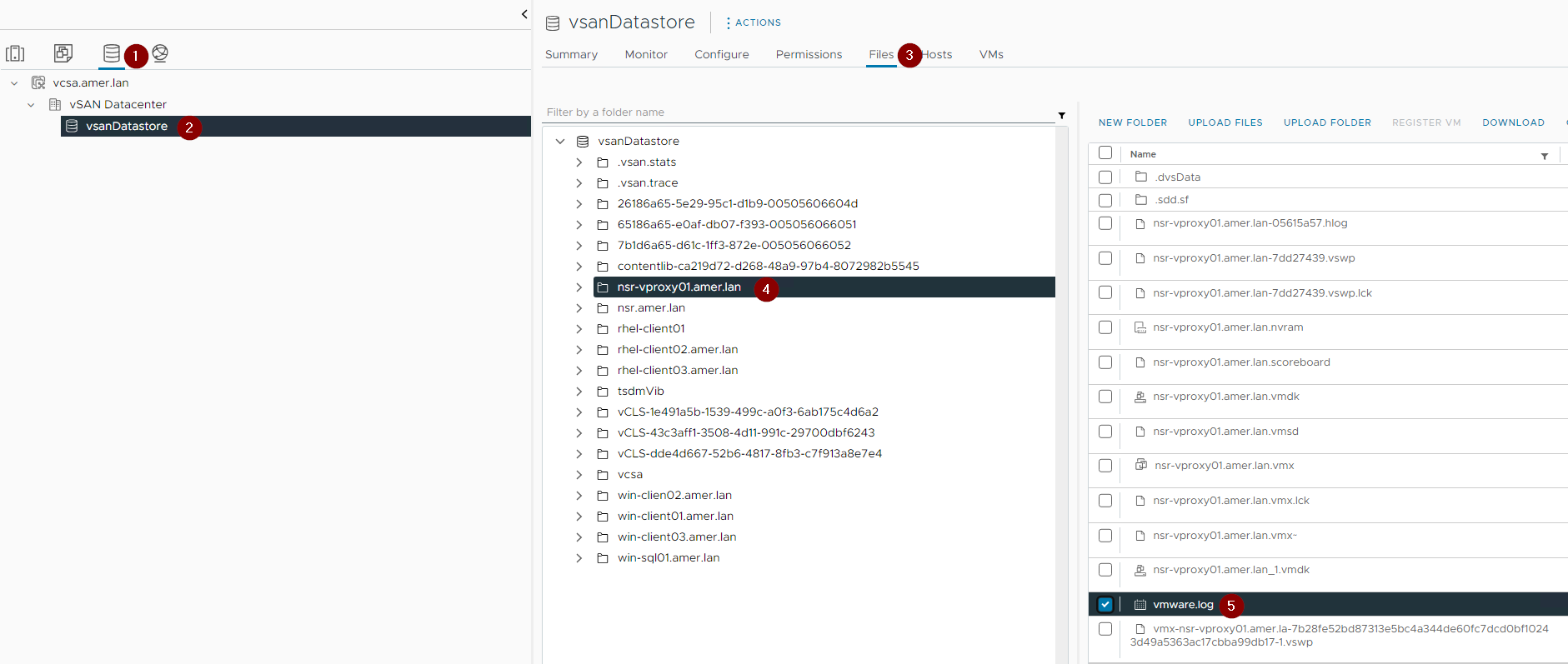
- vSphere support bundle:
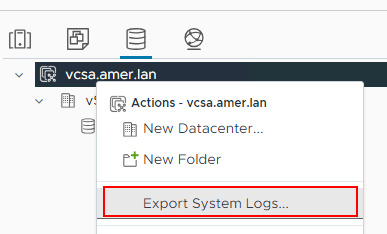
vCenter Server Support Bundle:
Collecting the vCenter and relevant ESXi host log bundles is optional. This is not typically required for standard NetWorker protection troubleshooting. This may be requested by NetWorker support while investigating support cases.
- Log in to the vCenter's vSphere web interface using an administrative user.
- Go to the Inventory tab.
- Right-click the vCenter server, then click Export System Logs:
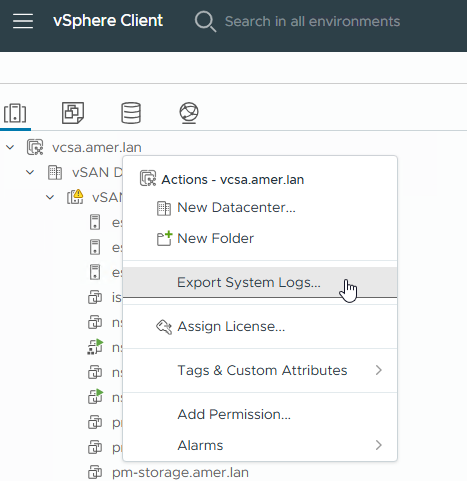
- Include relevant ESXi host logs:
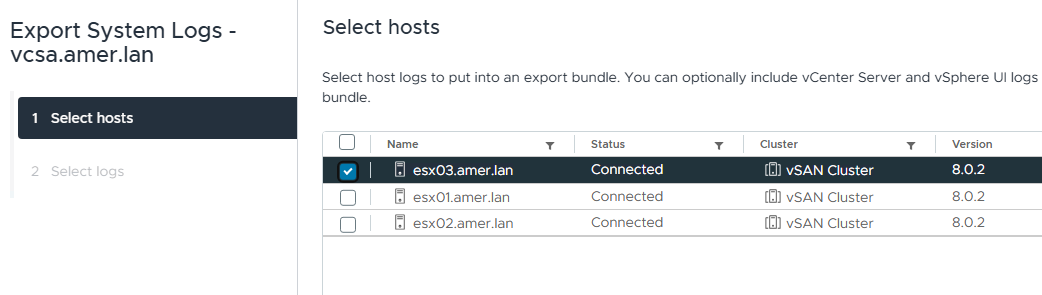
- Click Finish to generate the bundle.
- The bundle can be uploaded directly to your NetWorker Service Request, or to a support-provided MFT location.
Data Domain Logs:
Data Domain logs are optional and depend on the issue faced; for example, communication issues observed between vProxy and DD, or VMware and DD during a backup or recover operation.
The Data Domain ddfs.info log is the main log to focus on while performing initial diagnosis of suspected Data Domain related issues. The ddfs.info log can be collected and reviewed following: NetWorker: How To Collect ddfs.info log from Data Domain
For suspected performance issues, ddboost_precert logging can be enabled on the vProxy, see the DD Boost Precert Debugging section of: NetWorker VMware Protection-vProxy: How to Enable Debug Logging
Alternatively, collect a Full Data Domain Support Bundle:
- From a web browser, access the PowerProtect DD System Manager web interface:
https://DD_ADDRESS/ddem - Log in as an administrative user, for example:
sysadmin - Go to Maintenance -> Support Bundles -> then click Generate Support Bundle.
- From the Bundle Type drop down, select Full Bundle.
- From the Duration drop down, select All or a time range. When specifying a time range it is important that the range spans the time period the issue was observed.
- Click Generate.
- After the bundle has generated it can be downloaded to your system.
A DD support bundle can be uploaded to your NetWorker service request or a support-provided MFT.
Additional Information
Related articles:
- NetWorker VMware Protection (NVP)-vProxy: How to Enable Debug Logging
- NVP-vProxy: How to use health check tool ProxyHC on vProxy appliance
- NVP vProxy: Troubleshooting Network Connectivity For Backup and Restore Operations
- NetWorker: NVP vProxy Troubleshooting VM Backup and Restore Performance and Throughput
- NVP vProxy: Troubleshooting VMware Snapshot Issues during NetWorker backups.
- NVP vProxy: Understanding VMware VM backup levels shown in NetWorker