PowerEdge:サーバーをドメイン コントローラーに昇格した後、アプリケーションの設定からネットワーク アダプターを変更するときにエラーが発生しました
Summary: この記事では、Windowsエラー「Windows cannot access the specified device, path, or file.サーバーをドメイン コントローラーに昇格させようとした後、アイテムにアクセスするための適切なアクセス許可がない可能性があります。この動作は、Windows Server 2016、2019、および2022で発生します。 ...
This article applies to
This article does not apply to
This article is not tied to any specific product.
Not all product versions are identified in this article.
Symptoms
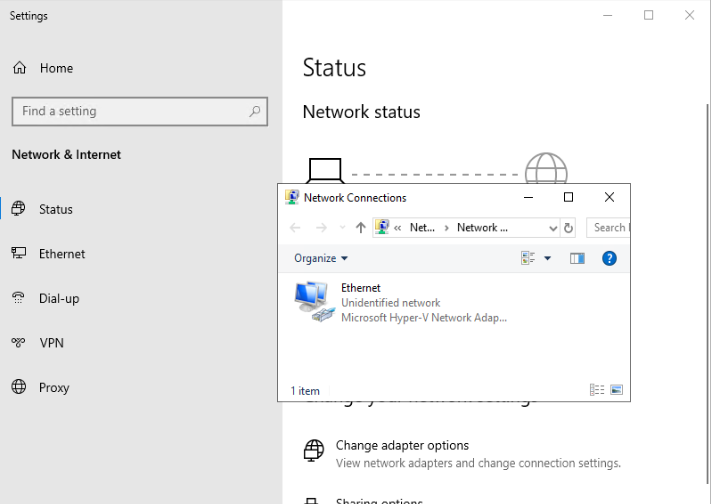
エラー メッセージのスクリーンショット:

Cause
これは、OSが統合管理アカウントのアクセスを処理する方法に関係しています。
Resolution
この問題に対処するには、ユーザー アカウント制御を有効にする必要があります。グループ ポリシー オブジェクトを使用した統合管理者アカウントの管理者承認モード
- 管理者としてPowerShellを開き 、次のコマンドを実行します
gpedit.msc
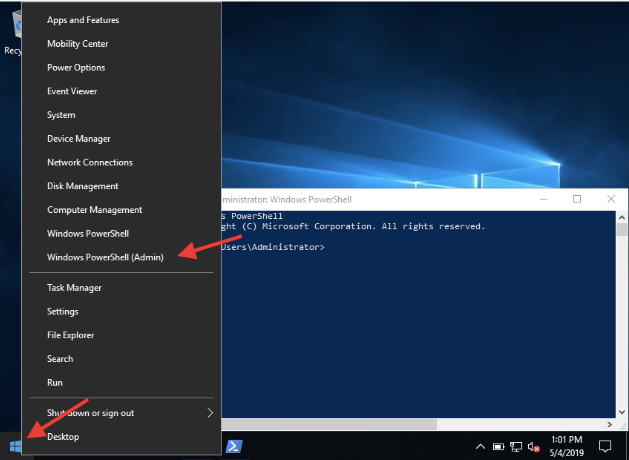

- 次にアクセスしてください。
コンピューターの構成>Windowsの設定>セキュリティ設定>[セキュリティ オプション]を選択し、[ユーザー アカウント制御]をダブルクリックします。統合管理者アカウントの管理者承認モードと有効化:

- サーバーを再起動して変更を適用すると、設定アプリからアダプター設定を変更できるようになります。
Affected Products
Microsoft Windows Server 2016, Microsoft Windows Server 2019, Microsoft Windows Server 2022, PowerEdge R440, PowerEdge R450, PowerEdge R470, PowerEdge R540, PowerEdge R550, PowerEdge R570, PowerEdge R640, PowerEdge R6415, PowerEdge R650
, PowerEdge R650xs, PowerEdge R6515, PowerEdge R6525, PowerEdge R660, PowerEdge R660xs, PowerEdge R6615, PowerEdge R6625, PowerEdge R670, PowerEdge R740, PowerEdge R740XD, PowerEdge R740XD2, PowerEdge R7415, PowerEdge R7425, PowerEdge R750, PowerEdge R750XA, PowerEdge R750xs, PowerEdge R7515, PowerEdge R7525, PowerEdge R760, PowerEdge R760xd2, PowerEdge R760xs, PowerEdge R7615, PowerEdge R7625, PowerEdge R770, PowerEdge R7715, PowerEdge R7725, PowerEdge R840, PowerEdge R860, PowerEdge R940, PowerEdge R940xa, PowerEdge R960, PowerEdge T350, PowerEdge T360, PowerEdge T440, PowerEdge T550, PowerEdge T560, PowerEdge T640
...
Article Properties
Article Number: 000203805
Article Type: Solution
Last Modified: 12 Jun 2025
Version: 5
Find answers to your questions from other Dell users
Support Services
Check if your device is covered by Support Services.