Solutions Enabler:「デバイスがマッピングされているため、操作を実行できません」というエラーでRecoverPointデバイスを削除できない
Summary: 「デバイスがマッピングされているため、操作を実行できません」というエラーでRecoverPointデバイスを削除できません。
This article applies to
This article does not apply to
This article is not tied to any specific product.
Not all product versions are identified in this article.
Symptoms
RecoverPointデバイスをエラーで削除できませんでした
 次に、次のコマンドを実行しました。

"The operation cannot be performed because the device is mapped"次のコマンドを実行すると、デバイスにFAマッピングがあり、RecoverPointデバイスであることがわかりました。
symdev -sid <SID> show <dev_id>

    Device Status            : Ready            (RW)
    Device SA Status         : Ready            (RW)
    Device User Pinned       : False
    Host Access Mode         : Active
    Device Tag(s)            : RecoverPoint External

    Extent Based Clone       : None
    Snapvx Source            : True
    Snapvx Target            : False
    Data Destaged            : True
    DIF1 Flag                : False
    Gatekeeper Device        : False
    AS400_GK                 : False
    Host Cache Registered    : False
    Optimized Read Miss      : N/A

    Front Director Paths (8):
        {
        -----------------------------------------------------------------------
                                 POWERPATH   DIRECTOR   PORT             LUN
                                 --------- ------------ ---- -------- ---------
        PdevName                 Type      Type Num     Sts  VBUS TID SYMM Host
        -----------------------------------------------------------------------
        Not Visible              N/A       FA   01D:004 RW   N/A  N/A N/A  N/A
        Not Visible              N/A       FA   01D:005 RW   N/A  N/A N/A  N/A
        Not Visible              N/A       FA   02D:004 RW   N/A  N/A N/A  N/A
        Not Visible              N/A       FA   02D:005 RW   N/A  N/A N/A  N/A
         }
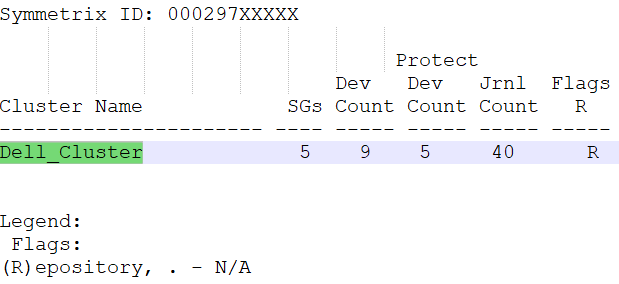
次のコマンドを実行して、クラスターの詳細を確認します。
symrpi -sid <SID> list
symrpi -sid <SID> list -cluster <Cluster_Name> -detail
Cause
ユーザーは、保護解除操作を実行せずにRecoverPoint SGからデバイスを削除しました。
Resolution
デバイスからRecoverPoint外部タグを削除するには、次のコマンドを使用します。
symrpi -sid <SID> -cluster <cluster_name> unprotect -devs <dev_id>RecoverPointタグが削除されたら、RecoverPointによるFAマッピングが削除されるため、デバイスを削除します。
symdev -sid <SID> delete <dev_id>
Affected Products
Solutions Enabler, Unisphere for VMAX, Unisphere for PowerMaxArticle Properties
Article Number: 000209868
Article Type: Solution
Last Modified: 03 Jul 2024
Version: 2
Find answers to your questions from other Dell users
Support Services
Check if your device is covered by Support Services.