PowerFlex: SO Node deployment fails as the OS repository is missing DellEMCPowerFlexEMbeddedOS2
Summary: Storage Only (SO) Node Deployment fails as the OS repository is missing on the MVMs after a resynchronization.
This article applies to
This article does not apply to
This article is not tied to any specific product.
Not all product versions are identified in this article.
Symptoms
SO node deployment fails after a resynchronization of the repository. New OS directories are created, and the expected OS directory is not available on the MVMs.
Cause
-
DellEMC PowerFlex EMbeddedOS 3 (RHEL) and DellEMC PowerFlex EMbeddedOS 4 (SUSE) were created after a resync.
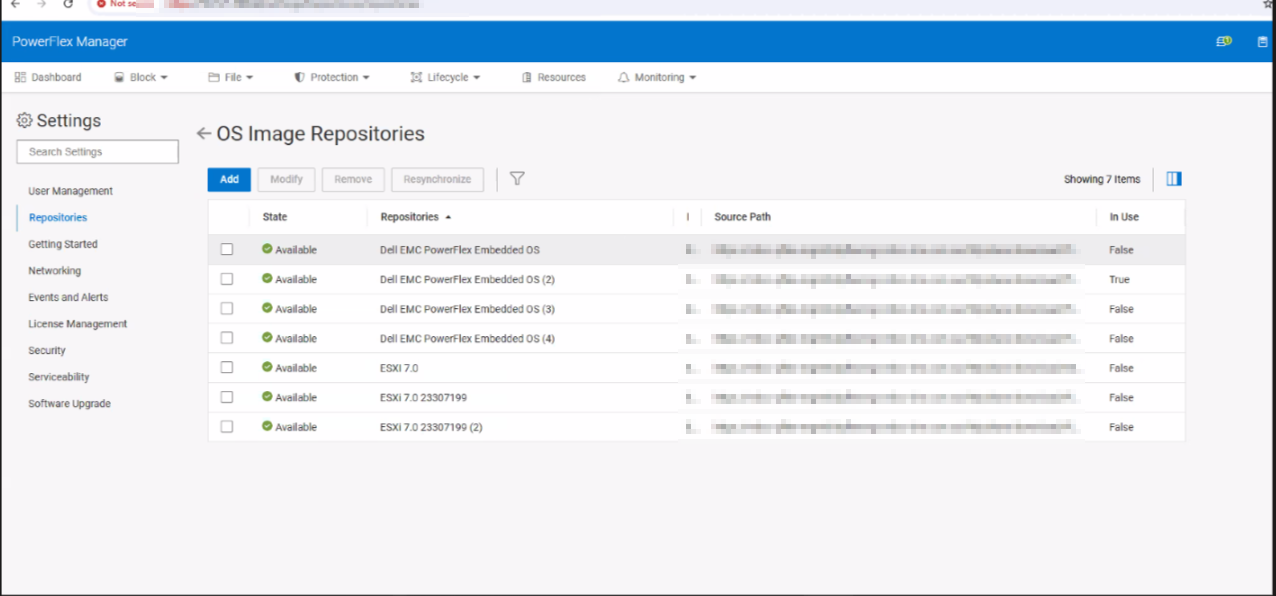
- PowerFlex Manager was trying to deploy using DellEMC PowerFlex EMbeddedOS 2 (SUSE)
-
In
/opt/platfrom/fileshare/[deploymentID]/on each MVM the DellEMCPowerFlexEMbeddedOS2 is no longer available.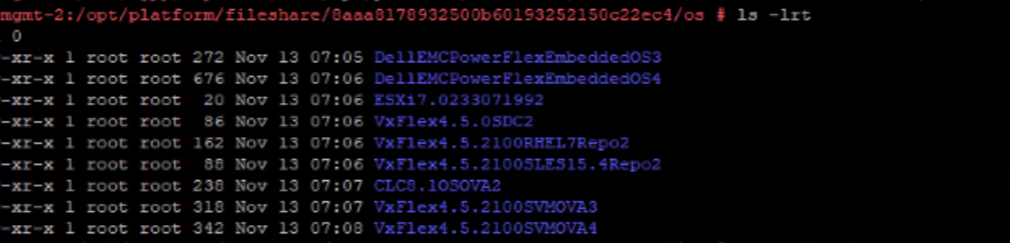
Resolution
Create the directory and copy the contents from the required repository and retry the deployment. As this was a SUSE deployment, The neeeded files are from DellEMCPowerFlexEMbeddedOS4.
Example:
cp -r DellEMCPowerFlexEMbeddedOS4 DellEMCPowerFlexEMbeddedOS2
Affected Products
PowerFlex rack, PowerFlex Appliance, PowerFlex custom node, PowerFlex custom nodeArticle Properties
Article Number: 000248816
Article Type: Solution
Last Modified: 03 Jan 2026
Version: 3
Find answers to your questions from other Dell users
Support Services
Check if your device is covered by Support Services.