Dell NativeEdge: NativeEdge 엔드포인트에 대해 소비자 GPU(Graphics Processing Unit) 패스스루를 설정하는 방법
Summary: NativeEdge 엔드포인트에서 소비자용 GPU(Graphics Processing Unit) 패스스루(GPU) 구성에 대한 지침
This article applies to
This article does not apply to
This article is not tied to any specific product.
Not all product versions are identified in this article.
Instructions
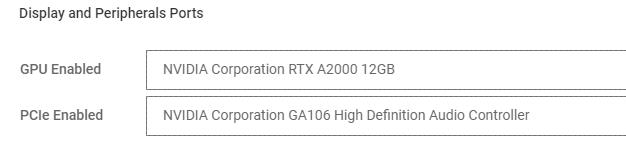
NativeEdge 엔드포인트에서 NVIDIA RTX와 같은 소비자 GPU와 함께 GPU(Graphics Processing Unit) 패스스루를 사용하려면 사용자가 추가 PCIe 디바이스도 패스스루해야 합니다.
Blueprint에서 GPU에 있는 추가 PCIe 디바이스를 지정해야 합니다. 예를 들어 GPU가 올바르게 패스스루하려면 GA106 HD 오디오 컨트롤러가 포함되어야 합니다.
중요:
소비자 GPU가 여러 개 있는 경우 통과하는 GPU와 동일한 포트/슬롯에 매핑되는 관련 컨트롤러를 선택합니다.
Affected Products
NativeEdge Solutions, NativeEdgeArticle Properties
Article Number: 000285104
Article Type: How To
Last Modified: 30 Jun 2025
Version: 5
Find answers to your questions from other Dell users
Support Services
Check if your device is covered by Support Services.