Dell NativeEdge: De doorvoer van de Consumer Graphics Processing Unit (GPU) instellen voor NativeEdge-eindpunten
Summary: Instructies voor de configuratie van Graphics Processing Unit (GPU) Passthrough for consumer (GPU) op NativeEdge-eindpunten
This article applies to
This article does not apply to
This article is not tied to any specific product.
Not all product versions are identified in this article.
Instructions
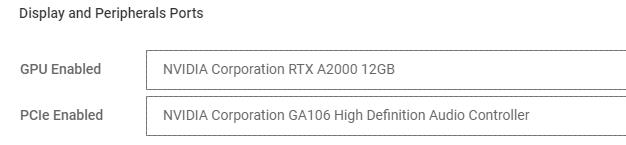
Als u passthrough van de grafische processor (GPU) wilt gebruiken met consumenten-GPU, zoals NVIDIA RTX op NativeEdge-eindpunten, moet de gebruiker ook extra PCIe-apparaten doorvoeren.
In de blauwdruk moet u het extra PCIe-apparaat opgeven dat op de GPU aanwezig is. De GA106 High Definition Audio Controller moet bijvoorbeeld worden meegeleverd om de GPU correct te laten passeren.
Belangrijk:
Als er meerdere consumenten-GPU's aanwezig zijn, selecteert u de relevante controller die is toegewezen aan dezelfde poort/slot als de GPU die wordt doorgegeven.
Affected Products
NativeEdge Solutions, NativeEdgeArticle Properties
Article Number: 000285104
Article Type: How To
Last Modified: 30 Jun 2025
Version: 5
Find answers to your questions from other Dell users
Support Services
Check if your device is covered by Support Services.