Dell NativeEdge: Så här konfigurerar du GPU-genomströmning (Consumer Graphics Processing Unit) för NativeEdge-slutpunkter
Summary: Anvisningar för konfiguration av GPU-genomströmning (Graphics Processing Unit) för konsument (GPU) på NativeEdge-slutpunkter
This article applies to
This article does not apply to
This article is not tied to any specific product.
Not all product versions are identified in this article.
Instructions
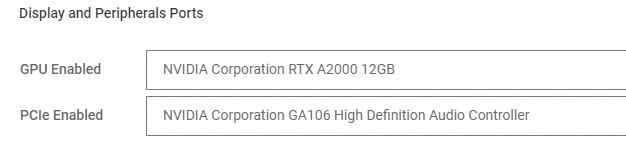
Om du vill använda GPU-genomströmning (Graphics Processing Unit) med konsument-GPU som NVIDIA RTX på NativeEdge-slutpunkter måste användaren även vidarekoppla ytterligare PCIe-enheter.
I skissen måste du ange den extra PCIe-enhet som finns på GPU:n. Till exempel måste GA106 High Definition Audio Controller inkluderas för att GPU:n ska kunna passera korrekt.
Viktigt!
Om det finns flera konsument-GPU:er väljer du relevant styrenhet som är mappad till samma port/kortplats som GPU:n som passeras.
Affected Products
NativeEdge Solutions, NativeEdgeArticle Properties
Article Number: 000285104
Article Type: How To
Last Modified: 30 Jun 2025
Version: 5
Find answers to your questions from other Dell users
Support Services
Check if your device is covered by Support Services.