Dell NativeEdge:如何为 NativeEdge 端点设置消费者图形处理单元 (GPU) 直通
Summary: 有关在 NativeEdge 端点上配置消费者 (GPU) 图形处理单元 (GPU) 直通的说明
This article applies to
This article does not apply to
This article is not tied to any specific product.
Not all product versions are identified in this article.
Instructions
要在 NativeEdge 端点上将图形处理单元 (GPU) 直通与消费级 GPU(如 NVIDIA RTX)配合使用,还需要用户直通其他 PCIe 设备。
在蓝图中,您必须指定 GPU 上存在的附加 PCIe 设备。例如,必须包含 GA106 高保真音频控制器,GPU 才能正确直通。
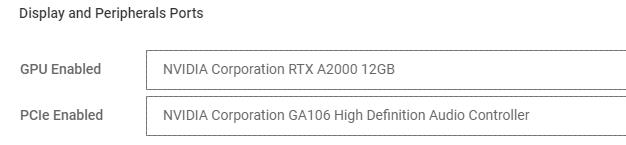
重要提示:
如果存在多个消费类 GPU,请选择映射到与通过的 GPU 相同的端口/插槽的相关控制器。
Affected Products
NativeEdge Solutions, NativeEdgeArticle Properties
Article Number: 000285104
Article Type: How To
Last Modified: 30 Jun 2025
Version: 5
Find answers to your questions from other Dell users
Support Services
Check if your device is covered by Support Services.