PowerEdge:針對 AMD EPYC 7xx2 系列處理器的 Windows Server 支援和安裝說明
Summary: 本文介紹針對 AMD EPYC 7xx2 系列處理器的 Windows Server 作業系統安裝說明和支援聲明。
This article applies to
This article does not apply to
This article is not tied to any specific product.
Not all product versions are identified in this article.
Instructions
本文亦說明對這些處理器支援的數種已知限制。Microsoft已在文章 KB4514607
Windows Server 支援
Windows Server 2019 支援 AMD EPYC 7xx2 系列 CPU。若您如「安裝 Windows Server」解決方案一節所述安裝 Windows Server 2019,便可支援 X2APIC 模式。
在使用 AMD EPYC 7xx2 (AMD Rome) 處理器的電腦上安裝 Windows Server
若要在使用 AMD EPYC 7xx2 處理器的電腦上安裝 Windows Server,請遵循下列步驟:
- 開機至系統 BIOS (F2)。
- 前往「處理器設定」區段。
- 在電腦的 BIOS 中停用邏輯處理器設定。請參閱下表。
- 在電腦的 BIOS 中,停用 x2APIC 設定。請參閱下表。
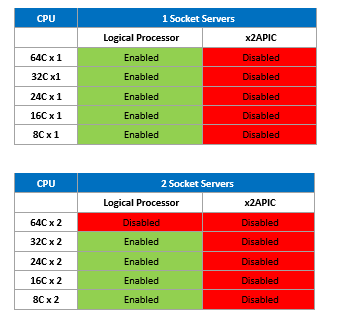
圖 1:停用 X2APIC 設定
- 使用 WS2019 作業系統媒體安裝 Windows Server。
- 安裝最新的 服務堆疊更新
- 安裝 2019 年 8 月累積更新
- 現在前往 BIOS > 處理器設定 ,並啟用 邏輯處理器 和 x2APIC。
注意:從 Microsoft 開始,即開始提供 Windows Server 2019 的 X2APIC 支援,從 2019 年 8 月累積更新開始。
注意:若為具有 S150 控制器的 AMD EPYC 7xx2 (AMD ROME) 伺服器,則必須停用 x2APIC,請參閱此Microsoft文章
注意:截至 2020 年 5 月 11 日,目前 W2019 的出貨版本為 10.0.14393.1884
Affected Products
Microsoft Windows Server 2019Products
PowerEdge C6525, PowerEdge C6615, PowerEdge R6415, PowerEdge R6515, PowerEdge R6525, PowerEdge R6615, PowerEdge R6625, PowerEdge R7415, PowerEdge R7425, PowerEdge R7515, PowerEdge R7525, PowerEdge R7615, PowerEdge R7625Article Properties
Article Number: 000130134
Article Type: How To
Last Modified: 13 Dec 2024
Version: 6
Find answers to your questions from other Dell users
Support Services
Check if your device is covered by Support Services.