How to Download the CrowdStrike Falcon Sensor
Summary: Learn how to download the CrowdStrike Falcon Sensor from the Falcon Console for Windows, macOS, or Linux.
This article applies to
This article does not apply to
This article is not tied to any specific product.
Not all product versions are identified in this article.
Instructions
Note: The process to access the CrowdStrike Falcon Sensor download is the same regardless of if it is purchased from Dell or CrowdStrike.
- In a web browser, go to https://falcon.crowdstrike.com/login/
.
- Log In to the Falcon Console.

- In the left menu pane, click Host setup and management and then select Sensor Downloads.
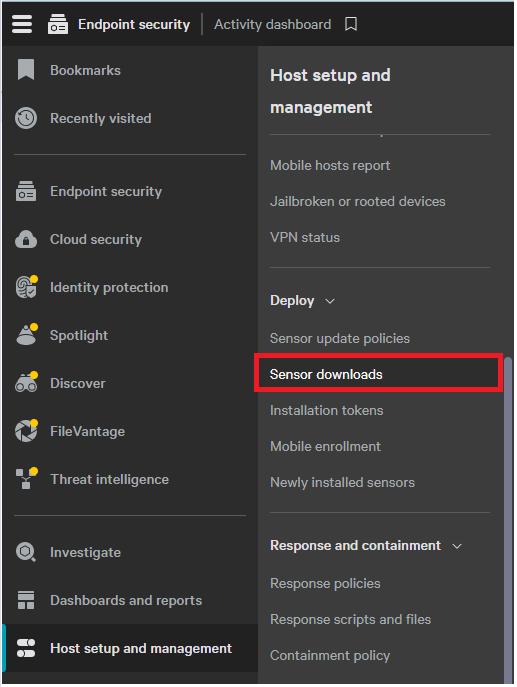 Note: The layout in the example may differ slightly from your environment.
 - Click the Download icon on the appropriate operating system.
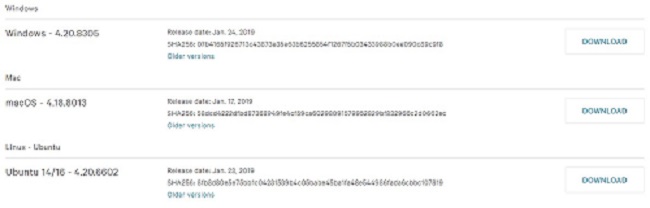
Note: The operating system versions may differ from the example.
Affected Products
CrowdStrikeArticle Properties
Article Number: 000156053
Article Type: How To
Last Modified: 10 Aug 2026
Version: 20
Find answers to your questions from other Dell users
Support Services
Check if your device is covered by Support Services.