Dellワイヤレス キーボードとマウス コンボでUSBワイヤレス レシーバーを使用する方法
Summary: 次の記事では、Dellワイヤレス キーボードとマウス コンボでUSBワイヤレス レシーバーを正しく使用する方法について説明します。
This article applies to
This article does not apply to
This article is not tied to any specific product.
Not all product versions are identified in this article.
Instructions
コンピューターでDellキーボードとマウス コンボUSBワイヤレス レシーバーを使用する方法
Dellキーボードとマウス コンボ デバイスの所有者は、ペアリングされたUSBワイヤレス レシーバーを1つだけ使用する必要があります。一部のキーボードとマウス コンボ セットでは、キーボードとマウスの両方にUSBワイヤレス レシーバーが格納されています。両方の入力デバイスと通信するには、無線周波数(RF)ドングルを1つのみコンピューターに接続する必要があります。
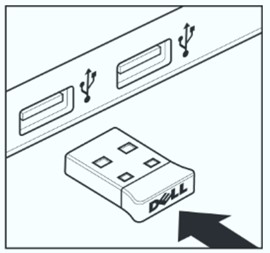
(図1Dell USB Type-Aワイヤレス レシーバー)
この記事に固有のDellコンボ製品:
- Dell Wireless Keyboard and Mouse - KM117のマニュアルおよび文書
- Dell KM636キーボードの使用方法とトラブルシューティング ガイド
- DellキーボードおよびマウスKM3322Wの使用方法とトラブルシューティング ガイド
- Dell ProキーボードおよびマウスKM5221Wの使用方法とトラブルシューティング ガイド
- Dell Pro Plusコンパクト キーボードおよびマウス KM7120Wの使用方法とトラブルシューティング ガイド
- Dell Pro Plusキーボードおよびマウス KM7321Wの使用方法とトラブルシューティング ガイド
マウスとキーボード コンボのクイック セットアップまたはユーザー ガイドの手順に従って、デバイスを取り付けて操作します。
メモ: USBワイヤレス レシーバーは、ワイヤレス ネットワークを使用する場合にのみ必要です。お使いのワイヤレス デバイスもサポートしており、Bluetoothを使用して接続されている場合は、RFドングルを使用する必要はありません。
Affected Products
Dell Pro Plus Compact Keyboard and Mouse KM7120W, Dell Pro Plus Keyboard and Mouse KM7321W, Dell Pro Keyboard and Mouse KM5221W, Dell Wireless Keyboard and Mouse - KM117, Dell Keyboard and Mouse KM3322W
, Dell Wireless Keyboard and Mouse- KM636 (black)
...
Article Properties
Article Number: 000206144
Article Type: How To
Last Modified: 03 Jul 2025
Version: 6
Find answers to your questions from other Dell users
Support Services
Check if your device is covered by Support Services.