NetWorker:AD 與 LDAP 整合與組態 (故障診斷指南)
Summary: 此知識文章可用來協助針對外部授權使用者故障診斷 NetWorker 驗證問題;Microsoft Active Directory (AD) 或 Linux 輕量型目錄存取通訊協定 (LDAP)。
This article applies to
This article does not apply to
This article is not tied to any specific product.
Not all product versions are identified in this article.
Instructions
組態
下列文章可協助您使用 NetWorker 設定 AD 或 LDAP。
NetWorker Web 使用者介面 (NWUI):如何設定 AD/LDAP:NetWorker:如何從 NetWorker Web 使用者介面
設定 AD 或 LDAP如何設定 AD/LDAP:NetWorker:如何設定 AD/LDAP 認證
如何設定安全的 AD/LDAP (LDAPS):NetWorker:如何設定 LDAPS 驗證
需要注意的資訊:
- 詳細問題說明
- 出現錯誤訊息的錯誤訊息或螢幕擷取畫面
- 記下 NetWorker Management Console (NMC) 所使用的 AUTHC 伺服器。
- 在 NMC 伺服器上,檢查下列檔案:
-
-
- Linux:/opt/lgtonmc/etc/gstd.conf
- Windows (預設):C:\Program Files\EMC NetWorker\Management\etc\gstd.conf
-
-
- 確認
authsvc_hostname是正確的 AUTHC 伺服器主機名稱。
- 確認
注意:根據預設,NetWorker 伺服器為 AUTHC 伺服器。在單一伺服器 (NetWorker 伺服器與 NMC 全部透過單一主機管理) 中,就是這種情況。在透過單一 NMC 管理多個 NetWorker 伺服器的較大型環境中,用於處理登入要求的只有一台伺服器是 AUTHC 伺服器。
- 環境詳細資料:
- 完整的 NetWorker 伺服器版本,包括每個 NetWorker 主機的內部組建編號 (如果不同):
- NetWorker 伺服器。
- AUTHC 伺服器 (請參閱上述步驟 2)。
- NetWorker Management Console (NMC) 伺服器。
- 每個 NetWorker 主機的作業系統版本 (如果不同):
- NetWorker 伺服器。
- AUTHC 伺服器 (請參閱上述步驟 2)。
- NetWorker Management Console (NMC) 伺服器。
- 使用中的目錄服務:Active Directory 還是 LDAP 伺服器?
- 是否正在使用 LDAPS (AD 或 LDAP over SSL)?
- 從 Active Directory 或 LDAP 伺服器取得屬性和物件類別。
- 綁定帳戶的可分辨名稱 (DN)
- 使用者與群組搜尋路徑 (DN)
- 使用者 ID 屬性
- 使用者物件類別
- 群組名稱屬性
- 群組物件類
- 群組成員屬性
資訊收集
- 如果在初始組態或更新期間發生問題,請確認正在使用下列哪種方法,並收集輸出結果:
- 指令檔:Linux 和 Windows NetWorker 伺服器均提供範本指令檔。當驗證伺服器為 Active Directory 時,會使用 authc-create-ad-config* 指令檔;authc-create-ldap-config* 適用於 LDAP 伺服器。
- Linux:/opt/nsr/authc-server/scripts/ (authc-create-ad-config.sh.template 和 authc-create-ldap-config.sh.template)
- Windows:C:\Program Files\EMC NetWorker\nsr\authc-server\scripts\ (authc-create-ad-config.bat 和 authc-create-ldap-config.bat)
- NMC 或 NWUI:收集在 NMC 的外部授權精靈中設定組態參數的螢幕擷取畫面。請務必展開「顯示進階選項」。收集觀察到的錯誤訊息的螢幕擷取畫面。
- 如果 AD/LDAP 組態成功,但在登入期間發生問題,請在 NetWorker 伺服器上執行下列步驟:
authc_config -u Administrator -e find-all-configs
authc_config -u Administrator -e find-config -D config-id=config-id_from_above_command
注意:執行上述命令時,系統會提示您輸入 NetWorker 系統管理員帳戶密碼 (隱藏)。您可以在執行命令時指定「-p password」,但在某些作業系統上使用 -p 的純文字密碼時,可能會失敗。
- 其中設定的 AD/LDAP 群組或使用者 DN:
- NMC:NMC ->設定 -> 使用者和角色 -> NMC 角色:

- NetWorker 伺服器:伺服器 -> 使用者群組:
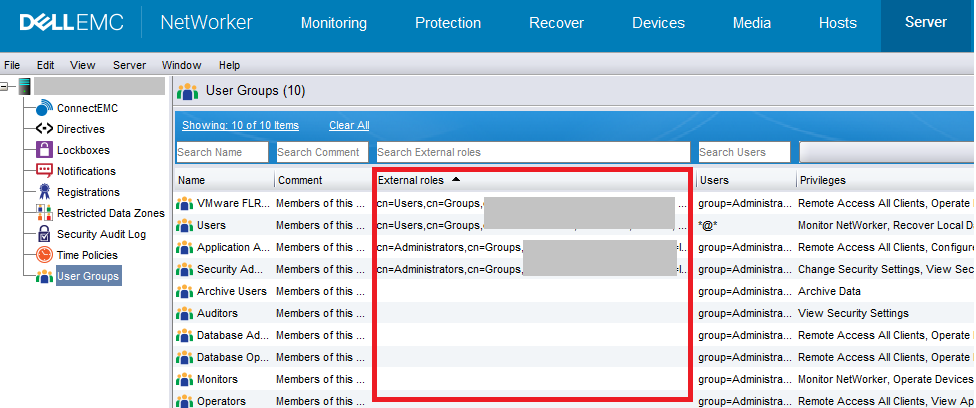
- NetWorker 是否正確查詢 AD/LDAP 群組和使用者:
authc_mgmt -u Administrator -e query-ldap-users -D query-tenant=tenant_name -D query-domain=domain_name
authc_mgmt -u Administrator -e query-ldap-groups -D query-tenant=tenant_name -D query-domain=domain_name
authc_mgmt -u Administrator -e query-ldap-groups-for-user -D query-tenant=tenant_name -D query-domain=domain_name -D user-name=external_username
注意:執行上述命令時,系統會提示您輸入 NetWorker 系統管理員帳戶密碼 (隱藏)。您可以在執行命令時指定「-p password」,但在某些作業系統上使用 -p 的純文字密碼時,可能會失敗。對於查詢租戶值,除非配置了租戶,否則該值為預設值。
- 您是否能在 NMC 之外驗證 AD/LDAP 使用者?在 NetWorker 伺服器上執行:
nsrlogin -t tenant_name -d domain_name -u external_username
如果成功,請執行:
nsrlogout
注意:除非已配置租戶,否則此值為預設值。網域名稱值是在 AUTHC 組態指令檔或 NMC 外部授權中設定的網域值。如果 nsrlogin 成功,則 NetWorker 伺服器正在正確驗證;如果 NMC 登入失敗,則問題很可能與權限相關。
額外資源
- NetWorker 安全性組態指南: https://www.dell.com/support/product-details/product/networker/docs (必須登入支援網站才能使用連結)。
- NetWorker:AD 或 LDAP 外部認證整合 - 故障診斷登入或遺失資訊的問題
- Active Directory 有一個名為 ADSI Edit
的工具,可以查詢 DN、屬性和物件類,以及 dsget 和 dsquery 公用程式。
- 在 LDAP 伺服器上,使用 ldapsearch
Additional Information
- authc_config選項:
usage: authc_config
 -d <logindomain>               The domain name to use when connecting to
                                service.
 -D,--define <property=value>   Set value for given configuration property.
                                (e.g. -D config-domain=foo or --define
                                config-domain=foo)
                                Available property names:
                                tenant-id, tenant-name, tenant-alias,
                                tenant-details, config-id, config-tenant-id,
                                config-name, config-domain,
                                config-server-address, config-user-dn,
                                config-user-dn-password, config-user-group-attr,
                                config-user-id-attr, config-user-object-class,
                                config-user-search-filter,
                                config-user-search-path,
                                config-group-member-attr,
                                config-group-name-attr,
                                config-group-object-class,
                                config-group-search-filter,
                                config-group-search-path, config-object-class,
                                config-active-directory, config-search-subtree,
                                permission-id, permission-name,
                                permission-group-dn,
                                permission-group-dn-pattern, option-id,
                                option-name, option-value
 -e <operation>                 Specify an operation to execute.
                                Available operations:
                                find-all-tenants, find-tenant, add-tenant,
                                update-tenant, remove-tenant, find-all-configs,
                                find-config, add-config, update-config,
                                remove-config, find-all-permissions,
                                find-permission, add-permission,
                                update-permission, remove-permission,
                                find-all-options, find-option, add-option,
                                update-option, remove-option,
                                query-api-versions, query-cert-pem,
                                query-cert-pemtext, query-server-info
 -H,--help                      Print help information
 -p <loginpassword>             The password to use when connecting to service.
 -t <logintenant>               The tenant name to use when connecting to
                                service.
 -u <loginuser>                 The user name to use when connecting to service.
- authc_mgmt選項:
usage: authc_mgmt
 -d <logindomain>               The domain name to use when connecting to
                                service.
 -D,--define <property=value>   Set value for given management property.
                                (e.g. -D user-name=foo or --define
                                user-name=foo)
                                Available property names:
                                user-id, user-name, user-domain, user-password,
                                user-first-name, user-last-name, user-email,
                                user-details, user-enabled, user-groups (csv
                                format), group-id, group-name, group-details,
                                group-users (csv format), query-tenant,
                                query-domain, password-new-value,
                                user-options-id, user-options-user-id,
                                user-options-password-must-change,
                                user-options-password-never-expires
 -e <operation>                 Specify an operation to execute.
                                Available operations:
                                find-all-users, find-user, add-user,
                                update-user, remove-user, update-password,
                                find-all-user-options, find-user-options,
                                update-user-options, find-all-groups,
                                find-group, add-group, update-group,
                                remove-group, query-ldap-users,
                                query-ldap-groups, query-ldap-users-for-group,
                                query-ldap-groups-for-user
 -H,--help                      Print help information
 -p <loginpassword>             The password to use when connecting to service.
 -t <logintenant>               The tenant name to use when connecting to
                                service.
 -u <loginuser>                 The user name to use when connecting to service.
Affected Products
NetWorkerProducts
NetWorker, NetWorker Management ConsoleArticle Properties
Article Number: 000013620
Article Type: How To
Last Modified: 10 Oct 2025
Version: 6
Find answers to your questions from other Dell users
Support Services
Check if your device is covered by Support Services.