How to recover a SQL database using command line recovery with NMM
This article applies to
This article does not apply to
This article is not tied to any specific product.
Not all product versions are identified in this article.
Instructions
This article documents the procedure to follow for a successful restore of a SQL database that was backed up with NMM using VDI
Restoring a SQL database from the backup using command line maybe required if there is a issue with restoring from the GUI (Networker user for SQL server GUI or the SSMS plugin). Either the browsing task from the GUI is slow or the required database is not visible in the GUI for restore.
Typically the following savesets are created when a single DB is backed up:
A full backup of a single DB will have the following savesets:
SQLbackups.001 Data Domain sql12srv1 5/25/2016 1:26:41 PM 119 MB 3209027663 cb full MSSQL$FINANCE:testdb ==> Full backup saveset
SQLbackups.001 Data Domain sql12srv1 5/25/2016 1:29:16 PM 5 KB 3192250597 cb incr MSSQL$FINANCE:testdb ==> metadata saveset.
A incremental backup of a single DB will have the following savesets:
SQLbackups.001 Data Domain sql12srv1 5/25/2016 1:34:14 PM 1320 MB 3141919250 cb incr MSSQL$FINANCE:testdb ==> Log backup saveset
SQLbackups.001 Data Domain sql12srv1 5/25/2016 1:40:31 PM 5 KB 3125142409 cb incr MSSQL$FINANCE:testdb ==> metadata saveset
Notice each backup has a metadata saveset, which is always created as 'incr' level and is normally very small. This save set contain information that makes it possible to see the DB listing in the "Networker User for SQL server" GUI. This save set gets created with each SQL VDI backup. However its possible that this save set may not exist if manual cloning process incorrectly did not include this save set for cloning and if the original save sets no longer exists. If this is the case, then command line restore is the only option.
Once you determine which backup you need to recover from, then you can construct the command line. Below is an example of a restore command:
nsrsqlrc -s nsr-server -c sql12srv1 -t "5/25/2016 1:34:14 PM" -d "MSSQL$FINANCE:testdb-recovered" -C " 'testdb' = 'c:\recover\testdb.mdf', 'testdb_log' = 'c:\recover\testdb_log.ldf', 'testdb_log1' = 'c:\recover\testdb_log1.ldf'" "MSSQL$FINANCE:testdb"
In the above command
-s option is to specify the Networker server name,
-c option is used to specify the source client (if the recovery is being done on a host other than the source client),
-d specify the destination DB to restore to. This DB will not exist. The restore process will create the DB on the target instance.
-C specifies this is a copy restore. The parameters after the -C specifies the Logical names of the files in the database. Note these names have to be exactly matching the logical names of the database being restored. If the database exists, then do properties on the DB name from SSMS GUI and look under 'Files'.
**** If the restore is being done to a clustered SQL server, add the "-A "virtual-Server name" " to the restore command.
The last component in the command is the name of the DB being restored e.g MSSQL$
FINANCE:testdb
If you are not sure what the logical names of the database files are, then you can provide a incomplete command as below:
nsrsqlrc -s nsr-server -c sql12srv1 -t "5/25/2016 1:34:14 PM" -d "MSSQL$FINANCE:testdb-recovered" -C " 'mydb' = 'c:\recover\testdb.mdf'" "MSSQL$FINANCE:testdb"
43708:(pid 2144):Start time: Wed May 25 15:37:42 2016
43621:(pid 2144):Computer Name: SQL12SRV1 User Name: administrator
NSR_CLIENT: sql12srv1.jets.local;
NSR_SERVER: nsr-server;
37725:(pid 2144):Recovering database 'testdb' into 'testdb-recovered' ...
142468:(pid 2144):[2292]nsr/db_apps/bsmsql/rcstripes.c(222): Finding backup for saveset MSSQL$FINANCE:/testdb.
37945:(pid 2144):Missing relocation for logical file testdb.
37945:(pid 2144):Missing relocation for logical file testdb_log.
37945:(pid 2144):Missing relocation for logical file testdb_log1.
37946:(pid 2144):No logical file named mydb in original database
29401:(pid 2144):Database file relocation list error. Actual file list is:
37947:(pid 2144): testdb = C:\Program Files\Microsoft SQL Server\MSSQL11.FINANCE\MSSQL\DATA\testdb.mdf
37947:(pid 2144): testdb_log = C:\Program Files\Microsoft SQL Server\MSSQL11.FINANCE\MSSQL\DATA\testdb_log.ldf
37947:(pid 2144): testdb_log1 = C:\Program Files\Microsoft SQL Server\MSSQL11.FINANCE\MSSQL\DATA\testdb_log1.ldf
142468:(pid 2144):[2292]nsr/db_apps/bsmsql/rcstripes.c(222): Finding backup for saveset MSSQL$FINANCE:/testdb.
37945:(pid 2144):Missing relocation for logical file testdb.
37945:(pid 2144):Missing relocation for logical file testdb_log.
37945:(pid 2144):Missing relocation for logical file testdb_log1.
37946:(pid 2144):No logical file named mydb in original database
29401:(pid 2144):Database file relocation list error. Actual file list is:
37947:(pid 2144): testdb = C:\Program Files\Microsoft SQL Server\MSSQL11.FINANCE\MSSQL\DATA\testdb.mdf
37947:(pid 2144): testdb_log = C:\Program Files\Microsoft SQL Server\MSSQL11.FINANCE\MSSQL\DATA\testdb_log.ldf
37947:(pid 2144): testdb_log1 = C:\Program Files\Microsoft SQL Server\MSSQL11.FINANCE\MSSQL\DATA\testdb_log1.ldf
Restore operation finished with error(s). Refer to the module backup log file for details. unknown XBSA error 1169 (0x491) nsr/db_apps/bsmsql/rcovmain.cpp(442): Entering cleanUp(). nsr/db_apps/bsmsql/rcovmain.cpp(500): Exiting cleanUp().
43709:(pid 2144):Stop time: Wed May 25 15:37:49 2016
***********************
In the above command I gave a random logical name 'mydb' and the command spits out the actual logical name of the DB files and the original location of them. You can use this information to build your restore command. Note you have to provide a different path to restore the data to. You cannot and should not provide the original source path in the restore command to avoid the risk of overwriting existing data.
The backup time for restore can be obtained from mminfo command. Either the savetime as shown in the output can be used or you can report on nsavetime and use this time instead.
e.g:
mminfo -avot -s nsr-server -q "client=sql12srv1,savetime >= yesterday"
SQLbackups.001 Data Domain sql12srv1 5/25/2016 1:26:41 PM 119 MB 3209027663 cb full MSSQL$FINANCE:testdb
SQLbackups.001 Data Domain sql12srv1 5/25/2016 1:29:16 PM 5 KB 3192250597 cb incr MSSQL$FINANCE:testdb
SQLbackups.001 Data Domain sql12srv1 5/25/2016 1:34:14 PM 1320 MB 3141919250 cb incr MSSQL$FINANCE:testdb
SQLbackups.001 Data Domain sql12srv1 5/25/2016 1:40:31 PM 5 KB 3125142409 cb incr MSSQL$FINANCE:testdb
mminfo -avot -s nsr-server -q "client=sql12srv1,savetime >= yesterday" -r volume,client,sumflags,sumsize,level,savetime(25),nsavetime,name
SQLbackups.001 sql12srv1 cb 119 MB full 5/25/2016 1:26:41 PM 1464197201 MSSQL$FINANCE:testdb
SQLbackups.001 sql12srv1 cb 5 KB incr 5/25/2016 1:29:16 PM 1464197356 MSSQL$FINANCE:testdb
SQLbackups.001 sql12srv1 cb 1320 MB incr 5/25/2016 1:34:14 PM 1464197654 MSSQL$FINANCE:testdb
SQLbackups.001 sql12srv1 cb 5 KB incr 5/25/2016 1:40:31 PM 1464198031 MSSQL$FINANCE:testdb
Note you can specify the nsavetime/savetime of either the metadata saveset or the actual data save set. Either of these will work.
Scenario 2:
If the backups are registered in the media db without the DB names, then the time of the required backup will not be as obvious. For example all DB backups have the same save set names as below:
SQLbackups.001 Data Domain sql12srv1 5/25/2016 4:43:15 PM 151 KB 2672168543 cb incr MSSQL$FINANCE:
SQLbackups.001 Data Domain sql12srv1 5/25/2016 4:45:26 PM 151 KB 2655391455 cb incr MSSQL$FINANCE:
From the above one cannot tell which save set has the backup you need.
If the medata data save set exists, then the backups will be browsable from the GUI and you can find the DB name and the backup time from the GUI. E.g if DB24 was required, the GUI shows the backup time as "5/25/2016 4:49 PM".
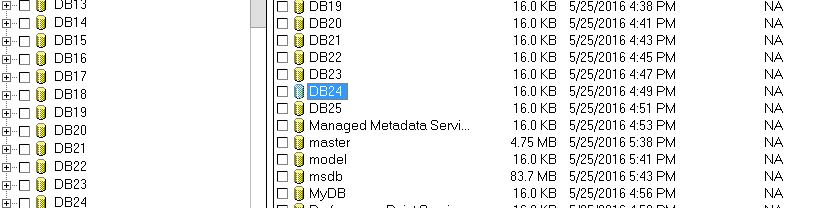
If the metadata save set is not there, then you will need to run nsrinfo command to find the save time for the restore. e.g if the mminfo shows the savesets as below:
SQLbackups.001 Data Domain sql12srv1 5/25/2016 4:43:15 PM 151 KB 2672168543 cb incr MSSQL$FINANCE:
SQLbackups.001 Data Domain sql12srv1 5/25/2016 4:45:26 PM 151 KB 2655391455 cb incr MSSQL$FINANCE:
SQLbackups.001 Data Domain sql12srv1 5/25/2016 4:47:34 PM 151 KB 2638614367 cb incr MSSQL$FINANCE:
SQLbackups.001 Data Domain sql12srv1 5/25/2016 4:49:42 PM 151 KB 2621837279 cb incr MSSQL$FINANCE:
SQLbackups.001 Data Domain sql12srv1 5/25/2016 4:51:50 PM 151 KB 2605060191 cb incr MSSQL$FINANCE:
SQLbackups.001 Data Domain sql12srv1 5/25/2016 4:53:58 PM 151 KB 2588283103 cb incr MSSQL$FINANCE:
Run nsrinfo on the save times as below to get info on the DB that's part of the save set:
nsrinfo -n mssql -t "5/25/2016 4:43:15 PM" sql12srv1
scanning client `sql12srv1' for savetime 1464208995(5/25/2016 4:43:15 PM) from the mssql namespace
MSSQL$FINANCE:/DB21
MSSQL$FINANCE:/DB21%/files.1464208995.1464209044
2 objects found
nsrinfo -n mssql -t "5/25/2016 4:49:42 PM" sql12srv1
scanning client `sql12srv1' for savetime 1464209382(5/25/2016 4:49:42 PM) from the mssql namespace
MSSQL$FINANCE:/DB24
MSSQL$FINANCE:/DB24%/files.1464209382.1464209437
2 objects found
As the save sets do not show the DB names, the above could be a bit of trial and error, in the scenario where the metadata save set does not exists. Use the approximate DB size as a clue to narrow down the nsrinfo query to a few save sets.
Article Properties
Article Number: 000022417
Article Type: How To
Last Modified: 09 Aug 2022
Version: 4
Find answers to your questions from other Dell users
Support Services
Check if your device is covered by Support Services.