Avamar: From version 18.2 the built-in schedules cannot be modified using the Avamar User Interface (AUI)
Summary: From Avamar v8.2 onwards, the built-in schedules cannot be modified using the Avamar User Interface (AUI)
This article applies to
This article does not apply to
This article is not tied to any specific product.
Not all product versions are identified in this article.
Symptoms
From Avamar 18.2, the built-in schedules cannot be edited or deleted in the Avamar User Interface (AUI).
This includes:
- Daily Schedule
- Default Replication Schedule
- Default Schedule
- Default Tiering Schedule
- Evaluation Schedule
- Notification Schedule
- Override Daily Schedule
- Statistics Schedule
- Usage Intelligence Schedule
For example:
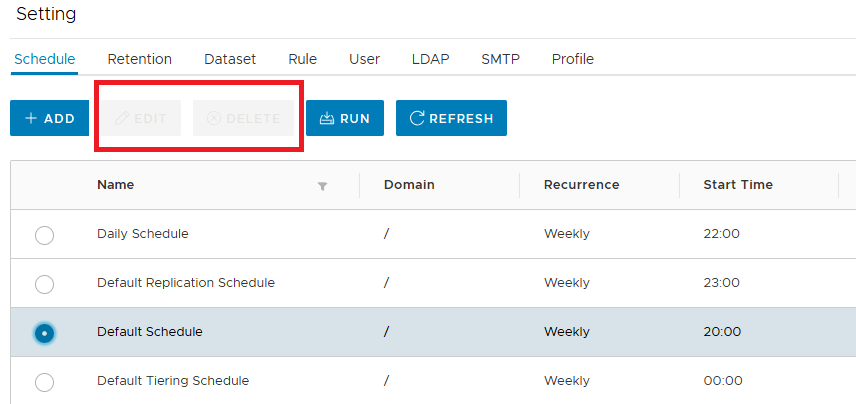
Cause
This is by design from Avamar version 18.2 onwards.
Note: In addition, the default retentions and datasets could not be edited or deleted in the AUI in v18.2.
Resolution
Workarounds:
- The schedules can be edited from a command line using mccli commands
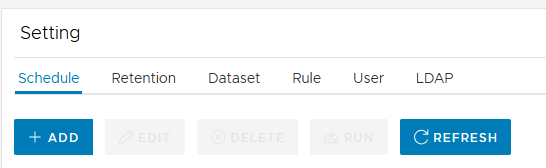
- A new schedule can be created in the AUI:
Affected Products
Avamar, Avamar ServerArticle Properties
Article Number: 000033433
Article Type: Solution
Last Modified: 08 Apr 2025
Version: 8
Find answers to your questions from other Dell users
Support Services
Check if your device is covered by Support Services.