De consolepoort van de Dell EMC Networking Virtual Edge Platform 1405 serie openen
Summary: De consolepoort van de Dell EMC Networking Virtual Edge Platform 1405 serie openen
Symptoms
In dit artikel wordt uitgelegd hoe u de console opent in een Dell EMC Networking VEP1405
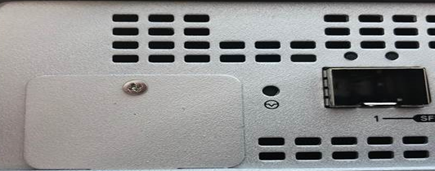
De VEP1405 heeft een speciale beheerconsole op een micro-USB-poort. Deze vind je aan de achterkant van het toestel.
Inhoudsopgave
Fysieke locatie van de micro-USB-consolepoort
Consolekabel
Driversoftware
Poortinstellingen console
Fysieke locatie van de micro-USB-consolepoort
Draai de beschermplaat naar rechts. U ziet de USB-consolepoort

Consolekabel
VEP1405 wordt geleverd met een Micro-USB-consolekabel (USB naar USB type-A). Gebruik dit om toegang te krijgen tot de consolepoort aan de achterkant.
Driversoftware
U kunt de driver voor de USB-UART COM-poort vinden via onderstaande link.
https:// www.silabs.com/products/development-tools/software/usb-to-uart-bridge-vcp-drivers 
te installeren.
Poortinstellingen console
Gegevenssnelheid 115200 baud
Databits 8 bits
Stopbits 1
Geen pariteit