Configuração de rede não convergente do Dell Azure Stack HCI
Summary: Exemplo de como configurar uma rede não convergente para um host de cluster do Dell EMC Solutions Microsoft Azure Stack HCI. Este exemplo não inclui uma rede de backup ou configuração de modelagem de rede, conforme documentado no Guia do usuário. As informações para este artigo foram retiradas do Guia de referência "Dell EMC Solutions for Microsoft Azure Stack HCI – Opções de integração de rede e configuração de rede do host". ...
This article applies to
This article does not apply to
This article is not tied to any specific product.
Not all product versions are identified in this article.
Instructions
A captura de tela abaixo é uma exibição de diagrama de hardware da configuração de uma rede não convergente do Azure Stack HCI usando uma equipe de rede SET para comunicação de rede de gerenciamento:
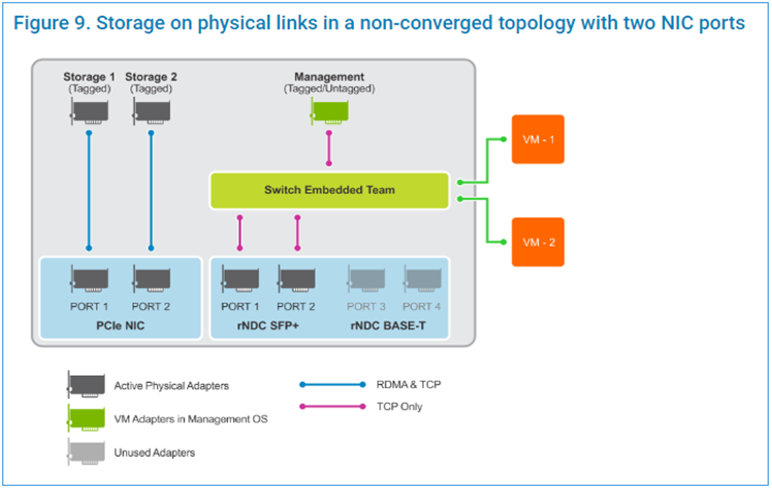
as etapas de script abaixo são executadas em uma janela administrativa do PowerShell:
as etapas de script abaixo são executadas em uma janela administrativa do PowerShell:
$ErrorActionPreference = 'Stop'

#region Variables for the scenario

## Management Adapter
$ManagementSwitchName = 'Management'
$ManagementNetAdapterName = @('NIC1','NIC2')
$ManagementAdapterName = 'Management'

# VLAN ID for host management traffic; if no VLAN is preferred set this to 0
$ManagementVlanId = 102

# Management Gateway address
$ManagementGateway = '10.0.0.1'

# DNS Server Address
$ManagementDns = '10.0.0.15'

# Set this to a string 'DHCP' for a dynamic IP address
$ManagementIPAddress = '10.0.0.51'

# Management address prefix (24 translates to subnet mask 255.255.255.0)
$ManagementAddressPrefix = 24

## Storage Adapters
### You must specify 2 or 4 network adapter port names
$StorageNetAdapterName = @('SLOT 2 PORT 1', 'SLOT 2 PORT 2')

### You must specify 1 or 2 or 4 VLANIDs
### Specify 0 if you want the network not tagged with any VLAN
$StorageVlanId = @(103, 104)

### You must specify 2 or 4 IP Addresses
### DHCP as a value is accepted if you want dynamically assigned IP addresses
$StorageIPAddress = @('172.16.101.1', '172.16.102.1')

### You can specify 1 or 2 or 4 prefix length values (24 translates to subnet mask
255.255.255.0)
$StorageAddressPrefix = @(24)
#endregion

## Create a VM switch for management
$null = New-VMSwitch -Name $ManagementSwitchName -AllowManagementOS 0 -NetAdapterName
$ManagementNetAdapterName -MinimumBandwidthMode Weight -Verbose

## Add VM Network Adapters and configure VLANs and IP addresses as needed
### Configure Management Adapter
$managementAdapter = Add-VMNetworkAdapter -SwitchName $ManagementSwitchName
-ManagementOS -Passthru -Name $ManagementAdapterName -Verbose
if ($ManagementVlanId -and ($ManagementVlanId -ne 0))
{
# Set VM Network adapter VLAN only if the VLAN ID specified is other than 0
Set-VMNetworkAdapterVlan -VMNetworkAdapter $managementAdapter -Access -VlanId
$ManagementVlanId -Verbose
Start-Sleep -Seconds 5
}
if ($ManagementIPAddress -ne 'DHCP')
{
$null = New-NetIPAddress -InterfaceAlias "vEthernet ($ManagementAdapterName)"
-IPAddress $ManagementIPAddress -DefaultGateway $ManagementGateway -PrefixLength
$ManagementAddressPrefix -Verbose
Set-DnsClientServerAddress -InterfaceAlias "vEthernet ($ManagementAdapterName)"
-ServerAddresses $ManagementDns -Verbose
}
{
# if there is a single VLAN for storage use the first and only element
if ($storageVlanId.Count -eq 1)
{
$storageVlan = $storageVlanId[0]
}
else
{
# else use the right index to get the VLAN ID
$storageVlan = $storageVlanId[$i]
}
# Check if only one prefix is provided
if ($StorageAddressPrefix.Count -eq 1)
{
$StoragePrefix = $StorageAddressPrefix[0]
}
else
{
# if more than one, use the right index to get the address prefix
$StoragePrefix = $StorageAddressPrefix[$i]
}
if ($storageVlan -and ($storageVlan -ne 0))
{
# Set VM Network adapter VLAN only if the VLAN ID specified is other than 0
Set-NetAdapterAdvancedProperty -Name $StorageNetAdapterName[$i] -DisplayName
'VLAN ID' -DisplayValue $storageVlan -Verbose
Start-Sleep -Seconds 5
}
if ($StorageIPAddress[$i] -ne 'DHCP')
{
$null = New-NetIPAddress -InterfaceAlias $StorageNetAdapterName[$i] -IPAddress
$StorageIPAddress[$i] -PrefixLength $StoragePrefix -Verbose
}
}
Videos
Affected Products
Dell EMC Cloud For Microsoft Azure Stack, Enterprise Hybrid CloudProducts
Enterprise Hybrid CloudArticle Properties
Article Number: 000200052
Article Type: How To
Last Modified: 05 Sep 2025
Version: 10
Find answers to your questions from other Dell users
Support Services
Check if your device is covered by Support Services.