NVP vProxy: VM backups fail when using hot add "vProxy is not available for datastore"
Summary: NetWorker VMware Protection (NVP) backups fail when using the hot add transport method, stating "vProxy is not available for datastore." The vProxy is on an ESXi host with VMware datastore access to the Virtual Machines (VM). The error is occurring because the vProxy is returning its "shortname" when `hostname` is used. ...
Symptoms

The vProxy is powered on and reports as Enabled under Devices->VMware Proxies.
The vProxy is deployed on a VMware ESXi host that has access to the failed VM's VMware datastore:


Cause
When the vProxy VM was deployed, the vProxy's shortname was provided instead of its Fully Qualified Domain Name (FQDN) in the OVA deployment.
The hostname command on the vProxy returns shortname instead of FQDN
nsr-vproxy02:~ # hostname
nsr-vproxy02
hostnamectl returns:
nsr-vproxy02:~ # hostnamectl
   Static hostname: nsr-vproxy02.amer.lan
Transient hostname: nsr-vproxy02
Resolution
vProxy 4.3.0.x and older:
1. Delete the vProxy from NetWorker.
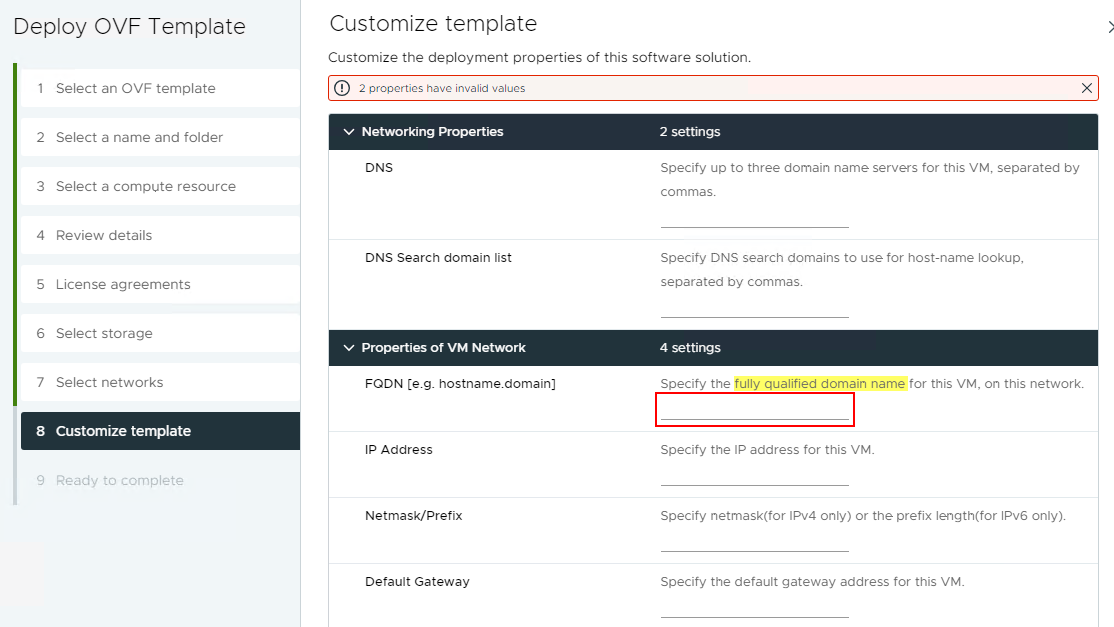
2. Redeploy the vProxy and specify the vProxy's FQDN in the Customize template window:
3. Register the newly deployed vProxy with NetWorker.
vProxy 4.4.0.x and newer
1. Open an SSH session to the vProxy and log in as admin.
2. Switch to root:
sudo su -
3. Update the /etc/hostname file to specify the vProxies FQDN instead of its shortname.
4. Ensure that the /etc/hosts file contains the vProxies FQDN and shortname:
nsr-vproxy02:~ # cat /etc/hosts
127.0.0.1  localhost.localdom localhost
192.168.9.152     nsr-vproxy02.amer.lan     nsr-vproxy02
5. Reboot the vProxy and repeat steps 1 and 2 once the vProxy comes back online.
6. Set the vProxy's transient hostname to the Domain Name System (DNS) resolvable FQDN:
hostnamectl set-hostname --transient vProxy_FQDN
7. Verify that the hostname command returns the vProxy's FQDN instead of shortname. hostnamctl should return the vProxies FQDN:
nsr-vproxy02:~ # hostnamectl
   Static hostname: nsr-vproxy02.amer.lan
         Icon name: computer-vm
           Chassis: vm
        Machine ID: 6256d6f0fc6486601577a662606516fc
           Boot ID: 90261c06d0c04dfebea826556a8faac4
    Virtualization: vmware
  Operating System: SUSE Linux Enterprise Server 12 SP5
       CPE OS Name: cpe:/o:suse:sles:12:sp5
            Kernel: Linux 4.12.14-122.183-default
      Architecture: x86-64
8. Ensure that the vProxy is set to use hot add only:

9. Rerun NetWorker VMware Protection policies
Additional Information
If the hostname command returns the vProxy's FQDN, this KB is not applicable. See: NVP-vProxy: How to use health check tool ProxyHC on vProxy appliance.
Use the ProxyHC utility as detailed in the above KB. Use the following syntax to test hot add connectivity for a specified VM:
./ProxyHC hotadd
This tool checks for other potential issues resulting in hot add backup failure.