Dell Networking | Risoluzione dei problemi di base delle ventole per switch con unità ventole rimovibili
Summary: Una breve panoramica delle procedure di base per la risoluzione dei problemi delle ventole su tutte le piattaforme di switch Dell con unità ventola rimovibili.
Instructions
Dell Networking | Risoluzione dei problemi di base delle ventole per switch con unità ventola rimovibili:
- Cerca prove visive e uditive del funzionamento della ventola:
Visivo:
-
-
- Tutte le ventole installate devono girare visibilmente.
- Lo switch stesso dispone di uno o più LED specifici del modello. Le possibili posizioni includono:
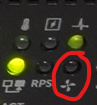
- Indicatore LED della ventola: Un'icona illuminata a forma di ventola a quattro pale o un LED contrassegnato con un'icona a forma di ventaglio nella parte anteriore dell'unità
- A seconda del modello, un LED verde fisso o spento può indicare il normale funzionamento.
- La maggior parte delle unità indica un guasto o un guasto della ventola con un LED giallo lampeggiante.
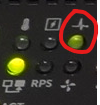
- Indicatore LED di sistema: Un'icona illuminata a forma di elettrocardiogramma o un LED contrassegnato con un'icona a forma di elettrocardiogramma nella parte anteriore dell'unità
- Un LED di sistema giallo lampeggiante indica un errore di sistema non critico, che può includere il guasto di una singola ventola.
- Un LED di sistema giallo fisso (giallo) indica un errore critico di sistema, che può anche derivare da guasti di più unità ventola.
-
Indicatore LED dell'unità ventola: Un LED sul retro del quadro elettrico, spesso sull'unità ventola stessa

- Indicatore LED della ventola: Un'icona illuminata a forma di ventola a quattro pale o un LED contrassegnato con un'icona a forma di ventaglio nella parte anteriore dell'unità
-
Uditivo:
-
-
-
Il funzionamento eccessivamente rumoroso della ventola o l'assenza di alcun suono possono essere indicativi di un problema della ventola.
-
-
-
-
-
Verificare lo stato operativo della ventola tramite l'interfaccia della riga di comando (CLI), incluse la direzione e la velocità della ventola, utilizzando il comando appropriato per la piattaforma:
- OS6:
console> show system fan Fans: Unit Description Status ---- ----------- ------ 1 Fan 1 OK 1 Fan 2 OK 1 Fan 3 OK - OS9:
DellEMC# show system Stack MAC : 34:17:eb:f2:xx:xx Reload Type : normal-reload [Next boot : normal-reload] -- Unit 1 -- Unit Type : Management Unit Status : online Next Boot : online Required Type : S4048-ON - 54-port TE/FG (SK-ON) Current Type : S4048-ON - 54-port TE/FG (SK-ON) Master priority : 14 Hardware Rev : 2.0 Num Ports : 72 Up Time : 33 min, 51 sec Dell Networking OS Version : 1-0 (0-5005) Jumbo Capable : yes POE capable : no FIPS Mode : disabled Burned In MAC : 34:17:eb:f2:94:c4 No Of MACs : 3 -- Power Supplies -- Unit Bay Status Type FanStatus FanSpeed(rpm) --------------------------------------------------------------------------- 1 1 up UNKNOWN up 10704 1 2 absent up 0 -- Fan Status -- Unit Bay TrayStatus Fan1 Speed Fan2 Speed ------------------------------------------------------------------------------------ 1 1 up up 10134 up 10031 1 2 up up 10031 up 10031 1 3 up up 10031 up 10031 Speed in RPM - OS10:
S4148U-1# show system brief Node Id : 1 MAC : e4:f0:04:c3:xx:xx -- Unit -- Unit Status ReqType CurType Version ---------------------------------------------------------------- 1 up S4148U S4148U 10.5.5.6 -- Power Supplies -- PSU-ID Status Type AirFlow Fan Speed(rpm) Status ---------------------------------------------------------------- 1 up AC NORMAL 1 13344 up 2 fail -- Fan Status -- FanTray Status AirFlow Fan Speed(rpm) Status ---------------------------------------------------------------- 1 up NORMAL 1 9590 up 2 9614 up 2 up NORMAL 1 9590 up 2 9614 up 3 up NORMAL 1 9614 up 2 9590 up 4 up NORMAL 1 9590 up 2 9590 up - Sonico:
E3248PXE-ON-U35# show platform fanstatus
-----------------------------------------------------------------------
Fan            Status         Speed (RPM)         Direction
-----------------------------------------------------------------------
FAN 1          OK             5698               exhaust
FAN 2          OK             5657               exhaust
FAN 3          OK             5674               exhaust
- OS6:
-
Rimuovere l'unità ventola interessata dal relativo slot sul retro dello switch.
-
Ispezionare visivamente l'unità ventola per verificare che non presenti danni (ammaccature, bruciature e segni simili di difetti osservabili).
-
Sostituire l'unità ventola sospetta con un'altra funzionante.
-
Se il problema è presente sul nuovo slot dopo lo scambio, il problema riguarda l'unità ventola.
-
Se il problema persiste nello slot originale dopo lo scambio, il problema riguarda lo slot dell'unità ventola.
-
Se dopo la sostituzione entrambe le ventole presentano il funzionamento normale, aggiornare il sistema operativo e il firmware per applicare correzioni note relative al firmware.
-
-
Creare e inviare un ordine di lavoro per sostituire il componente difettoso identificato nel passaggio 5.